


Hitting "send" on an important email can feel like shouting into the void. Did they open it? Is it just sitting there, unread? That uncertainty is a real time-waster. This is where email tracking in Gmail changes things. Think of it as a delivery confirmation for your inbox. When you track email opens, you get a simple notification the moment your message is read. This isn't about spying—it's about smart timing. Knowing exactly when to follow up makes all the difference. This guide will show you how to set up email tracking for Gmail and turn that insight into action.
That tiny slip of paper lets you watch your package journey across states, through sorting facilities, and right up to the recipient's door.
And there's a certain satisfaction in knowing exactly where it is and when it's received, right?

Now, imagine having that same email tracking capability for your sales emails, where you can check seen emails and know exactly when to follow up.
No more shooting messages into the void and hoping your prospects have seen them. No more guesstimating when the right time to reach out would be.
In this blog post, we'll talk about what email tracking is and how it works, and we’ll guide you through the ins and outs of how to track email opens in Gmail.
|
How Does Email Tracking for Gmail Work?
Ever wondered how email tracking actually works?
The magic word is “pixel.”
But it’s not the traditional colorful dots on our screens that we know and love.
When it comes to emails, tracking pixels are tiny, invisible images. Once the email is opened, this pixel sends a signal back to the sender, notifying them of the open event.
Which brings us to…
What's a Tracking Pixel?
Here’s how an email tracking pixel works:
- The tracking pixel (usually a 1x1 pixel image) is embedded in the email.
- When the recipient opens the email, the pixel gets downloaded.
- This download action sends back information to the sender, such as time of access, frequency, and sometimes even the device and/or location.
This tracking pixel technology operates subtly in the background, giving email senders a glimpse into recipient behavior.
Is Email Tracking Right for You?
Sales: By knowing if and when your business partners have read your email, salespeople who are trying to close a deal can follow up more effectively.
Recruiting: Recruiters can use email tracking to respond to candidates at the right time to nurture their interest and without appearing overzealous by replying too often.
Support: If a customer hasn’t read a support message, you’ll know it’s time to follow up. You can retain customers by ensuring your help has reached them.
P.S. Get free email tracking with Mixmax ⬇️ 
|
Gmail Read Receipts vs. Email Tracking Tools
Gmail offers its own take on email tracking for G Suite* users: the Read Receipt. Instead of relying on embedded pixels, Gmail informs senders when their email has been opened by the recipient.
Here’s how Gmail’s read receipts work:
- The sender requests a read receipt while composing the email.
- Once the recipient opens the email, the sender gets a notification.
- It’s worth noting that this feature needs to be enabled by the G Suite admin, and recipients can decline to send read receipts.
While Gmail's native tool provides basic tracking, third-party solutions with Gmail integration, like Mixmax, take it to the next level with more granular insights (more on that later).
*G Suite is only available if you use Gmail for work or school set up by an administrator.
Here’s how to get started with Gmail's read receipts.
What Can Email Tracking Do for You?
Understanding the mechanics behind email tracking, like pixel technology, is just the tip of the iceberg.
The real power lies in the benefits this feature provides (a hypothetical example to follow).
So, how does email tracking work in favor of businesses and sales teams?
Timely follow-ups
By knowing when a prospect has engaged with your email, you can time your follow-ups perfectly. With a sales engagement platform like Mixmax, you can even set up automatic follow-ups based on how many times (if any) a prospect has opened your email.
Here’s what that automatic follow-up would look like in Mixmax:
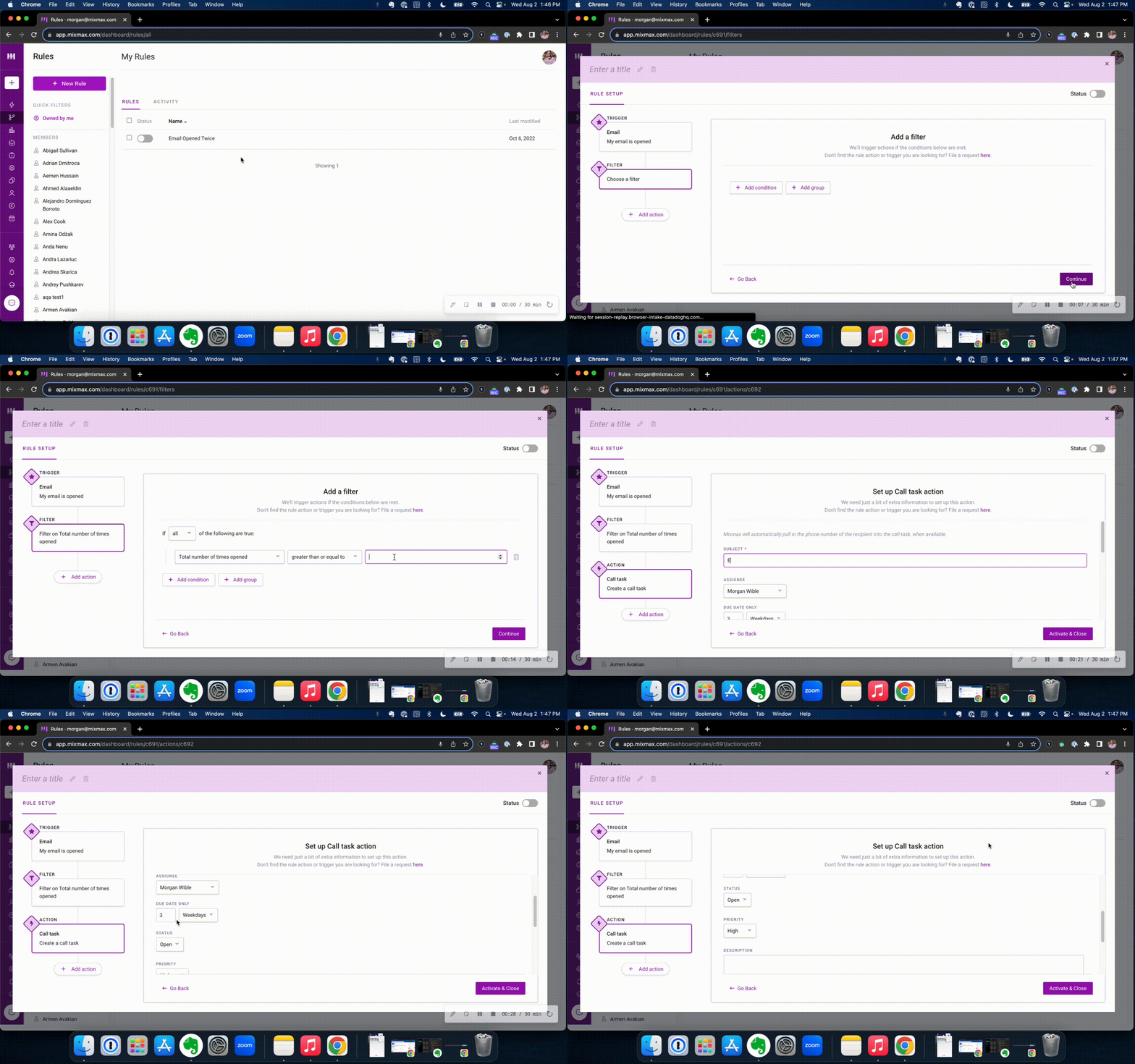 Mixmax Rules: Automatic follow-up
Enhanced engagement data
Aside from opens, some email tracking software also let you know if your emails are being forwarded, or if recipients click on embedded links or PDFs (like contracts). This data can offer insights into what content or offerings resonate with your audience, or if a buyer is getting ready to sign a deal.
Better sales forecasting
With insights on email engagement, sales teams can make more informed predictions about potential deals and their chances of closure.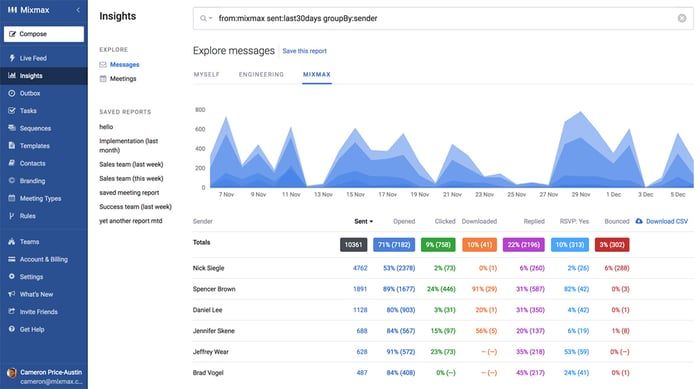
Mixmax's sales engagement insights
Improved sales email campaigns
For salespeople, knowing which emails are getting opened and which links are clicked helps refine email sequences and nurture campaigns for better effectiveness.
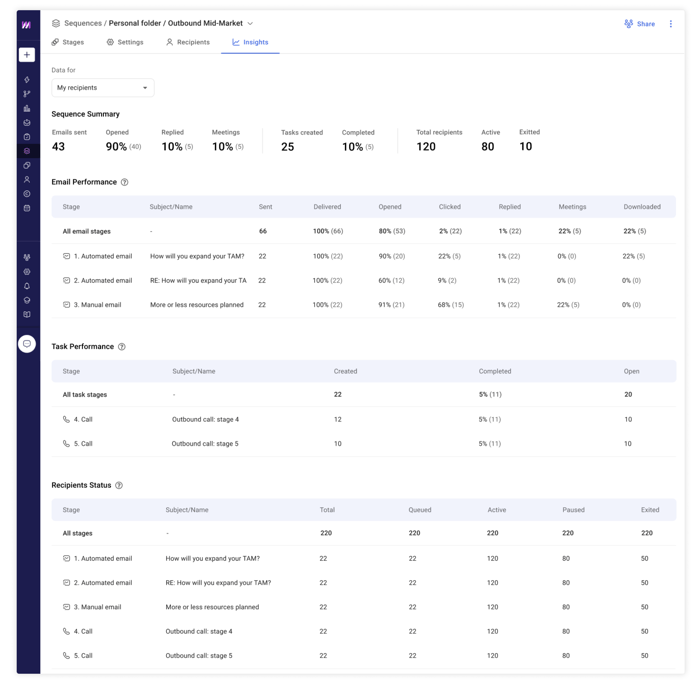
Mixmax sequence insights
| Related post: 51 Follow Up Email Subject Line Examples for Revenue Teams |
Example of how email tracking can help drive decisions
Here’s a HYPOTHETICAL EXAMPLE of how tracking emails can help sales teams make data-driven decisions:
Jane's Tech Solutions, a small software firm, has recently launched a new software tool for graphic designers. Jane, the sales head, and her team of five have sent out a targeted email campaign to 500 potential clients, hoping to convert a significant portion into buyers.
Using email tracking, they noticed:
- 200 recipients opened the email within the first day.
- 100 of those clicked on the embedded link leading to a demo video.
- 25 of those replied back showing interest in a live demo or more information.
Using this data:
- Jane can confidently tell her team that at least 25 of the potential clients are highly interested (since they replied).
- Those who clicked on the demo video but didn't reply might need a follow-up in a few days*.
- Based on historical conversion rates (let's say 20% of interested leads make a purchase), Jane can forecast that around 5 (20% of 25) of these leads will likely result in a sale in the near term.
This insight lets Jane's team focus on the most promising leads, and Jane can set realistic sales targets and expectations.
*Follow-ups based on clicks can be automated with Mixmax.
Improve Your Follow-Up Timing
Knowing the exact moment a prospect opens your email removes the guesswork from your sales process. Instead of staring at your sent folder and wondering if you should follow up now or tomorrow, you get a clear signal that your message has been seen. This allows you to time your next move perfectly, reaching out when you're already top of mind. With a sales execution platform, you can even use AI-powered workflows to automatically trigger a follow-up task or send a pre-written message based on that open signal. This ensures you never miss the perfect moment to connect and keep the conversation moving forward, turning a simple open into a real opportunity.
Increase Reply Rates by 80%
It’s not just about if you follow up, but when. Timing is everything. Sending a follow-up email right after the first one is opened can make people reply 80% more often. This isn't a small lift; it's the difference between a quiet inbox and one full of active conversations. That's the power of timing your outreach based on real engagement, not just a hunch or a calendar reminder. Acting on that immediate interest is one of the fastest ways to turn a cold lead into a warm conversation and book your next meeting.
Identify Your Most Engaged Prospects
Not all opens are created equal. A single open might just be a quick scan, but multiple opens from the same person signal real interest. Email tracking helps you identify these highly engaged prospects who are actively reviewing your message or sharing it with their team. Instead of treating your entire list the same, you can focus your energy on the people who are showing clear buying intent. This is how you separate the curious from the committed and prioritize your day effectively, ensuring your best efforts are spent on your best opportunities and you know exactly what to do next.
Test and Optimize Your Subject Lines
Email tracking isn't just about individual emails; it's about making your entire outreach strategy smarter. By tracking open rates, you can A/B test different subject lines and preview text to see what grabs attention. Does a question work better than a statement? Is a personalized subject line more effective? This data allows you to stop guessing and start making decisions based on what your audience actually responds to. Over time, you can optimize your templates and sequences for higher performance, turning insights into better results for your whole team.
Practical Applications for Email Tracking
Email tracking is more than just a sales tool. It’s a simple, effective way to get confirmation and context in all sorts of professional communication. From closing a deal to landing a job, knowing your message has been seen can make all the difference. Let's look at a few common scenarios where email tracking proves its worth.
Sales: Know When to Follow Up on Quotes
For any salesperson, sending a quote or proposal can feel like a waiting game. You’ve done the work, and now you’re left wondering if the prospect has even seen it. Email tracking removes that uncertainty. Knowing exactly when a decision-maker opens your proposal is a powerful buying signal. It tells you they are actively considering your offer, giving you the perfect window to follow up while you’re still top of mind. This insight helps you prioritize your efforts, focusing on engaged prospects who are moving through the sales cycle. With real-time engagement signals, you can stop guessing and start connecting at the moments that matter most, turning warm interest into closed deals.
Job Hunting: See if Recruiters Read Your Resume
The job hunt can be a nerve-wracking process, especially after you’ve sent your resume into the digital void. Did anyone see it? Did it get lost in a crowded inbox? Email tracking offers some much-needed peace of mind by confirming a recruiter has opened your application. Beyond simple confirmation, it can also provide strategic clues. If a recruiter opens your email multiple times over a few days, it’s a strong indicator of interest. This information helps you gauge which of your applications are gaining traction, allowing you to focus your energy and prepare for a potential interview. It’s a small piece of data that can make you feel more in control of your job search.
Invoicing: Confirm Clients Have Received Bills
If you’re a freelancer or small business owner, managing cash flow is critical. Chasing down late payments is a frustrating and time-consuming task, often made worse by the classic "I never received the invoice" excuse. Email tracking puts an end to that ambiguity. When you track your invoices, you get a notification the moment your client opens the email, creating a digital paper trail. This allows you to follow up with confidence. Instead of a timid, "Just checking if you saw my invoice," you can be more direct. It ensures everyone is on the same page and helps you get paid faster by eliminating simple communication mishaps.
Education: Track if Students Open Course Materials
For educators, ensuring students are engaged with course material is a constant challenge. It can be difficult to know who is keeping up and who might be falling behind until an exam or a major deadline has passed. Email tracking offers a simple way to gauge student engagement proactively. By tracking emails containing important announcements, lecture notes, or assignment details, instructors can see who has opened the materials. If a student consistently fails to open crucial communications, it can be an early warning sign that they may need extra support. This allows educators to intervene with a helpful check-in before the student falls too far behind.
What to Look for in an Email Tracking Tool
The market is bursting with email tracking solutions. While Gmail's built-in read receipts are helpful, sometimes the sales game demands a sharper edge with advanced email tracking features.
Here’s what you should look for when choosing an email tracking tool for your team.
Go Beyond Tracking Email Opens
While Gmail tells you if your email was opened using an optional read receipt, sometimes you want to know more. Did they click on any links or open any attachments? How many times did they open the email? On which device?
Some tools, like Mixmax, can give you these extra details, helping you decide on next steps.
Find a Tool That Fits Your Workflow
A good tool should work well with platforms you're familiar with. For instance, there are tools that work directly within Gmail so you don't have to context switch every three minutes.
Get Real-Time Notifications
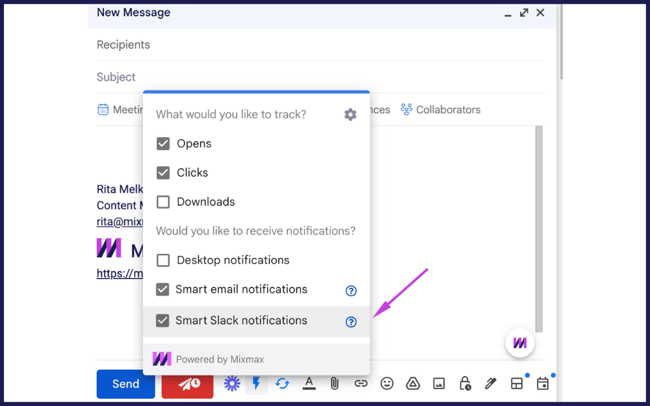
Imagine getting a quick notification when someone reads your email. Or setting a reminder to touch base with them later. Some tools offer these helpful features so you never miss a beat.
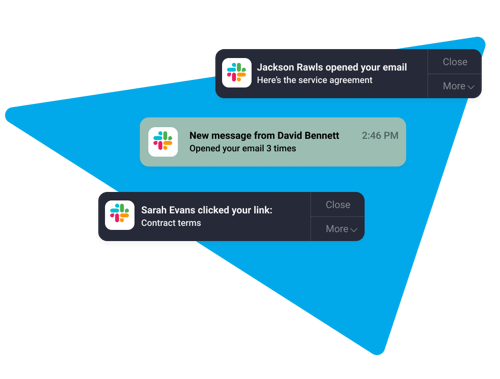
Mixmax's Slack notifications feature
Ensure Accuracy (and Avoid Tracking Yourself)
The data you get from email tracking is only useful if it’s accurate. If you’re constantly opening your own sent emails to double-check details, you could be creating false positives, making you think a prospect is hot when they haven’t even seen your message. A quality tracking tool knows to ignore your activity. Look for a tool that specifically promises it won’t count an email as opened if you open it yourself. This is a non-negotiable feature. For example, Mixmax is built to filter out your own opens, so every notification you receive is a genuine signal from your prospect. This ensures you can trust the data to time your follow-ups perfectly, acting on real engagement, not noise.
A Look at Top Email Tracking Tools for Gmail
Once you decide you need more than Gmail’s basic read receipts, you’ll find plenty of tools ready to help. They range from simple, free extensions to full-featured sales platforms. The right one for you depends on what you need to accomplish. Are you just curious if your emails are being read, or do you need to know which prospects are most engaged to build your pipeline? Let's walk through some of the most popular options so you can see how they stack up and figure out which one fits your workflow.
Mailtrack
Mailtrack is one of the most well-known free tools for a reason. It’s a simple Chrome extension that adds double-check marks to your sent emails in Gmail, much like a messaging app. One check means the email was sent, and two checks mean it was opened. It’s an easy, visual way to get started with tracking without a steep learning curve. The free version is quite popular, but it does come with a "Sent with Mailtrack" signature, which is something to keep in mind if you're using it for professional outreach.
Features and User Experience
As a straightforward tool, Mailtrack focuses on one thing and does it well: telling you if your email was opened. It integrates directly into your Gmail interface, so there’s no need to log into a separate platform. You install the extension, and it starts working immediately. This simplicity is its biggest strength. You won't get advanced analytics like link-click tracking or download notifications in the free version, but if all you need is a simple open notification, Mailtrack delivers a clean and intuitive user experience that’s hard to beat for a free tool.
Trust and Security
Handing over access to your Gmail can feel a bit nerve-wracking, so security is a valid concern. Mailtrack addresses this directly, stating that it doesn't store, sell, or even look at your personal emails or information. The tool's tracking mechanism is focused solely on the open event triggered by the tracking pixel. For users who want basic tracking without compromising their data privacy, this commitment to security is a significant plus and a key reason for its widespread adoption among casual and professional users alike.
Streak
If you’re looking for more than just email tracking, Streak might be on your radar. It’s a complete CRM that lives inside your Gmail inbox. While it offers free and unlimited email tracking, that’s just one piece of its functionality. Streak is designed to help you manage entire workflows, from sales pipelines and hiring processes to customer support queues, all without leaving Gmail. It tracks opens, link clicks, and even location data, giving you a much richer view of recipient engagement than simpler tools. It's a great option for individuals or small teams who want to add CRM-like functionality to their inbox.
MailTracker by Hunter
MailTracker by Hunter is another excellent, lightweight option for those who want simple, effective email tracking without any frills. It’s a Chrome extension that provides unlimited email tracking for free. One of its biggest selling points is that it doesn't add any signature or branding to your emails, which helps maintain a professional look. It’s a no-fuss tool that’s highly regarded for its reliability. If your main goal is to track opens discreetly and you don’t need advanced analytics or CRM features, MailTracker is a strong contender that respects your professional image.
Yesware
Yesware is geared more toward sales professionals and teams who need a robust set of tools. It goes beyond simple open tracking to offer features like customizable email templates, attachment tracking, and presentation analytics. One of its key features is its integration with Salesforce, which allows teams to sync their email activity directly to their CRM. However, it's worth noting that this crucial Salesforce integration is only available on their higher-priced Enterprise plan. For teams that need deep CRM sync and AI-powered workflows, a tool like Mixmax might offer more value, as it provides that functionality right inside Gmail without locking it behind the most expensive tier.
Mail Track for Gmail
Not to be confused with Mailtrack, Mail Track for Gmail is another tool focused on the core function of open notifications. It works on both your computer and phone, which is a great benefit for reps who are often on the go. The tool provides real-time notifications when your emails are read, allowing you to follow up at the perfect moment. Like many similar tools, it operates on a freemium model, offering basic tracking for free while reserving more advanced features and the removal of its branding for paid subscribers. It’s a solid choice for users who prioritize mobile access and immediate notifications.
Free vs. Paid Tools: What to Expect
The choice between a free and a paid email tracking tool often comes down to a few key differences. Free tools are fantastic for getting started and understanding the basics of recipient engagement. They’ll tell you if an email was opened, which is valuable information. However, as your needs grow, you’ll likely run into the limitations of free plans. Paid tools typically offer more detailed analytics, remove branding, and integrate with other platforms like your CRM, providing a more complete picture of your sales process.
Branding and Signatures
One of the most common trade-offs with free email trackers is the mandatory signature. Many free tools will add a small message like "Sent with [Tool Name]" to the bottom of every email you send. While this might be fine for personal use, it can appear unprofessional in a sales context. It signals to your prospect that you’re tracking them and can detract from your message. Upgrading to a paid plan almost always removes this branding, allowing you to maintain a clean, professional appearance in all your communications.
Pricing Models
When you decide to upgrade, you'll find that most tools offer a few different pricing tiers. These are often billed monthly or annually, with a discount for the yearly commitment. For example, a tool might cost $5.99 per month if you pay monthly, but the price could drop to the equivalent of $2.99 per month if you pay for a full year upfront. This model is common across the SaaS industry. As you evaluate paid options, consider not just the price but the value each tier provides, such as advanced reporting, CRM sync, and AI-powered workflows.
How to Track Email Opens with Mixmax
Mixmax stands out in the world of free email tracking software, especially since it lives directly inside Gmail. But how does it differentiate itself?
With Mixmax’s email tracking for Gmail, you can:
- Automatically enable email tracking on all messages sent, without having to specify it manually each time.
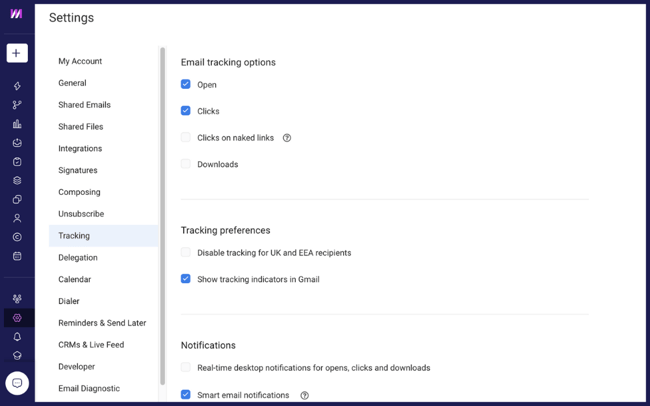
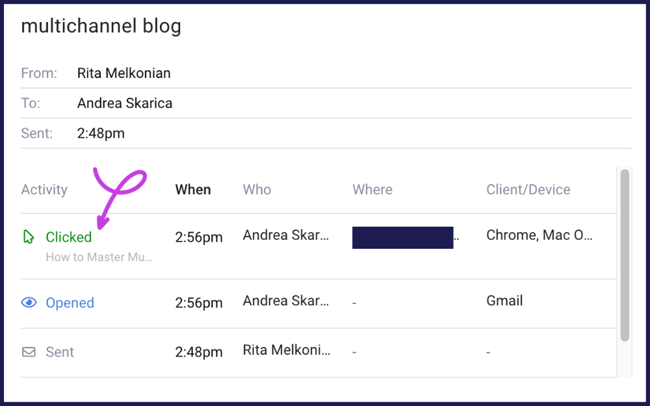
- Identify which recipients are most engaged by seeing who opens or interacts with your content—and how many times.
- Find out which devices your prospects and customers are using and where they are located.
.png?width=650&height=406&name=Tracking%20email%20opens%20in%20Mixmax%20(1).png)
- Determine the content that resonates most with your prospects and clients by analyzing which links or attachments are clicked.
- Customize notifications so you're alerted immediately when crucial emails are read — either through Slack alerts, email notifications, or automated tasks.
- Seamlessly integrate these insights with your workflow, ensuring timely follow-ups and that no potential deal is overlooked.
How to track email opens in Gmail with Mixmax
These granular details empower sales reps. They allow them to tailor their communication strategies, which increases the chances of successful conversations.
What Does Your Email Data Really Mean?
With the power of email tracking comes the ability to make data-driven decisions.
And interpreting the data correctly is key.
For example, frequent email opens could indicate:
- High interest: The recipient might be genuinely interested in what you have to offer, revisiting the content multiple times.
- Confusion: The message might not be clear enough, prompting the recipient to re-read the email multiple times.
Sometimes, it might even be a combination of both. It's up to the salesperson to figure it out and act accordingly.
The data might hint that a follow-up is needed, or maybe a clearer, more concise message the next time around.
How to Tell if an Email You Received is Being Tracked
We’ve covered how you can track your own emails, but what about the messages landing in your inbox? It’s fair to wonder if your opens are being watched. Most of the time, this is done with a tiny, invisible image called a tracking pixel. When your email client loads the images in a message, it also loads that pixel. This action sends a "ping" back to the sender's server, confirming the email was opened. It’s a subtle process, but there are a few tell-tale signs you can look for if you're curious about whether an email is being tracked.
The most common giveaway is related to how your email client handles images. Many services, including Gmail, don't load images automatically to protect your privacy. If you open an email and see a prompt like "Display images below," it's a sign the message contains images—and one of them could be a tracking pixel. By choosing not to display images, you can often prevent the open from being tracked. This is the simplest line of defense against pixel-based tracking and gives you control over when and if you trigger that notification for the sender.
Another clue is in the links. Senders don't just track opens; they also track clicks. Before you click a link in an email, hover your mouse over it. If the URL that appears in the bottom corner of your browser is long and complex, and seems to go through a different domain before reaching the intended destination, it's almost certainly a tracking link. This redirect allows the sender's service to log your click before sending you on your way. It’s a common practice for measuring engagement with the content shared in the email.
Ultimately, it's helpful to remember that this technology is standard for most modern sales and marketing teams. Platforms like Mixmax provide these valuable engagement signals to help reps know when a prospect is interested, allowing for more timely and relevant follow-ups instead of just guessing. While it can feel a bit like "Big Brother," the intent is usually to create a better, more responsive communication experience. For a sales rep, knowing you’ve read their proposal means they can follow up with helpful information instead of another "just checking in" email.
Start Tracking Your Emails with Confidence
Tracking email opens in Gmail helps you understand your audience to ensure your communications are effective.
By knowing when and how often a recipient engages with your content, you can:
- Refine your messaging and approach
- Time your follow-ups right
- Cater to individual preferences
- Make data-driven decisions and predictions
By using email tracking, you'll no longer wonder how to check seen emails; Mixmax makes it straightforward and efficient. ⬇️
Frequently Asked Questions (FAQ)
How does email tracking impact the privacy of recipients, and what are the ethical considerations?
Email tracking impacts recipient privacy by allowing senders to know when an email is opened without the recipient's explicit consent. This raises ethical concerns regarding the balance between the sender's interest in engagement data and the recipient's right to privacy. Ethical use of email tracking involves being transparent with recipients about tracking practices and offering them an option to opt out.
Can recipients block or disable the tracking pixels, and if so, how does this affect the accuracy of tracking data?
Recipients can indeed take measures to block or disable tracking pixels, primarily by adjusting their email client settings to prevent automatic loading of images. This action can reduce the accuracy of tracking data by preventing the tracking pixel from sending a read receipt back to the sender. However, it's a trade-off between personal privacy and the full functionality of email services, which often rely on images for content delivery.
Are there any legal restrictions or compliance requirements (such as GDPR) that users should be aware of when using email tracking tools?
Legal restrictions, such as the General Data Protection Regulation (GDPR) in the European Union, impact the use of email tracking tools by requiring explicit consent from individuals before their data can be collected or monitored. This means that senders must inform recipients about the use of tracking technologies and obtain their consent, ensuring that email tracking practices comply with privacy laws and regulations. Ignoring such legal requirements can result in significant penalties and damage to a company's reputation.
Key Takeaways
- Stop guessing when to follow up: Email tracking gives you a real-time signal the moment a prospect reads your message, so you can connect when you're already top of mind.
- Focus on your warmest leads: A single open is a hint, but multiple opens or link clicks are clear buying signals. Tracking helps you see who is truly interested so you can spend your time on the deals most likely to close.
- Make your entire outreach smarter: Use open-rate data to A/B test subject lines and find what works. You can also connect these open signals to AI-powered workflows that automatically trigger your next step, ensuring you never miss the perfect moment to engage.