

It seems like “AI” is everywhere you look. But what does all the hype about AI in sales actually mean for you and your quota? It’s easy to feel overwhelmed. The truth is, you don’t need to be a tech genius to make it work. Think of it less as a robot takeover and more like getting the world’s smartest assistant. We’ve seen firsthand how the right approach to AI for sales transforms the daily grind. This guide cuts through the noise to show you the practical AI sales tools and clear strategies that help you close more deals.
AI has taken over boring tasks, improved customer targeting, and dramatically increased efficiency.
But there are a TON of AI tools for sales out there that do a TON of different things.
Where do you start?
What do they offer?
Will AI take over the world? (Spoiler alert: maybe).
In this blog, we will discuss:
- 16 best AI tools for sales (free and paid)
- Importance of artificial intelligence in sales
- How to choose the best AI tools for sales
- Training sales teams on the use of AI
- Wrap up
- FAQ
If you’re a salesperson or a leader looking to improve your sales process with the help of AI, this list is for you.
16 Best AI Sales Tools (Free and Paid Options)
Without further ado, let’s dive into the top 16 AI tools for sales:
1. Mailook AI’s email deliverability checker
Overview
Mailook is an email deliverability tool that helps identify and resolve email deliverability issues.
Main features
- Blacklist check: Mailook verifies your IP & domain against more than 100 blacklists and assists in getting whitelisted.
- Emailing setup check: Validates SPF, DKIM, and DMARC records to verify if your emails are correctly authenticated and protected from malicious activities.
- Email deliverability check-up: Performs a comprehensive audit of your email deliverability based on over 120 checkpoints.
Pricing
- Free
2. Mixmax AI sales engagement platform
Overview
Mixmax AI is a sales engagement platform for the entire revenue team. Its built-in generative AI feature allows salespeople to compose personalized sales emails directly in their sequences with AI, or improve ones they’ve already written. It also offers an AI email scheduler that takes the guessing out of ideal send times.

Main features
- Personalized and relevant messaging: Mixmax’s generative AI feature, AI Compose, allows you to craft engaging sales outreach tailored to your prospects’ interests directly within your sequence.
_Oct_23_GIF.CdiU5nrf_pBLQQ.webp?dpl=dpl_DB7a2uR49bJE2gebzBY4kSh2MMba)
Mixmax’s AI Compose feature
- Simplified content curation: The writing assistant can generate high-quality emails and subject lines in seconds, enabling you to create content faster and save time.
- AI email scheduler: Mixmax can suggest optimal times for you to send your emails based on your prospect’s inbox activity such as clicks, downloads, and replies—using AI & machine learning.

AI Smart Send in Mixmax Sequences
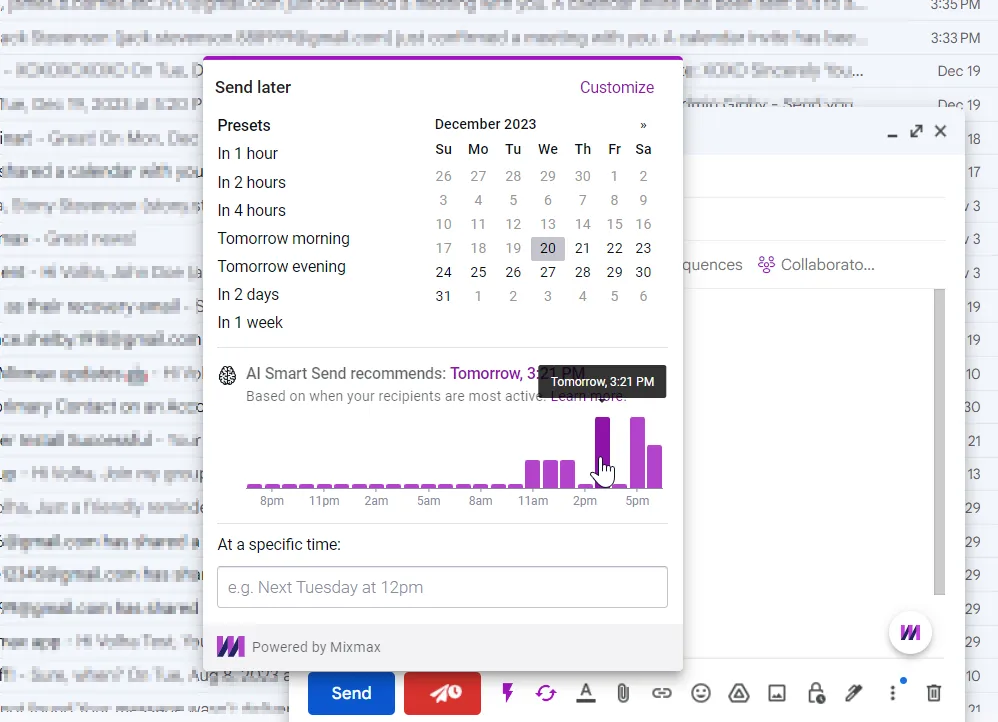 AI Smart Send in your email inbox
- Multichannel, personalized sequences: Create sequences that combine email, phone calls, SMS, and LinkedIn messages, enabling a comprehensive outreach strategy. Use dynamic fields and AI-driven personalization to tailor messages across all channels in real-time.
- Automatic rules and triggers: Set up automatic triggers based on recipient behavior (e.g., opens, clicks) to move prospects through the sales funnel. Implement complex logic to customize follow-up actions based on specific criteria and events.
- Follow-up reminders: Automatically generate follow-up tasks based on engagement signals or lack of response. Integrate with calendars and task management tools to ensure timely follow-ups.
- Notifications: Get instant notifications for key actions, such as email opens, link clicks, and replies. Customize notification settings to prioritize critical updates and reduce noise.
Pricing
- Free: $0
- Paid plans: from $29 per user/month (billed annually), with every feature included; the price depends on how many people you reach with sequences each month
- 14-day free trial available
3. Sendspark’s AI video creation tool
Overview
Sendspark is an AI-driven video creation platform that simplifies the process of recording personalized videos to enhance sales outreach and engagement.
Main features
- Video creation: Quickly record and share personalized videos and screen recordings to connect with leads effectively.
- AI-powered video scripts: The AI script generator crafts personalized video scripts customized for each prospect.
- Email integration: Integrate Sendspark with your email-sending platform, including Mixmax, to seamlessly incorporate personalized videos into your email sequences.
Pricing
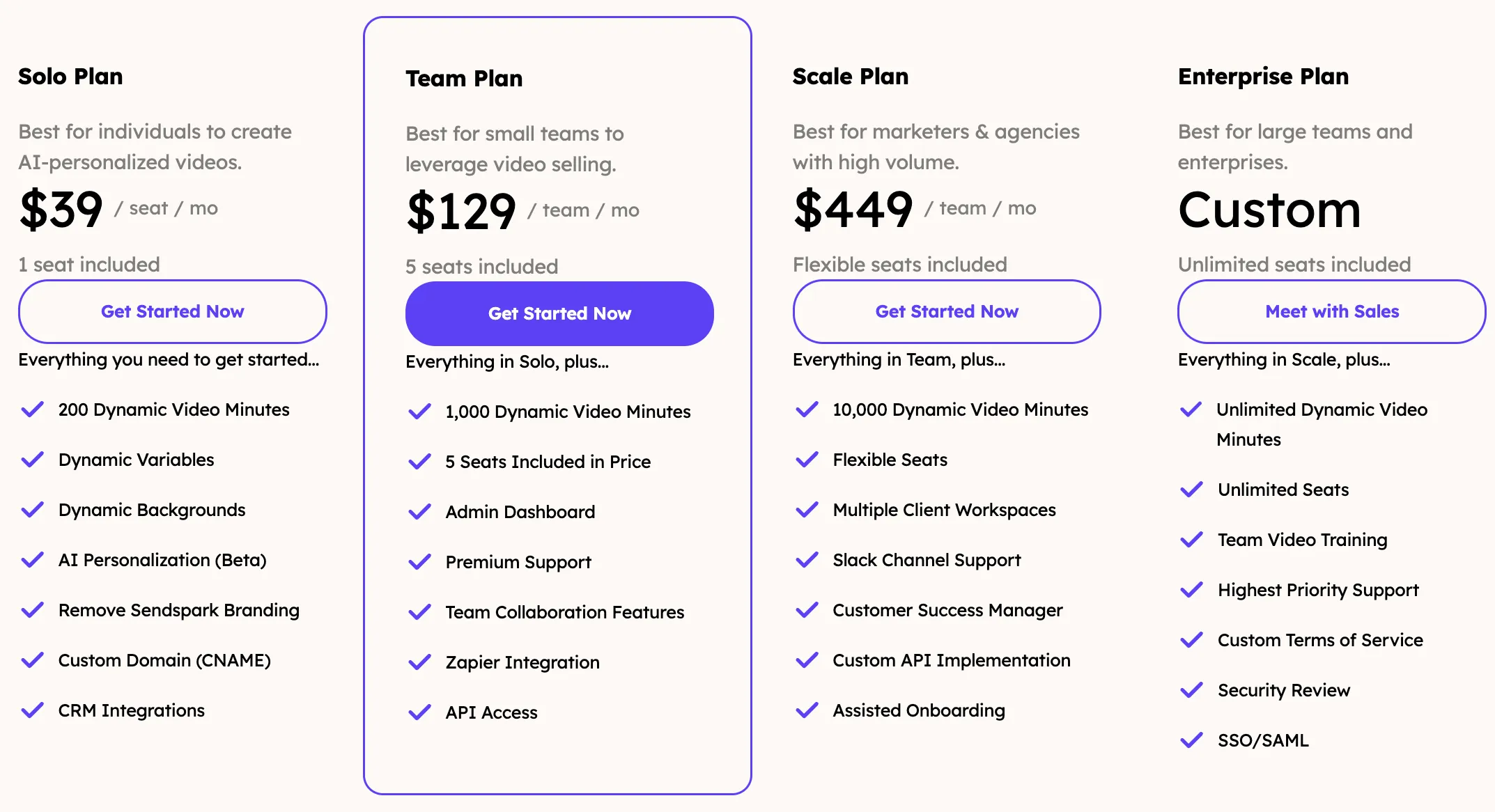
- Solo Plan: $39 per seat per month (billed annually)
- Team Plan: $129 per team per month (billed annually), includes 5 seats
- Scale Plan: $449 per team per month (billed annually), includes flexible seats
- Enterprise Plan: Custom pricing, includes unlimited seats.
4. Otter AI’s transcription service
Overview
Otter.ai uses machine learning algorithms to transcribe spoken language into written text. It mostly transcribes meetings in real time and can be accessed online, on mobile devices, and via a Chrome extension.
Main features
- Real-time transcription: Otter.ai can transcribe meetings as they happen and identify different speakers in a recording.
- Meeting recording: Meetings are recorded and stored, allowing users to revisit discussions.
- Otter Assistant(Meeting Copilot): Can attend meetings on your behalf and provide transcriptions, acting as your personal note-taker.
- Custom vocabulary: Otter.ai can recognize and learn custom vocabulary, including industry jargon, acronyms, and difficult name pronunciations.
Pricing
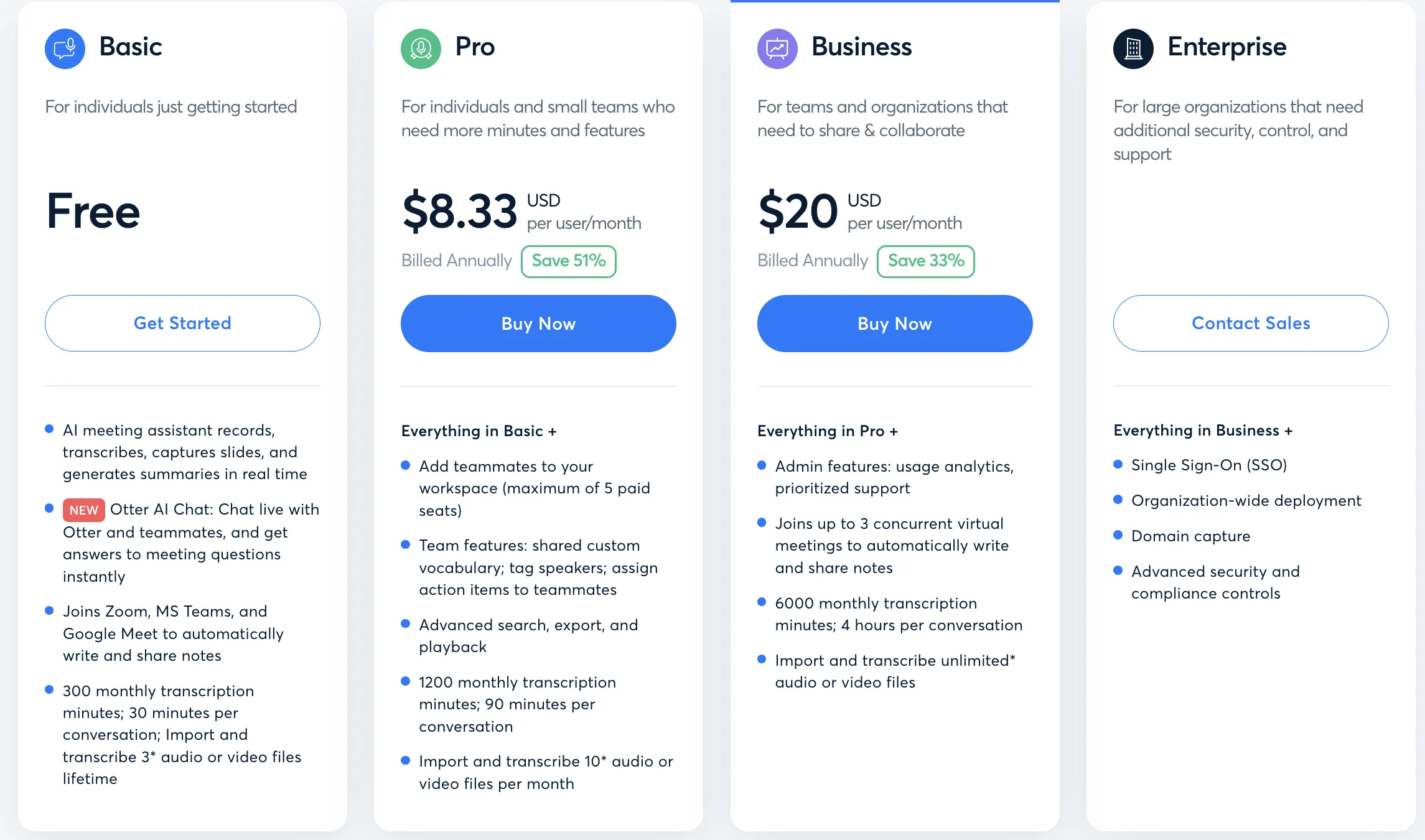
- Basic: Free
- Pro: $8.33 per user/month
- Business: $20 per user/month
**
5. Seamless.AI sales lead finder**
Overview
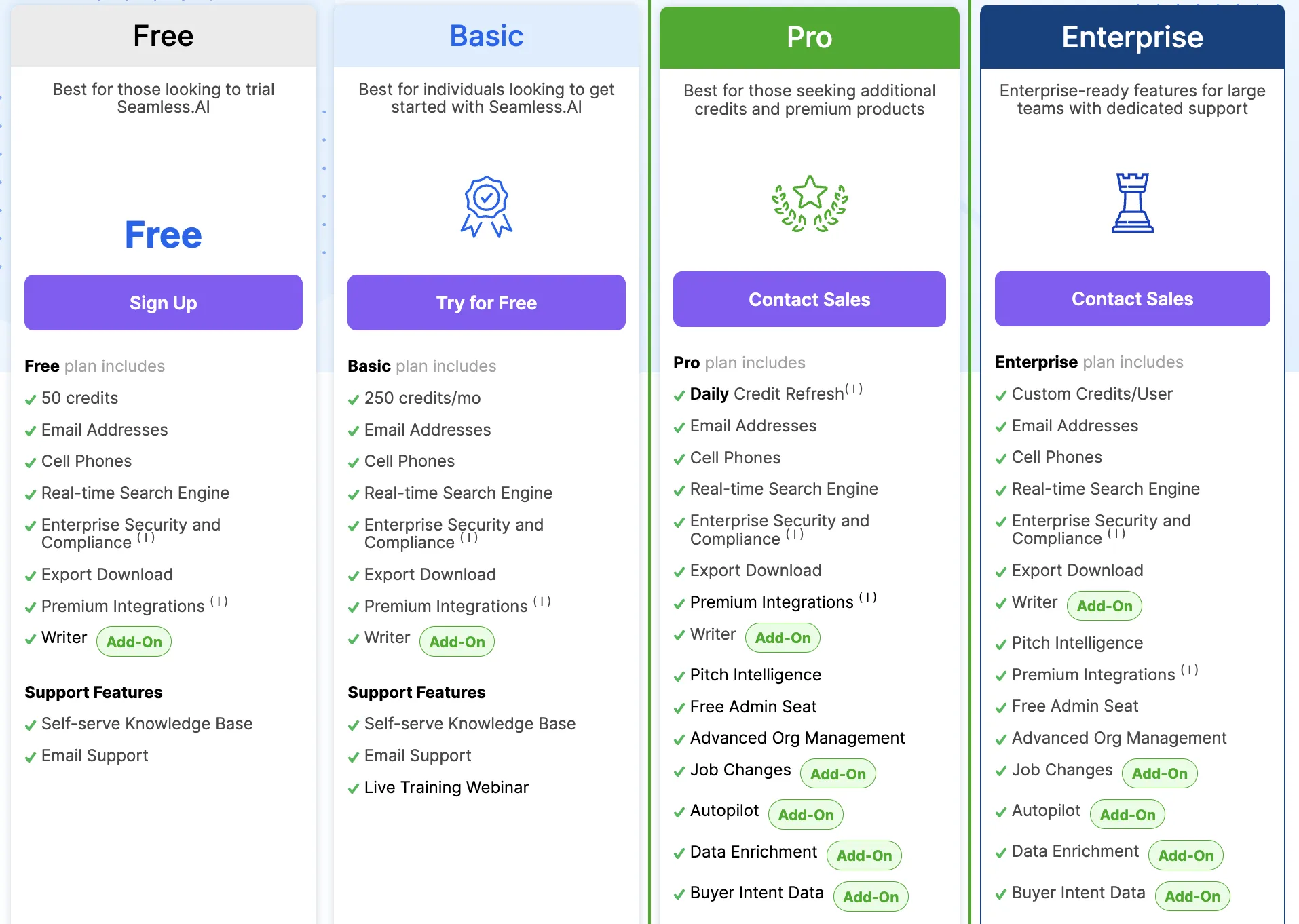
Seamless.AI provides an AI-powered sales search engine that helps sales teams find and connect with prospects faster and more efficiently.
Main features
- Real-time search: Continuously updates and verifies contact information in real-time.
- Prospect list building: Helps build targeted prospect lists quickly.
- Email and phone numbers: Provides accurate contact details including emails and phone numbers.
- Buyer intent data: Identifies prospects actively looking to buy based on their online behavior and signals.
- CRM integration: Seamlessly integrates with CRM systems to enrich existing data and streamline workflow.
Pricing
- Offers a free tier and free trial
- Custom pricing available for teams
💡 Fun fact: Seamless.AI and Mixmax have an integration coming soon that allows users to import leads from Seamless.AI into Mixmax Sequences with just one click.
**
6. Lavender’s AI email assistant**
Overview
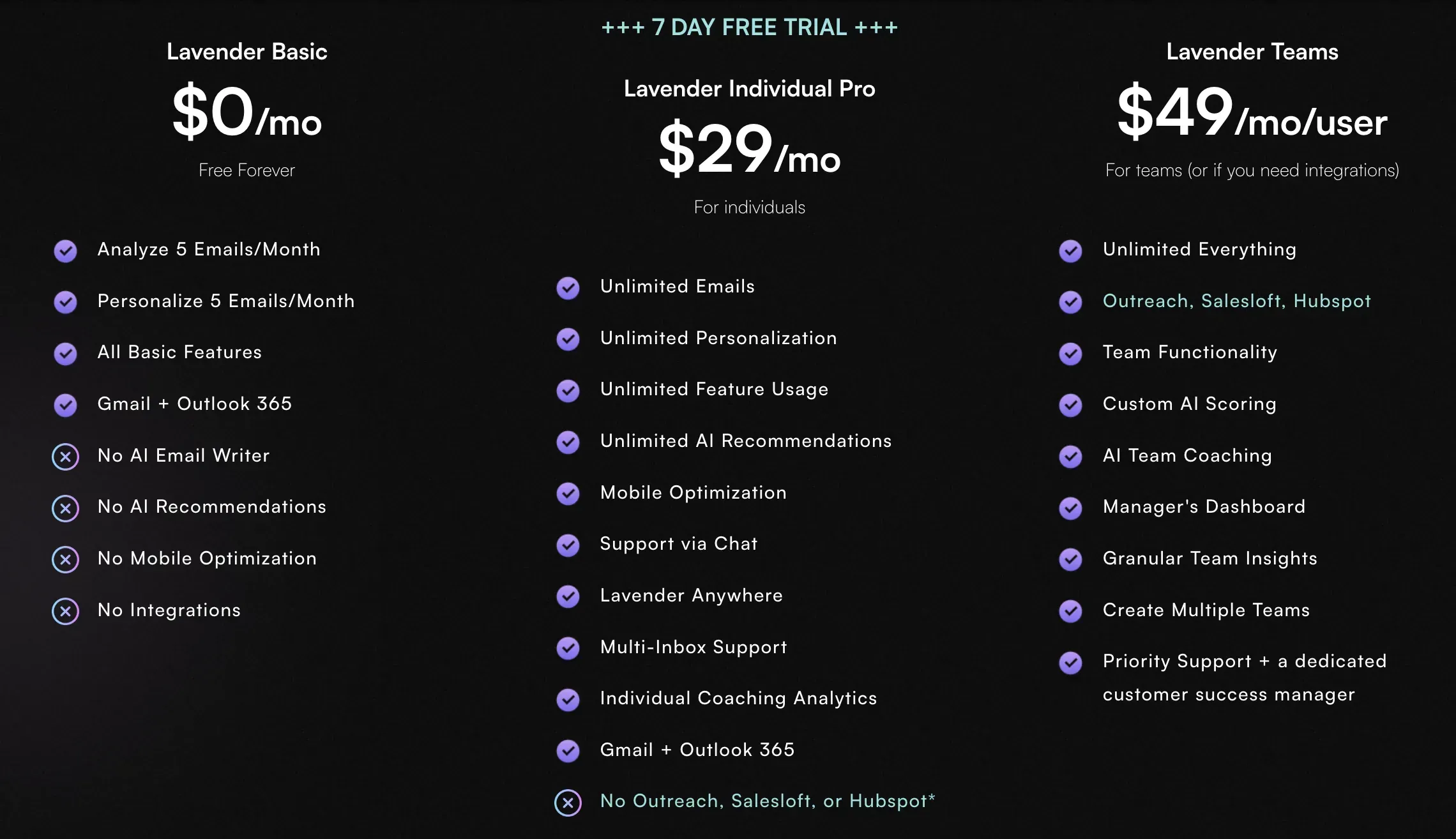
Lavender is an AI email assistant that integrates with multiple platforms such as Gmail, Outlook, and LinkedIn. It provides real-time coaching as you write emails, enhancing your email quality and effectiveness.
Main features
- AI-driven coaching: Get real-time feedback on your emails as Lavender’s sales AI identifies and corrects any issues that could harm your chances of receiving a reply.
- Email personalization and validation: Lavender validates your email, checks it for spam, and gives a mobile-friendly view. It also helps you research your prospect without leaving your inbox.
- Email intelligence for teams: Lavender provides insights to managers, helping them understand their team’s strengths and weaknesses.
Pricing
- Basic: Free
- Pro: $29 per month or $319 per year
- Teams: $49 per month per user or $539 per year per user
**
7. Quantified AI’s sales simulator**
Overview
Quantified provides a role-play partner and coach for sales reps, a coaching portal for managers, and an admin portal for sales, enablement, and RevOps leaders.
Main features
- Video-based, AI-simulated role playing: Offers video-based role-playing scenarios with an AI replica of your customer for effective, repeatable practice.
- Intelligent customer conversations: The AI uses existing product, customer, and conversation data to create a realistic conversation scenario.
- Performance feedback: After each role-play, the AI simulator provides immediate feedback, scoring, and coaching.
Pricing
- Must contact for pricing
8. RB2B website visitor identifier
Overview
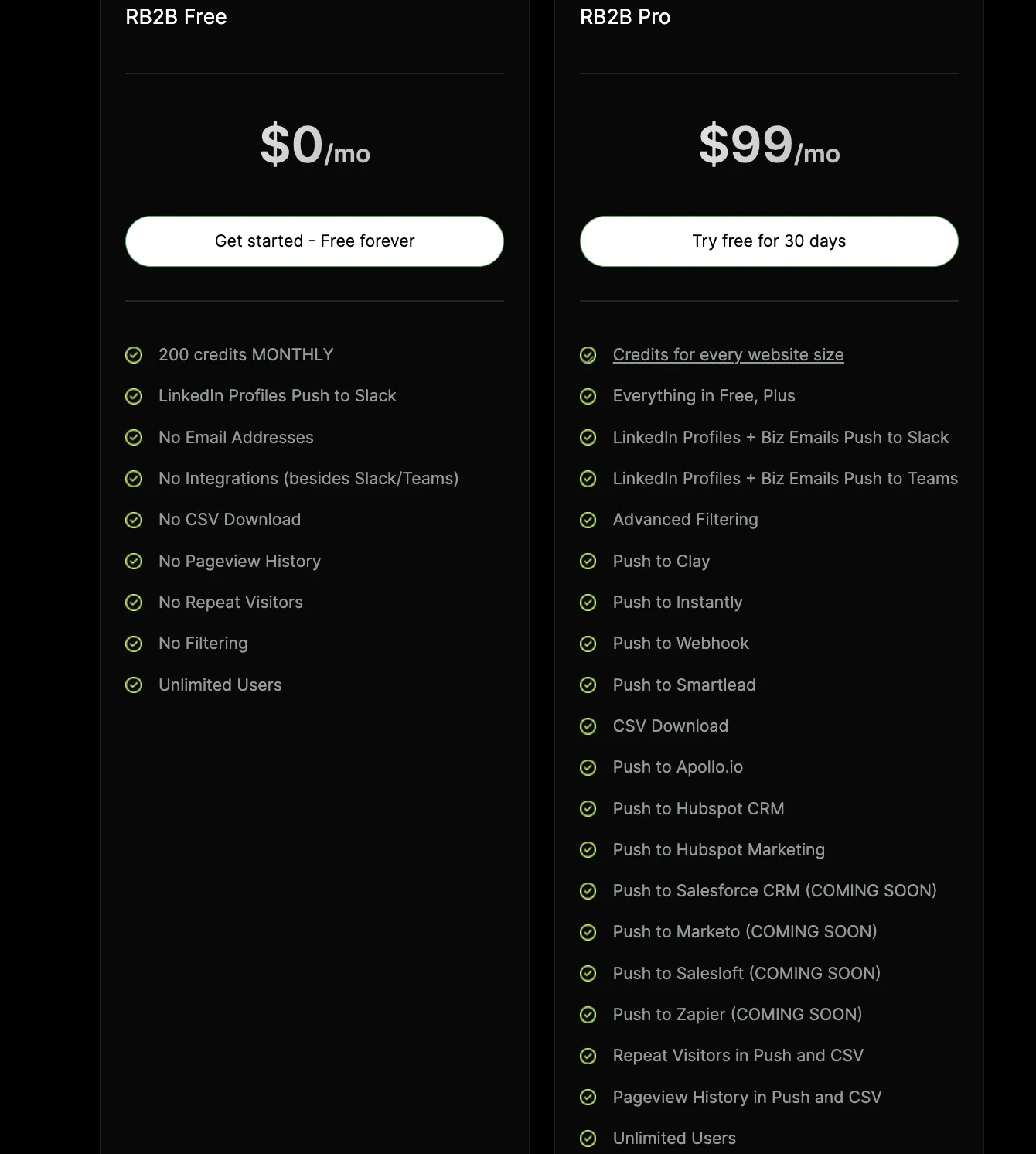
RB2B is an advanced B2B platform that identifies and engages anonymous website visitors using sophisticated algorithms to decipher digital footprints. It provides deep insights into buying intent, enabling personalized user experiences and targeted marketing strategies, transforming anonymous traffic into actionable intelligence.
Main features
- Lead generation: Uses AI to discover and target potential leads based on detailed criteria.
- Hot pages: Identifies visitors to important pages on your website.
- ICP tagging: Tags visitors who meet your ideal customer profile.
- Slack integration: Enhances communication efficiency by providing real-time visibility of leads (individual LinkedIn profiles) directly in Slack.
- Analytics and insights: Provides users with detailed insights into website visitor activity, including trend metrics, daily collected profiles, top page visits, and visitor demographics by city.
Pricing
- Free tier available
- Pro starting at $99/mo
9. Intercom AI chatbot
Overview
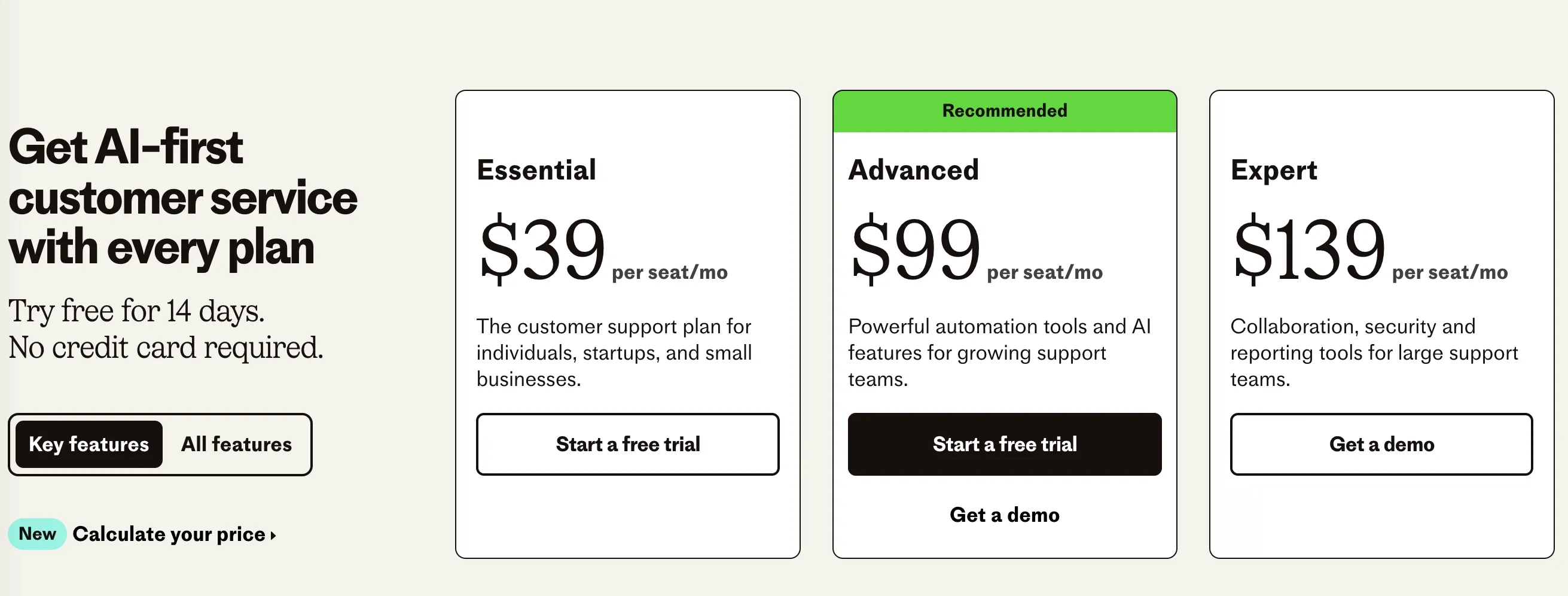
Intercom is a customer messaging platform that uses AI to help businesses engage with leads and customers through personalized, automated conversations.
Main features
- Live Chat: Engage website visitors in real-time with live chat.
- AI Chatbots: Automate responses to common questions and route complex inquiries to human agents.
- Customer Segmentation: Segment customers based on their behavior and engagement.
- Conversational Marketing: Use chatbots and live chat to convert website visitors into leads.
- Integration: Seamlessly integrates with various CRM systems and other tools.
Pricing
- Starts at $39 per month for basic plans.
- Custom pricing available for advanced features.
10. Storydoc’s AI Proposal Software
Overview
Storydoc is a business proposal software and pitch deck creator that uses AI to generate business-tailored scripts and media for a variety of use cases. The software enables salespeople and SDRs to better engage with prospects and drive decision-making.
Main features
- UX design for any device: Storydoc decks can be read anywhere, even on mobile.
- Widget embeds: Embed any type of content into proposals and decks, from video to calendars.
- CRM and sales tools integrations: Storydoc decks can be personalized and automated from any CRM or outreach platform.
- Engagement analytics: See who opened your proposal and when for full visibility into how deals are progressing.
Pricing
- No free plan (14 days trial).
- Starter: $30 per month per user, save $120 with annual subscription.
- Pro: $45 per month per user, save $180 with annual subscription.
- Team plan: Contact sales for pricing.
11. Drift’s intelligence chat
Overview
Drift is an AI-powered conversational platform that accelerates conversations, pipeline, and sales rep onboarding with features like suggested replies and language translations.
Main features
- AI-powered chat: Drift chatbots engage, qualify, and convert buyers proactively on any webpage, whether you’re online or not.
- Intelligent conversations: Drift chatbots are designed to hold open-text conversations, as well as understand and respond appropriately to inquiries.
- Customizable playbooks: You can design specific conversational pathways for the chatbots to follow based on the customer’s interaction.
- Integration: Drift seamlessly integrates with your existing tech stack, including CRM and email marketing software.
Pricing
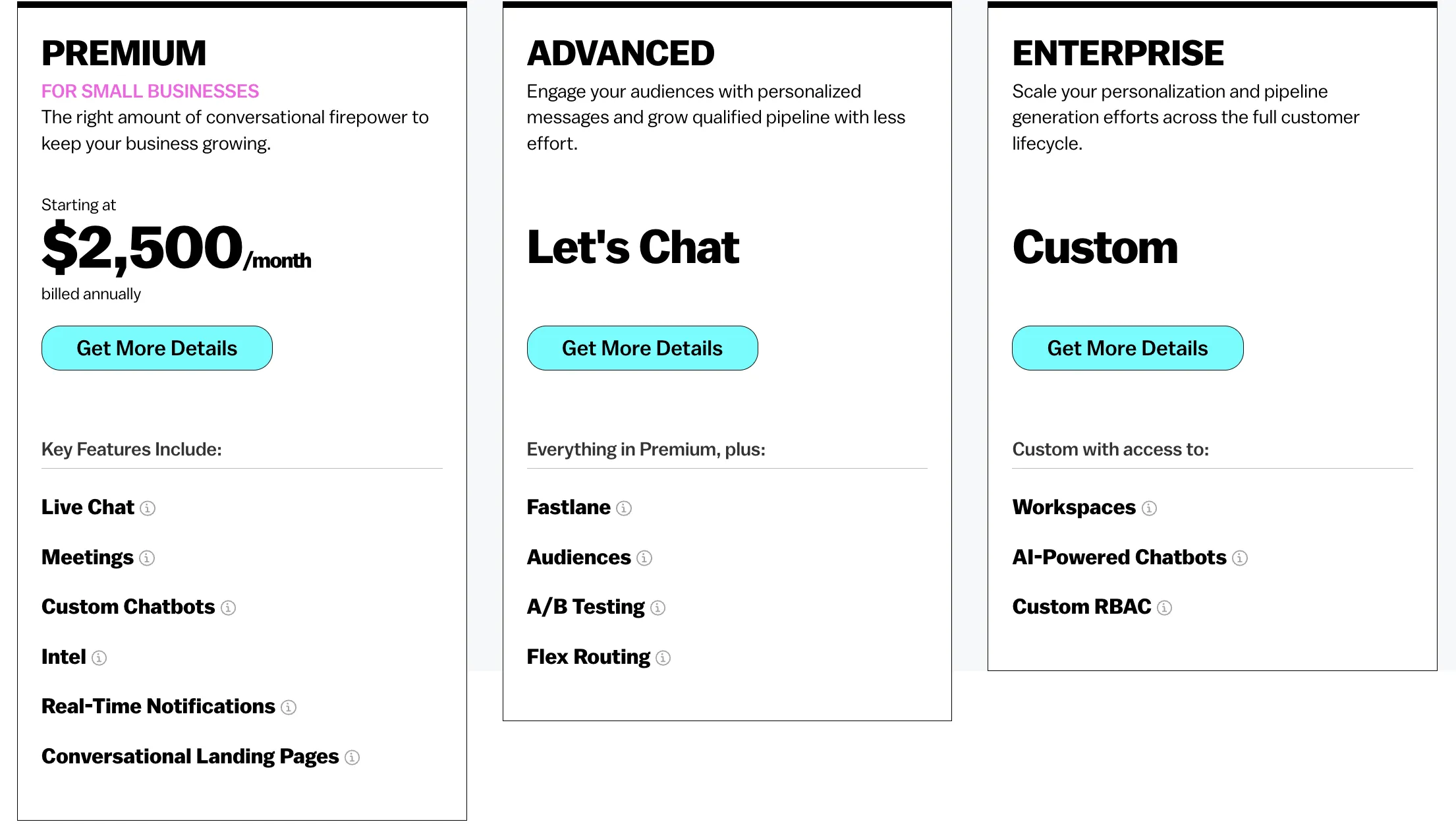
- Premium: Starts at $2,500 per month
- Advanced & Enterprise: Contact sales for pricing
**
12. Salesforce Einstein**
Overview
Sales Cloud Einstein is an intelligence solution that uses customer data to drive decision-making and productivity in every stage of the sales cycle.
Main features
- Predictive scoring: Each lead and opportunity is automatically scored based on likelihood to convert and close.
- Automated contacts: Automatically logs emails and calendar events, providing a prebuilt activity timeline.
- AI-powered insights: Einstein Discovery allows you to explore data, uncover insights, predict outcomes, and automate actions to make every business decision smarter.
- Forecasting: Salesforce Einstein uses machine learning to analyze, process and understand key trends in your past CRM data, helping it to make detailed sales forecasts.
Pricing
- Add Einstein AI & Analytics to Service Cloud: $50 per user/month, billed annually.
13. Taplio’s LinkedIn automation tool
Overview
Taplio is an AI-powered LinkedIn automation tool designed to help sales professionals build a strong personal brand and engage with prospects effectively.
Main features
- Content suggestions: Uses AI to provide personalized content suggestions for LinkedIn posts.
- Automated engagement: Automates likes, comments, and follows to increase visibility and engagement.
- Analytics: Provides detailed analytics on post performance and audience engagement.
- Content scheduling: Allows users to schedule posts in advance for consistent activity.
- CRM integration: Integrates with CRM systems to sync LinkedIn activities with sales workflows.
Pricing
- 7-day free trial available
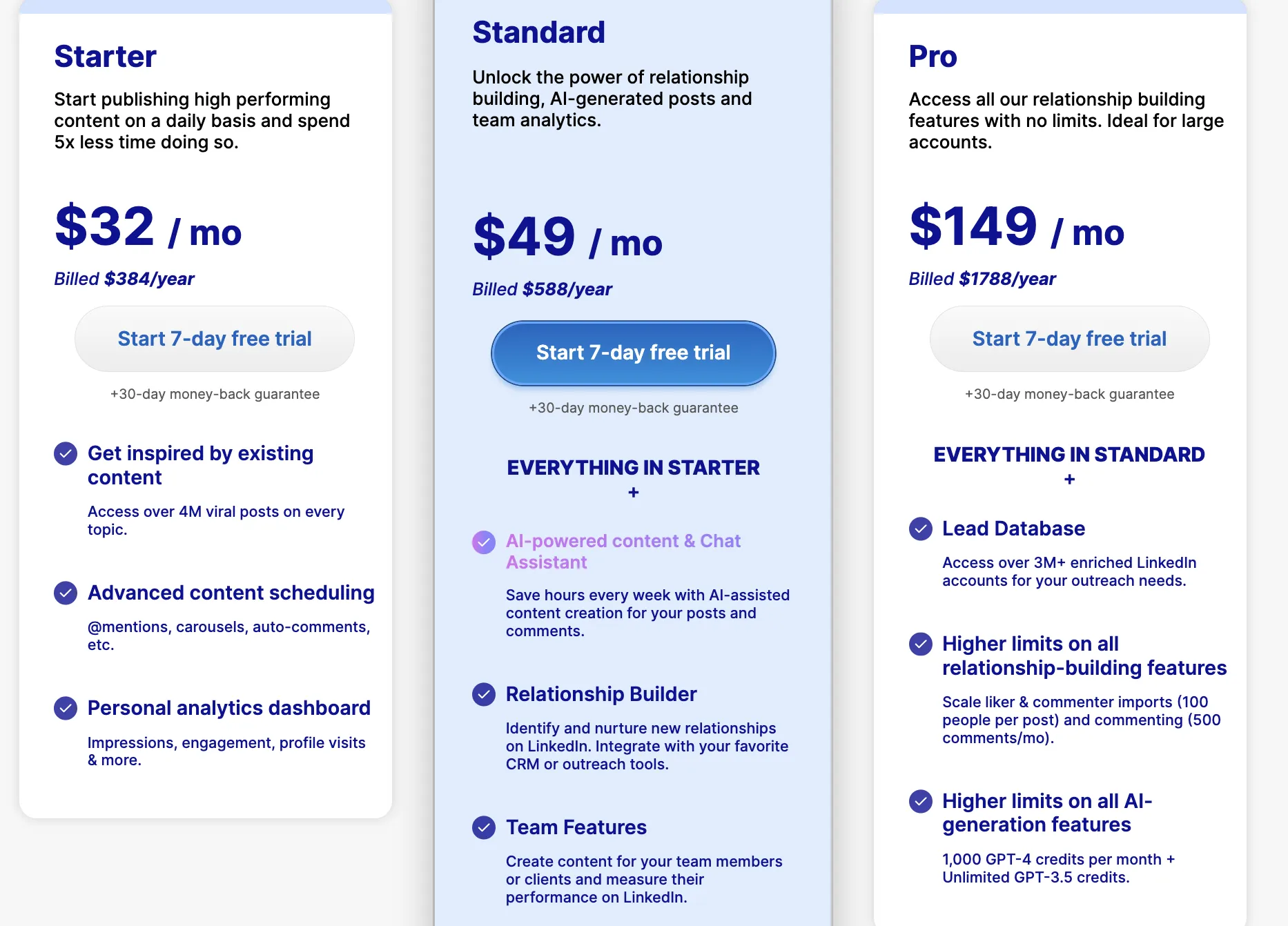
- Starter: $32 per month
- Standard: $49 per month
- Pro: $149 per month
14. HubSpot’s AI-powered tools
Overview
HubSpot’s AI powers all tools throughout the HubSpot platform. It helps you save time and do more with less work.
Main features
- Website Generator: Creates a single-page website based on simple prompts (English only).
- AI Content Writer: An AI-powered copywriter that drafts content quickly.
- Social Caption Generator: Produces engaging copy for social media posts.
- Brand Voice: Captures your unique brand voice for consistent content creation
Pricing
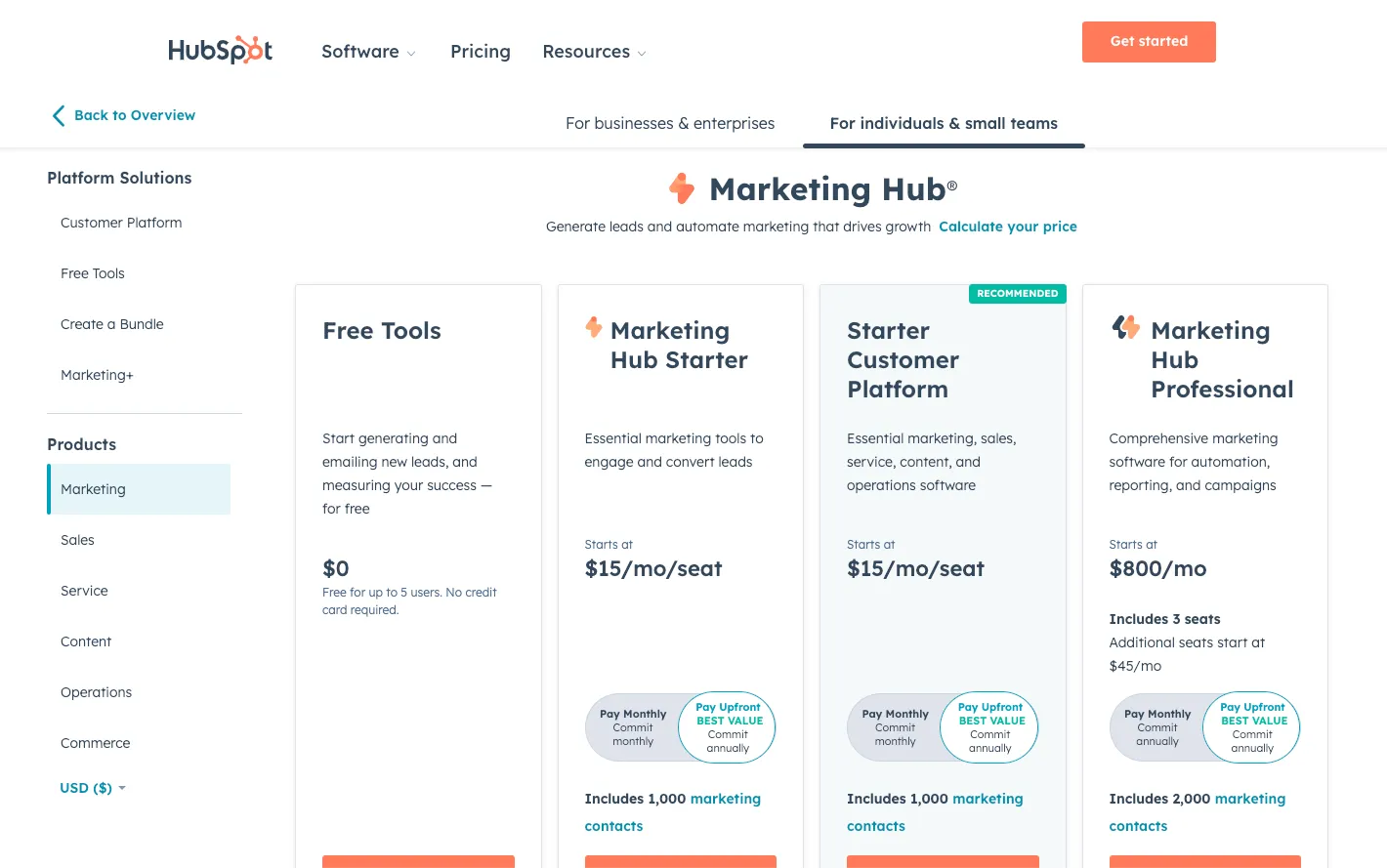
- You can get started for free, but you can always upgrade to paid plans to enjoy premium features.
15. Gong.io’s conversational intelligence
Overview
Gong.io is a conversation analytics and salesforce training tool that uses sales AI to analyze sales calls and meetings, providing insights and coaching to sales teams.
Main features
- Sales conversation analytics: Gong.io transcribes and analyzes every sales call, picking out the most important parts.
- Deal and people intelligence: Access real-time insights into your deals and people. See what’s working, what’s not, and identify coaching opportunities.
- Market intelligence: Gong.io also provides insights on market trends and competitor landscapes based on the aggregated and anonymized data from your sales calls.
Pricing
- Must contact for pricing
Fun fact: Gong integrates with Mixmax’s sales engagement platform so you can send your call recordings to Gong for analysis directly through Mixmax.
16. Shuttle’s meeting and follow-up intel
Overview
Shuttle is an AI-powered platform designed to automate mundane sales tasks, helping sales teams close more deals and build better relationships. It triggers personalized actions by analyzing contextual data from calendars, emails, and preferences.
Main features
- Meeting intel: Provides comprehensive research on prospects and companies before meetings.
- Follow-up: Automates reminders and drafts personalized responses to close deals faster.
- Daily rundown: Offers a snapshot of the day to help plan for conflicts, travel time, and rescheduling.
- Gifting: Turns calendar reminders into thoughtful gifts for prospects and clients.
- Integration: Seamlessly integrates with existing sales tools.
Pricing
- Meeting intel: $10/month
- Follow-up: $5/month
- Contact sales for additional pricing details.
Related post: How to Use AI in Sales the Right Way (with Prompt Examples)
Why Should Your Sales Team Use AI?
AI tools for sales leverage machine learning and other AI technologies to automate, optimize, and enhance different aspects of the sales process.
These tools can predict customer behavior, suggest next steps, do research, summarize articles, and even automate communication.
So why are AI tools so important?
Here are a few reasons:
- They save time by automating boring tasks.
- They increase productivity and efficiency.
- They provide insights that help with decision-making.
- They lend a helping hand (think of AI as an assistant on steroids, if you will).
Here’s a snippet from our interview with sales expert Belal Batrawy, founder of Death to Fluff, where he talks about the power of artificial intelligence in sales:
Belal Batrawy on AI in sales
The Impact of AI on Sales Performance
Let’s talk numbers. Adopting AI isn’t just about having the latest tech; it’s about seeing a real, measurable impact on your bottom line and daily workflow. When you strip away the jargon, AI is designed to make your sales process smarter, faster, and more effective. It helps you focus on the human elements of selling—building relationships and closing deals—by handling the heavy lifting on the back end. From uncovering hidden opportunities in your pipeline to ensuring you never miss a follow-up, the right AI tools can fundamentally change your performance for the better. The data shows that teams embracing AI aren’t just keeping up; they’re pulling ahead of the competition in key areas.
Significant Revenue and Profit Growth
At the end of the day, sales is about driving revenue. This is where AI truly shines. By optimizing everything from lead scoring to pricing strategies, AI directly contributes to a healthier bottom line. According to research from Allego, companies that use AI are seeing their income go up by 13-15% and their sales profits increase by 10-20%. This isn’t a happy accident. AI achieves this by helping sales teams identify the most valuable prospects, personalize outreach at scale, and gain deeper insights into customer needs. It allows you to work smarter, not just harder, by focusing your energy where it will yield the greatest financial return.
Increased Sales Team Productivity
Imagine getting hours back in your week. That’s the promise of AI-driven productivity. So much of a seller’s day can be consumed by manual, repetitive tasks like data entry, scheduling, and logging activities. AI takes over these administrative burdens, freeing you up to focus on what you do best: selling. As Salesforce points out, “AI helps sales teams by automatically finding good leads, talking to them, and keeping sales deals organized.” With tools that offer AI-powered workflows, you can automate entire sequences of actions, from sending follow-up emails to updating your CRM, ensuring no opportunity slips through the cracks while you concentrate on building client relationships.
Higher Lead Volume and Conversion Rates
More productivity naturally leads to better results. When you can manage your time more effectively, you can handle more leads without sacrificing quality. In fact, AI helps improve the quality of your interactions, leading to better conversion rates. Research from Creatio found that sales professionals using AI reported a 50% increase in leads and appointments. This happens because AI can instantly score leads based on their likelihood to convert, identify the perfect time to reach out, and even suggest the most effective messaging. This data-driven approach removes the guesswork from prospecting and nurturing, helping you convert more leads into paying customers.
Key AI Functions and Technologies in Sales
To really appreciate what AI can do, it helps to peek under the hood. You don’t need a degree in computer science, but understanding the core technologies and functions can help you see how AI tools actually work their magic. Different AI technologies are suited for different tasks, from understanding customer emails to predicting your next big sale. Think of it as having a team of specialized assistants working for you. One is a data analyst, another is a language expert, and another is a strategist. Together, they provide the intelligence you need to make smarter decisions and streamline your sales process from start to finish.
Understanding AI-Guided Selling
AI-guided selling is all about creating a powerful partnership between you and the machine. It’s not about replacing your skills but augmenting them with data-driven insights in real time. As the team at Seismic puts it, “AI-guided selling mixes human smarts with machine learning to make sales interactions better and smarter.” Imagine you’re on a sales call, and an AI assistant prompts you with the perfect talking point based on the conversation. Or picture it suggesting the next best action for a deal that has stalled. That’s AI-guided selling in action—it’s your co-pilot, helping you make the right moves at the right time to keep deals moving forward.
Core AI Technologies Explained
While “AI” is a broad term, a couple of specific technologies do most of the heavy lifting in sales tools. Understanding these will give you a clearer picture of what’s happening behind the scenes when your software suggests a lead to call or a sentence to add to your email. These core technologies are the engines that power the intelligent features you use every day.
Machine Learning and Predictive AI
Machine learning is the process where computers learn from data to find patterns and make decisions without being explicitly programmed for every scenario. A key application of this is predictive AI, which, as Creatio explains, “forecasts future sales based on past information.” It analyzes your historical sales data—wins, losses, deal cycles, and customer profiles—to predict which of your current leads are most likely to close. This allows you to prioritize your pipeline and focus your efforts on the opportunities with the highest probability of success.
Natural Language Processing (NLP)
Have you ever wondered how a machine can understand the words in an email or a recorded call? That’s Natural Language Processing (NLP). This technology gives computers the ability to read, understand, and interpret human language. According to Creatio, “Natural Language Processing (NLP) helps AI understand human language in emails and calls.” NLP is what powers features like sentiment analysis, which can tell if a client’s email is positive or negative, and it’s the magic behind AI tools that can summarize long call transcripts or even help you draft a perfectly worded follow-up message.
Common AI Use Cases in Sales
So, how do these technologies translate into practical, day-to-day tools for a sales professional? The applications are incredibly diverse and are designed to assist at every stage of the sales cycle. From initial prospecting to forecasting your quarterly numbers, AI provides specific solutions that address common sales challenges, making your job easier and more effective.
Sentiment and Competitor Analysis
Using NLP, AI can “read the room” by analyzing customer communications. As Creatio notes, “AI can figure out how customers feel about a product or brand.” This means it can scan emails, call transcripts, and support tickets to gauge customer sentiment. Is a key account showing signs of frustration? AI can flag that for you. It can also monitor public channels for mentions of your competitors, giving you real-time intelligence on their activities and what their customers are saying, so you can stay one step ahead.
Dynamic Pricing and Forecasting
Creating an accurate sales forecast has always been part art, part science. AI leans heavily into the science. Tools like Salesforce Einstein use machine learning to “analyze, process and understand key trends in your past CRM data, helping it to make detailed sales forecasts.” By analyzing countless data points—far more than a human ever could—AI can predict sales outcomes with greater accuracy. This helps sales leaders allocate resources effectively and provides the entire business with a more reliable projection of future revenue.
How to Choose the Right AI Sales Tool for Your Team
Choosing the right AI tool for your sales team can be tricky with so many options on the market. To ensure you make the best decision, consider these critical factors:
1. Integration
Your AI tools for sales should seamlessly integrate with your existing sales tech stack, especially your CRM system. Here’s why this matters:
- Eliminate manual data entry: Avoid wasting time on repetitive tasks like transferring data between platforms.
- Enhance insights: Tools integrated with your CRM can leverage your existing customer data to provide better insights and more personalized recommendations.
💡Actionable tips:
- Check for pre-built integrations with your CRM, email platforms, and project management tools.
- Request a demo to see the integration in action.
- Test how the tool handles real-time data syncing during a free trial.
2. Ease of use
Even the most advanced AI tool is ineffective if it’s too complicated for your team to use. Look for user-friendly interfaces and accessible learning resources.
- Avoid the learning curve: A simple tool ensures faster adoption by your team.
- Streamline training: Tools with built-in tutorials or onboarding programs make it easier for your sales reps to get started quickly.
💡Actionable tips:
- Choose tools that offer a trial period to let your team test usability.
- Read user reviews or request case studies from companies with similar team sizes.
- Check if the tool offers role-specific dashboards to cater to different user needs, such as SDRs, account executives, and managers.
3. Customer support
Even with the most reliable tools, issues are bound to arise. Having dependable customer support ensures these hiccups don’t derail your sales process.
- Quick troubleshooting: Immediate assistance prevents prolonged downtime.
- Guidance on advanced features: Support teams can help you unlock the tool’s full potential.
💡Actionable tips:
- Evaluate the available support channels: live chat, email, phone, or a dedicated account manager.
- Check if 24/7 support is included in your pricing plan.
- Browse their help center or knowledge base to assess the quality of self-service resources.
4. Security
Data security is a non-negotiable aspect of any sales tool. Your chosen tool must safeguard sensitive customer information and comply with industry standards.
- Protect customer trust: Non-compliance or data breaches can damage your reputation.
- Avoid penalties: Ensure compliance with regulations like GDPR or CCPA.
💡Actionable tips:
- Verify that the tool uses encryption to secure data in transit and at rest.
- Check for security certifications like SOC 2, ISO 27001, or GDPR compliance.
- Ask about their data storage policies, including server locations and retention practices.
5. Cost
While cost is always a factor, focus on the value the tool brings rather than just its price tag. A higher upfront investment can lead to significant ROI if the tool improves efficiency and helps close more deals.
- Avoid hidden costs: Consider the total cost of ownership, including training, upgrades, and additional integrations.
- Invest strategically: Prioritize tools that address your most critical challenges first.
💡Actionable tips:
- Create a comparison chart of shortlisted tools with a breakdown of pricing tiers and included features.
- Check for scalable plans that grow with your team.
- Calculate potential ROI by estimating time savings, revenue growth, or increased lead conversions.
6. Scalability and customization
As your team grows, your tool should grow with you. Choose a solution that can handle increased data volumes and team members while allowing customization to fit your unique processes.
- Future-proof your investment: Ensure the tool supports add-ons, API access, or custom workflows.
💡Actionable tips:
- Ask vendors how their tool scales with team size or feature needs.
- Check for customization options, such as modifying reports, workflows, or dashboards.
- Look for tools with flexible pricing models for teams of all sizes.
7. Develop a Phased Implementation Plan
Rolling out a new tool across an entire sales team at once can be chaotic. A better approach is to introduce it in stages. This gives your team time to adapt, provides opportunities to gather feedback, and ensures a smoother transition. A phased plan helps you manage expectations and demonstrate the tool’s value without overwhelming everyone. It also allows you to work out any kinks with a smaller group before a full-scale launch, which saves a lot of headaches down the road.
Start with a pilot program involving a few of your most tech-savvy reps. Let them test the tool and become your internal champions. Once they’ve found success, you can gradually roll it out to the rest of the team with targeted training sessions. As everyone gets comfortable, you can begin to fully integrate the tool and explore more advanced features. For instance, you might start with basic email automation and later introduce custom AI-powered workflows to fit your unique sales process as your team grows and their needs evolve.
💡Actionable tips:
- Set clear, measurable goals for each phase of the implementation.
- Create a feedback loop to collect insights from your team at every stage.
- Celebrate early wins from the pilot group to build excitement and encourage user adoption.
How to Get Your Sales Team Onboard with AI
Now, onto the juicy bit: how do we help our sales teams feel at ease with AI?
AI isn’t about creating a troop of robotic salespeople who rely solely on AI to do their jobs. It’s about equipping your team with superpowers to close deals faster, understand customers better, and respond quicker.
Then, focus on the benefits. Show your team how AI can take care of the routine tasks — the follow-ups, the research, the summaries, the data crunching — and free up their time to do what they do best: connecting with people and building relationships.
Don’t forget the training. Yes, it’s new technology, and yes, it might seem intimidating at first. But with the right training, your team will soon see that AI isn’t the complex beast it’s often made out to be.
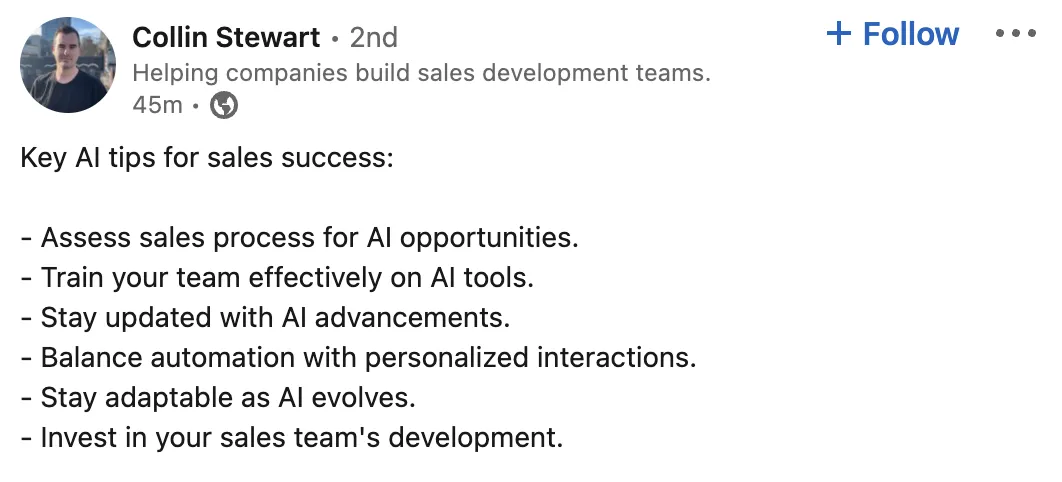
Here’s a LinkedIn post from Collin Stewart, CEO of Predictable Revenue, that summarizes AI training and tips well:
One last thing: patience is key. Everyone learns at their own pace, so give your team the time they need to get comfortable with AI. Rome wasn’t built in a day, and neither is a highly-skilled, AI-powered sales team.
Your AI for Sales Questions, Answered
We’ve shown you the benefits of AI, listed the top 16 AI tools for sales, and offered tips on how to ease your team into using AI so they’re comfortable working with it.
With tools like Mixmax’s generative AI feature at your fingertips, the question isn’t whether you should embrace AI, but rather, “Why on earth haven’t you done it already?”
Remember, AI is not about replacing you, the superstar salesperson. It’s about enhancing your existing abilities so you can focus on the good stuff.
Frequently Asked Questions (FAQ)
Are AI tools difficult to use?
Most AI tools are designed to be user-friendly. However, proper training and support are necessary to fully leverage the tool’s capabilities.
Do AI tools replace salespeople?
No, AI tools don’t replace salespeople. Instead, they assist salespeople, taking over mundane tasks and allowing them to focus on more strategic activities.
Is AI in sales expensive?
The cost of AI tools varies. However, the value they bring in terms of time savings, productivity increase, and sales growth can justify the investment.
Can I use multiple AI tools at once?
Yes, many sales teams use a suite of AI tools. However, it’s important to ensure these tools integrate well to avoid information silos and inefficiency.
Common Challenges and Limitations of AI in Sales
While AI offers some incredible potential, it’s not a magic wand that will instantly fix all your sales challenges. Diving in without a clear strategy can lead to frustration, wasted money, and a team that’s more skeptical than ever about new tech. It’s easy to get caught up in the hype, but many sales leaders find themselves bogged down by tools that overpromise and underdeliver, struggle with messy data, or fail to get their team on board. The market is flooded with options, and the pressure to adopt *something* can lead to hasty decisions that don’t align with your team’s actual needs. It’s a classic case of putting the cart before the horse.
Being realistic about these limitations is the first step toward building an AI strategy that actually works. Instead of looking for a single tool to solve everything, it’s better to identify your biggest bottlenecks and find targeted solutions. Do your reps spend too much time on administrative tasks? Is your data a mess? Are you struggling to personalize outreach at scale? By anticipating these hurdles, you can create a clear plan to address them head-on. This ensures you’re not just buying software, but investing in a system that supports your team, cleans up your processes, and ultimately helps you close more deals.
Avoiding “Vaporware” and Underutilization
It’s easy to get wowed by a flashy demo, but you have to distinguish genuine value from “vaporware.” Many AI providers are great at marketing but their tools don’t perform as advertised in a real-world sales environment. To avoid this trap, you need to vet your vendors thoroughly. Ask for a pilot program or an extended trial to test the tool with your actual team and data. Look for recent, relevant case studies and talk to current customers to get an honest opinion on their experience. This due diligence ensures you invest in a tool that solves a real problem for your team, rather than one that just sits on the shelf collecting dust after the initial excitement wears off.
Addressing Data Quality and Integration Issues
Here’s a hard truth: your AI is only as smart as the data you feed it. If your CRM is a graveyard of outdated contacts, incomplete records, and inconsistent entries, your new AI tool won’t be able to deliver accurate insights or effective personalization. Before implementing any AI platform, you need to get your data in order. A clean, organized CRM is non-negotiable. Furthermore, any new tool must integrate seamlessly with your existing tech stack. This prevents data silos and ensures that information flows smoothly between systems, allowing features like AI-powered workflows to function correctly and actually save your team time.
Understanding the Human Element
Perhaps the biggest challenge is remembering that AI is a tool to support salespeople, not replace them. The goal isn’t to create a team of robots who just follow an AI-generated script. It’s about equipping your reps with superpowers that help them understand customers better and respond faster. Many AI tools, like chatbots, still struggle with nuanced questions and complex emotional cues where a human is needed to step in. True success comes from blending AI’s efficiency with the irreplaceable value of human intuition, empathy, and relationship-building. When your team sees AI as a partner that handles the grunt work, they can focus on what they do best: connecting with people.
Applying the 30% Rule for Effective Adoption
To get the most out of AI without overwhelming your team, it helps to have a clear framework. The 30% Rule is a great way to think about this. It suggests that AI should handle about 70% of the repetitive, administrative work, freeing up humans to focus on the remaining 30% of high-value activities that require creativity and judgment. Think of it as letting AI manage tedious tasks like data entry, scheduling, and initial lead qualification. This allows your sales reps to dedicate their energy to building relationships, navigating complex negotiations, and closing deals—the parts of the job where a human touch is irreplaceable.
Key Takeaways
- Automate the busywork to focus on selling: Let AI handle repetitive tasks like data entry, scheduling, and lead qualification. This frees you to concentrate on the human side of sales—building relationships, navigating complex negotiations, and closing deals.
- Choose tools that fit your current workflow: The most effective AI software integrates seamlessly with your existing CRM and is intuitive for your team to use. A phased rollout, starting with a pilot group, ensures smooth adoption and prevents you from investing in a tool that goes unused.
- Clean data is the foundation of a successful AI strategy: Your AI is only as smart as the information you give it, so start by organizing your CRM data. To get your team on board, focus on how these tools solve their daily frustrations, not just on the technology itself.



