
Let’s be honest, a messy CRM is a huge headache. It leads to inaccurate reports, wasted time, and missed opportunities. This is where CRM hygiene comes in. So, what is CRM hygiene? It’s simply the ongoing process of keeping your customer data clean, accurate, and complete. Good CRM data hygiene isn’t just about tidying up; it’s about building a reliable foundation for your entire sales process. It ensures your team can trust the information they use every day to connect with customers and close deals more effectively.
This is essential because, as sales development reps, account executives, and customer success reps, you rely heavily on this data to connect and engage with your potential (and actual) customers in meaningful ways.
Imagine calling a customer by the wrong name or contacting someone who’s clearly not interested in your product anymore. Not only is it annoying and embarrassing for you, but it’s also irritating for the person you’re connecting with.

In this blog post, we’ll explore why having clean CRM data is important and share best practices that can help you and your team achieve it.
- What is data hygiene?
- Importance of clean CRM data
- Causes and consequences of dirty data
- 6 essential CRM data hygiene best practices
- Tools and technologies for clean data
- Wrap-up
So, What Exactly Is CRM Data Hygiene?
Imagine your Customer Relationship Management (CRM) system is like a digital address book on steroids. Data hygiene is the habit of making sure every name, number, email address, job title, and summary of the last communication in that book is correct.
It involves regularly checking and tidying up your contacts, so you don’t call Mr. Smith by mistake when you want to talk to Ms. Smythe.
It’s making sure all the information you have about your prospects and customers is accurate and up to date: There are no old phone numbers, no duplicate names, and updated info about previous communications.
This is essential for sales and customer success teams because when the list is clean, everyone can do their job properly.
Warning Signs of Poor Data Hygiene
Not sure if your data is dirty? It’s not always obvious, but there are a few tell-tale signs that your CRM needs a good scrub. If you spot any of these issues, it’s a clear signal that it’s time to focus on improving your data hygiene.
High email bounce rates
A high email bounce rate is one of the most immediate red flags. When you launch a sequence and a significant number of emails come back as undeliverable, it’s a clear sign your contact information is stale. People change jobs, companies get acquired, and email addresses become obsolete. As one source puts it, “When emails bounce back, it often signifies that the contact information is outdated or incorrect, which can severely impact your outreach efforts.” This not only wastes your time but also hurts your sender reputation, making it harder for your future emails to land in anyone’s inbox.
Inaccurate sales forecasts
Are your sales forecasts consistently off the mark? Poor data quality is a likely culprit. When your CRM is filled with incomplete deal information, outdated contact roles, or duplicate opportunities, it’s nearly impossible to make accurate predictions. Leadership relies on these forecasts to make critical business decisions, from hiring to resource allocation. Unreliable data leads to “misguided predictions and ultimately lost revenue.” If you can’t trust the data you’re using to build your forecast, you’re essentially flying blind, which can have serious consequences for the entire company.
Team frustration and low CRM adoption
Pay attention to how your team talks about your CRM. If you hear constant complaints about inaccurate information or reps avoiding the system altogether, you have a data hygiene problem. Dirty data creates unnecessary friction and frustration. When your team can’t trust the information in their most critical tool, they’ll stop using it, leading to low adoption rates. This creates a vicious cycle: low adoption means even less data gets updated, making the CRM even more unreliable. It’s a huge waste of resources and a major blow to team morale and sales productivity.
Difficult and unreliable reporting
When you can’t pull a straightforward report without spending hours cleaning up the data first, you’ve got a problem. Poor data quality makes it incredibly difficult to generate reports that provide clear, actionable insights. Inconsistent formatting, missing fields, and duplicate entries can skew your metrics, making it impossible to understand what’s actually working in your sales process. This hinders strategic decision-making for everyone from individual reps to the leadership team. Implementing AI-powered workflows to standardize data entry can help prevent these issues from the start, ensuring your reports are always based on clean, reliable information.
Why Clean CRM Data Is a Game-Changer
Here’s a breakdown of why clean CRM data is important for each role in a revenue team.
Sales Development Reps (SDRs): SDRs need the right info to reach out to potential customers effectively. With a clean address book, they won’t waste time calling wrong numbers, emailing inactive addresses, or bothering people who have made it clear they’re not interested.
Account Executives (AEs): Accurate info means AEs can better communicate with opportunities, understanding their specific needs, preferences, and pain points. This way, they can offer insight and deals that customers truly care about, increasing the chances of making successful sales.
Customer success (CS) teams: CS uses accurate data to offer help and support to customers when needed. With the right contact details and customer history, they can provide top-notch service, keeping customers happy and loyal, and (hopefully) avoiding churn.
Sales managers: Clean CRM data helps with efficient lead distribution among the sales team, with members receiving accurate and useful information. This accuracy is crucial not only for initiating first contact but also for nurturing leads through the sales funnel with personalized and relevant communication, which in turn drives successful conversions.
Revenue Operations (RevOps): Clean data ensures that operational processes from lead generation to deal closure are smooth and error-free. With reliable data, RevOps can make strategic decisions and optimize processes and tools to support sales teams.
Enables Accurate Forecasting
When your CRM is cluttered with outdated or duplicate information, it’s nearly impossible to get a clear picture of your sales pipeline. Good CRM hygiene helps you eliminate “ghost deals” and inaccurate data, allowing leadership to make decisions based on real revenue potential. With clean data, sales managers can confidently forecast future sales, set realistic targets, and allocate resources effectively. This means no more last-minute scrambles to meet quotas that were based on faulty numbers. Instead, your team can work with a predictable and reliable pipeline, which reduces stress and improves overall performance.
Ensures Legal Compliance
In an era of increasing data privacy concerns, maintaining clean data isn’t just good practice—it’s a legal necessity. Regulations like GDPR in Europe and CCPA in California have strict rules about how customer data is stored and used. Good data hygiene helps your organization meet these requirements by ensuring you have accurate records of consent and communication preferences. This protects your company from hefty fines and legal trouble, but more importantly, it shows your customers that you respect their privacy. Keeping your data clean is a fundamental step in building and maintaining trust with your audience.
Prepares Your Business for AI
As sales technology evolves, artificial intelligence is becoming a key player. But here’s the thing about AI: it’s only as good as the data it learns from. A clean CRM is a “living data asset” that powers your entire business strategy and helps you use new technologies effectively. If you want to leverage tools that can predict customer behavior, suggest the next best action, or automate outreach, you need a solid foundation of accurate data. This is especially true for implementing AI-powered workflows that can streamline your processes and save you time, ensuring your automations are triggered by the right information.
The Real Cost of Dirty Data (And How It Happens)
Errors happen! We’re all human (for now).
Sometimes, we input data manually, and it’s not always perfect, especially when we’re rushing or multitasking. When entering data manually into CRM systems, it’s easy for these errors to slip through.
But these small errors can add up, leading to:
- Inefficiencies: When data is incorrect, you waste time double-checking information or reaching out to the wrong contacts, slowing down processes and making your workday harder.
- Missed opportunities: Dirty data means you might miss out on connecting with potential customers or providing current clients with the best service, causing lost sales and weakened relationships.
- Negative customer experiences: Customers can become frustrated if they receive information or offers that aren’t relevant to them due to incorrect data, which can impact their view of your brand.
- Revenue loss: Ultimately, all these mistakes coming from unclean data translate to lost revenue, which hits where it hurts the most – your bottom line.
Taking care of the accuracy and consistency of the CRM data from the get-go helps prevent these pitfalls, ensuring a smoother and more profitable operation.
Quick tips on how to keep your CRM data clean with Mixmax’s Head of RevOps, Lana Ma.
The Financial Cost of Bad Data
Let’s talk numbers, because they don’t lie. According to research, poor data quality costs businesses an average of $15 million every year. That’s not a small chunk of change. This cost isn’t just an abstract figure on a balance sheet; it translates into very real problems for your sales team. It’s the time your SDRs waste chasing down leads with disconnected phone numbers, the marketing budget spent on emails that bounce, and the deals that fall through because an AE had the wrong information about a prospect’s needs. Every minute spent correcting errors or working with faulty data is a minute not spent selling, which directly impacts commissions and the company’s bottom line.
The Natural Decay of CRM Data
Even if you start with a perfectly clean CRM, it won’t stay that way on its own. Data has a shelf life. Think about it: people change jobs, get promoted, switch companies, and update their email addresses. It’s estimated that CRM data decays by about 34% annually. This means that over a third of your contact information could become obsolete within a year. This natural decay is why data hygiene can’t be a one-and-done project. It requires consistent effort to keep information fresh and relevant. Without regular maintenance, your once-valuable CRM can quickly become a digital graveyard of outdated contacts, making it nearly impossible to run effective outreach campaigns.
Common Causes of a Dirty CRM
So, how does a CRM get so messy in the first place? It usually comes down to a few common culprits. The most frequent reason is simple human error during manual data entry. We’ve all been there—typing too fast and making a typo or forgetting to fill in a crucial field. Other major issues include having duplicate records for the same contact or company, importing messy data from external lists without cleaning it first, and a lack of standardized entry procedures across the team. Understanding these root causes is the first step toward preventing bad data from piling up and creating a system that actually helps you sell.
Fake or temporary information from web forms
One of the biggest gateways for bad data is your own website’s lead capture forms. When you offer a valuable resource like an ebook or a webinar, some visitors will enter fake or temporary information just to get access without being contacted later. They might type “test@test.com” or use a disposable email address. If your system doesn’t have checks in place, this junk data flows directly into your CRM. This clutters your database and sends your sales team on a wild goose chase, wasting their time trying to follow up with contacts who don’t actually exist.
Unnecessary or excessive form fields
Have you ever landed on a page and been confronted with a form that feels like you’re filling out a tax return? When you ask for too much information upfront, you create what’s known as form fatigue. Prospects are more likely to either abandon the form altogether or rush through it, leading to incomplete or inaccurate entries. It’s crucial to strike a balance. Only ask for the information you absolutely need to qualify and contact a lead. You can always gather more details later in the sales process as the relationship develops. Keeping your forms concise respects your prospect’s time and increases the quality of the data you receive.
Lack of team training
Without a clear and consistent process for data entry, every team member will likely do things a little differently. One person might log a company as “IBM,” while another enters “International Business Machines.” This creates duplicate records and makes it incredibly difficult to get a clean view of an account. This is where establishing a data hygiene policy and providing regular training is essential. It also highlights the value of tools that can reduce manual work. For instance, using AI-powered workflows can automate data entry and sync activities from your inbox to the CRM, ensuring information is logged consistently and reducing the chance of human error.
The Consequences of Inaccurate Data
The fallout from dirty data extends far beyond simple inefficiencies. When your CRM is unreliable, you risk damaging customer relationships and missing out on significant revenue. Imagine reaching out to a long-time customer with an offer that’s completely irrelevant to them or, even worse, addressing them by the wrong name. These mistakes make your outreach feel impersonal and can erode the trust you’ve worked hard to build. As we’ve mentioned, inaccurate data can lead to lost sales and weakened relationships, turning your CRM from a powerful asset into a liability that actively works against your goals.
Erosion of user trust
When your sales team consistently encounters incorrect or outdated information in the CRM, they’ll stop trusting it. And when they don’t trust the tool, they stop using it effectively. This is a major driver of low CRM adoption. Reps might start keeping their own private spreadsheets or notes because they can’t rely on the shared system. This completely defeats the purpose of having a centralized source of truth. The CRM then becomes a tedious administrative task—something they *have* to update—rather than a valuable tool that helps them close deals and hit their targets.
Focusing on quantity over quality
There’s often pressure in sales to keep the pipeline full, which can lead to a “quantity over quality” mindset. Teams might import massive, unvetted lists or rush to add every possible contact to the CRM without proper qualification. While this might make the pipeline look impressive at a glance, it’s ultimately counterproductive. A CRM bloated with low-quality leads forces reps to sift through mountains of junk to find the few genuine opportunities. This wastes valuable time and energy that could be spent nurturing high-potential prospects. A smaller, cleaner list of well-qualified leads will always outperform a massive, messy one.
6 Actionable Steps for Better CRM Hygiene
To avoid these issues, let’s walk through six best practices to keep your data in tip-top shape:
1. Automate data updates
Automating contact data updates is the easiest way to have the most accurate data in your CRM. But to achieve this, you need your CRM to integrate with other apps you use like your Sales Engagement Platform (SEP) and inbox.
For example, Mixmax (a SEP) that already lives inside Gmail also offers a seamless integration with Salesforce. That’s killing three birds with one stone (horrific image, we know).
If you’re using Mixmax, you can set up rules that automatically update the contact’s information and status based on specific actions. This way, you don’t have to worry about manually updating anything. Plus, all the information about the contact can also be accessed through Gmail via Mixmax’s nifty Salesforce sidebar.
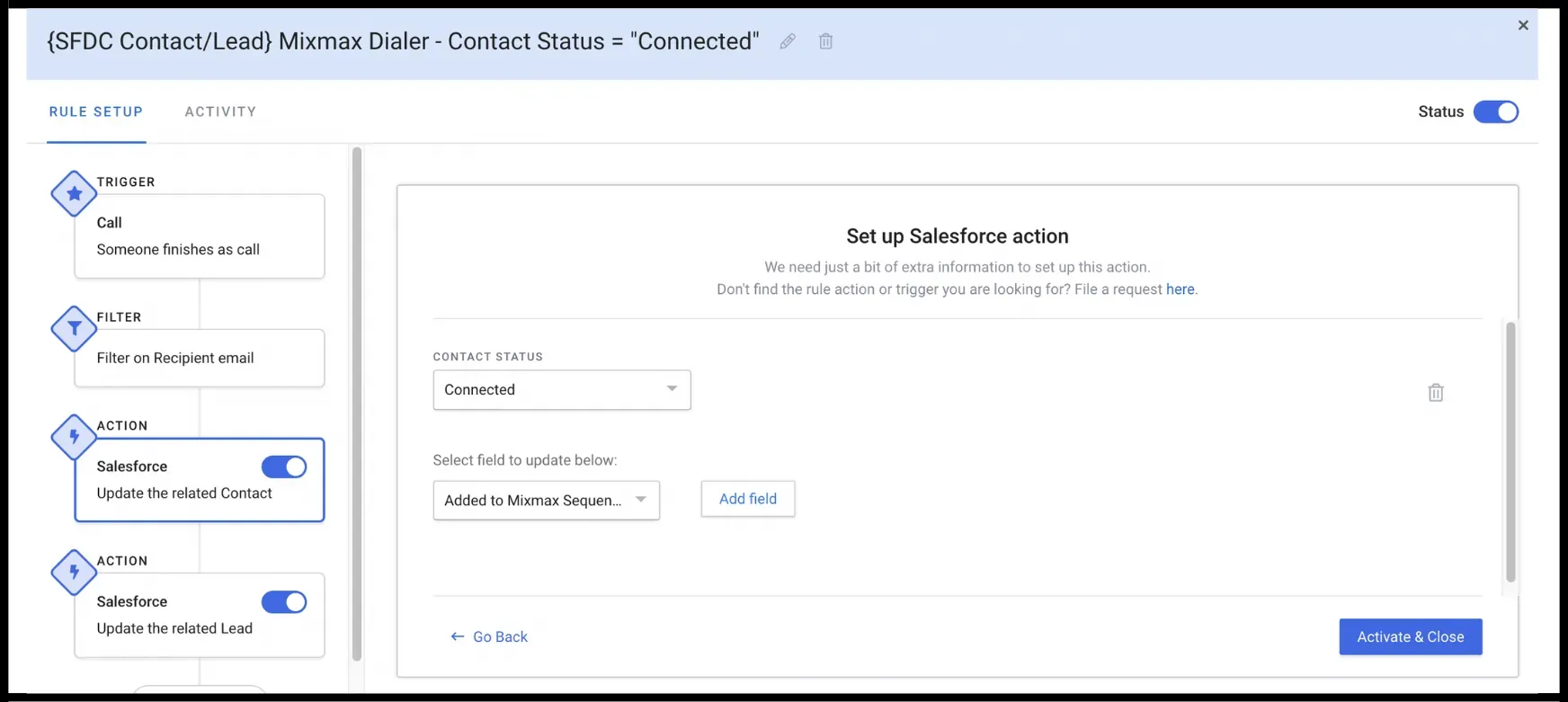 Salesforce Rules in Mixmax
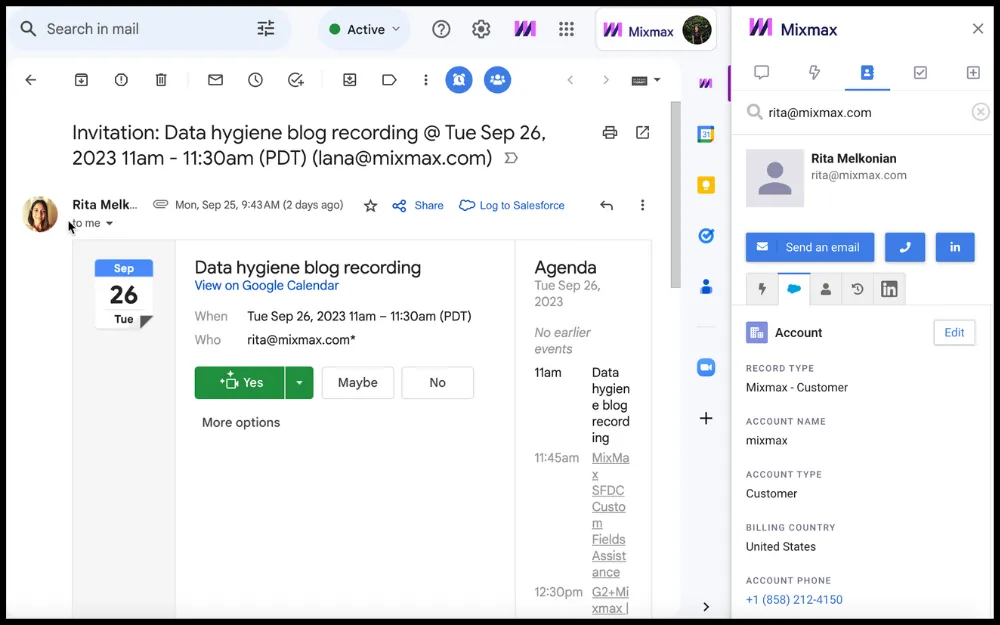 Salesforce sidebar in Gmail via Mixmax
2. Eliminate data silos
Data silos happen when information is isolated within a specific department or team, making it inaccessible to others. This hurts the free flow of data, making it hard for everyone to get the full picture.
Here’s why data silos are terrible for your organization:
- Limits accessibility: When data is trapped in silos, teams can’t access all the information they need to make informed decisions or to have a comprehensive understanding of customers.
- Inconsistent: With multiple departments entering and using data differently, inconsistencies can arise, leading to confusion and mistakes.
- Reduces productivity: If you have to spend time searching for or requesting access to data in silos, it slows down processes and hurts productivity.
So how do you overcome data silos?
All teams can agree to adopt and use the same CRM system where all data is stored. This is the best way to make sure everyone has access to the same information.
If it’s not possible to get everyone on board with using the same CRM, then you can leverage integration tools that bridge that gap. But you have to make sure the integration is near-perfect, otherwise, you’ll be left with duplicate/inconsistent data.
Related post: 3 Salesforce Automation Hacks for Revenue Teams
3. Avoid duplicate data
Duplicate data usually occurs when the same customer or lead information is entered into the system more than once.
This repetition might happen for different reasons, such as:
- A lack of communication among team members
- Different team members interacting with the same client
- Errors during data import processes
- Your sales engagement platform acting like a second CRM instead of staying in its lane (we won’t mention which ones do this… but it ain’t Mixmax).
Here’s why duplicate data is a significant issue:
Inconsistency in communication: With two profiles for the same contact, future communications might become disjointed. If one profile is updated but the other isn’t, team members might act on outdated or incorrect information, leading to potential misunderstandings or missed opportunities.
Inefficient resource utilization: Duplicate data means your team might waste time managing and updating redundant profiles, drawing precious time away from engaging with new leads or serving existing clients.
Compromised data analytics: When it’s time to analyze your sales data for insights and trends, having duplicate entries skews your data, making your analysis inaccurate and unreliable for strategic decision-making.
4. Run regular data audits
Performing regular data audits is like scheduling consistent health check-ups for your CRM data. It’s a proactive way to ensure your data’s accuracy, completeness, and relevance over time.
Data in your CRM system is dynamic; it constantly changes as prospects and customers move, switch jobs, change their contact information, or alter their preferences. Without regular checks and updates, your CRM data becomes outdated and loses its reliability and value.
A quick guide to data audits
Set a schedule: Depending on your business’s nature and the volume of data handled, these audits could be monthly, quarterly, or biannually. The key is consistency.
Define accuracy metrics: Determine what ‘accurate data’ means for your business. Set clear standards and benchmarks that your CRM data should meet. This could involve verifying the accuracy of email addresses, phone numbers, job titles, and company names.
Identify and remove duplicates: As mentioned earlier, duplicate data can muddy your CRM’s effectiveness. Use your CRM system’s deduplication tools or other third-party applications designed for this task to identify and merge or remove duplicate entries.
Fun fact: If you’re using Mixmax, you won’t have to worry about duplicate data because it integrates seamlessly with Salesforce instead of creating its own data repository.
**
Validate and update data**: Check the validity of the data. For instance, are the email addresses still active? Are the phone numbers correct? Validate the existing information and update records as necessary to reflect the current, accurate data.
Archive outdated records: Not all data stays relevant forever. If certain data is no longer needed or relevant, consider archiving it. This step helps in decluttering your active CRM space, making it easier for teams to navigate and use.
5. Educate CRM users
If you’re a sales or RevOps manager, providing education and training to the folks who use the CRM system daily is a must-do.
Let’s unpack why educating CRM users about data hygiene makes a significant difference.
- Prevents a mess before it starts: If every person who uses the CRM knows how important it is to enter data correctly from the beginning, there’s less chance of having errors and duplicates.
- Shares responsibility: When everyone knows how crucial clean data is, maintaining it becomes a shared goal. It’s not just “someone else’s job” to fix errors; it’s everyone’s job to prevent them.
- Boosts efficiency: With proper training, using the CRM system becomes second nature to everyone, making the whole process of entering and using data more efficient and stress-free.
6. Encourage feedback mechanisms
Creating channels for feedback about the CRM data handling processes is a good idea for ensuring the system’s efficiency and accuracy over time.
Here’s why feedback matters:
- Helps identify issues early: Feedback from users can help identify and address any issues or challenges in the CRM data management process early. This proactive approach prevents small problems from becoming big headaches down the line.
- Ensures data accuracy: Continuous feedback helps maintain the accuracy and integrity of the data. Users who engage with the data daily can provide valuable insights into any discrepancies or areas where the data quality can be improved.
- Fosters collaboration: A feedback mechanism promotes collaboration and collective responsibility among team members to maintain clean and reliable CRM data.
1. Define your data governance rules
This might sound a bit corporate, but it’s really just about setting some ground rules for your team. Think of it as creating a playbook for how everyone should handle data in the CRM. When everyone follows the same rules, you get consistency, which is the foundation of clean data. This playbook should be a living document that everyone on the team can access and refer to. It prevents the “I didn’t know” excuse and makes sure that from day one, new hires are contributing clean data to the system. It’s all about creating a culture of data responsibility.
Establish clear data entry standards
This is where you get specific. Decide on a single, uniform way to enter information. For example, should state names be abbreviated (CA) or spelled out (California)? Should job titles be standardized (e.g., “VP of Sales” instead of “VP Sales”)? Make rules for formatting phone numbers, addresses, and company names. You should also define which fields are absolutely mandatory for creating a new record. This simple step eliminates a ton of guesswork and prevents the small inconsistencies that snowball into a massive data mess later on.
Assign clear ownership for records
Every single record in your CRM should have a designated owner. This is non-negotiable. When someone is responsible for a record, they’re also responsible for its accuracy. This creates accountability and makes it clear who to talk to if information seems off. Without clear ownership, records can become orphaned, getting stale and outdated because everyone assumes someone else is taking care of it. Assigning an owner ensures that each contact, lead, and account has a dedicated person keeping an eye on it and maintaining its quality over time.
2. Analyze and audit your current data
Think of a data audit as a regular health check-up for your CRM. It’s a proactive process where you systematically review your data to check for accuracy, completeness, and relevance. You can’t fix what you don’t know is broken, and an audit is how you find the cracks. This isn’t a one-and-done task; it should be a recurring event on your team’s calendar. During an audit, you’ll look for duplicates, incomplete records, and outdated information. This process gives you a clear picture of your data’s health and provides a starting point for your cleaning efforts.
3. Purge bad data
Once your audit has identified the problem areas, it’s time to clean house. This means getting rid of the data that’s holding you back. Bad data includes everything from duplicate entries and outdated contact information to records for leads who have explicitly opted out or companies that have gone out of business. It can feel a little scary to delete data, but holding onto irrelevant or incorrect information is far more damaging. It clutters your CRM, skews your reporting, and wastes your team’s time. Be ruthless and remove anything that doesn’t serve a purpose.
Remove duplicate, old, or irrelevant records
Duplicate data is one of the most common culprits of a messy CRM. It often happens when multiple team members enter the same contact without realizing it already exists. These duplicates split the contact’s history across multiple records, making it impossible to get a complete view of your interactions. Similarly, old records for contacts who have changed jobs or irrelevant records that don’t fit your ideal customer profile just create noise. Systematically find and merge duplicates, and don’t be afraid to archive or delete records that are no longer valuable to your sales process.
4. Enhance and enrich your data
Cleaning your data isn’t just about removing the bad stuff; it’s also about making the good stuff even better. Data enrichment is the process of taking your existing records and adding missing information to make them more complete and valuable. This could mean filling in missing phone numbers, adding company size or revenue data, or updating a contact’s job title. Enriched data gives your sales team a much clearer picture of who they’re talking to, allowing for more personalized and effective outreach. It turns a basic contact list into a powerful strategic asset.
Fill in missing information and score leads
Start by identifying the key pieces of information that are most valuable for your sales process but are often missing from your records. This could be direct-dial phone numbers, LinkedIn profile URLs, or specific industry information. Use data enrichment tools or manual research to fill in these gaps. As you add more detail, you can implement a lead scoring system that automatically prioritizes prospects based on how well they match your ideal customer profile. This helps your team focus their energy on the most promising opportunities first.
5. Prevent bad data at the source
The most effective data hygiene strategy is to stop bad data from ever entering your CRM in the first place. While cleaning up an existing mess is necessary, creating systems to prevent future messes will save you countless hours down the road. This involves a combination of using the right tools and establishing the right processes for your team. By focusing on prevention, you shift from a reactive “clean-up” mode to a proactive “keep-it-clean” mindset, which is far more sustainable and efficient for everyone involved.
Use data validation tools
Many CRM platforms and third-party tools offer data validation features that can act as a gatekeeper for new information. These tools can automatically check for common errors as data is being entered, such as verifying that an email address is in the correct format or ensuring a phone number has the right number of digits. Some systems can even automatically capture and update data from email signatures or other sources, which reduces the risk of manual entry errors. Using these tools helps enforce your data entry standards automatically, saving time and preventing mistakes.
Train your team to search before creating new contacts
This sounds incredibly simple, but it’s one of the most effective ways to prevent duplicate records. Train every single person on your team to develop the habit of searching for a contact or company before creating a new one. A quick search can confirm if the record already exists, preventing a duplicate from being made. This should be a core part of your onboarding process for new hires and a regular reminder for the existing team. It’s a small behavioral change that has a massive impact on the long-term health of your CRM data.
6. Maintain and automate cleaning
CRM data hygiene is not a one-time project; it’s an ongoing commitment. Your data is constantly changing as people switch jobs and companies evolve, so your maintenance process needs to be continuous. The key to making this manageable is to establish a regular rhythm for your data health activities and to automate as much of the process as possible. This ensures that your CRM remains a reliable and valuable tool for your team without requiring a massive, time-consuming clean-up project every year. It’s about building good habits into your regular operations.
Set a regular cleaning schedule
Just like you schedule regular maintenance for your car, you need to schedule regular maintenance for your CRM. Decide on a cadence that works for your team—whether it’s monthly or quarterly—and stick to it. This schedule should include time for analyzing your data, purging bad records, and enriching existing ones. Putting this on the calendar ensures it doesn’t get pushed aside by more urgent tasks. Consistency is what turns data hygiene from a dreaded chore into a routine part of maintaining a high-performing sales organization.
Use AI-powered workflows to automate updates
Manually updating thousands of records is a recipe for burnout and human error. This is where automation becomes your best friend. Use tools that can automatically handle the tedious tasks of data maintenance. For example, you can set up AI-powered workflows that update a contact’s status in your CRM based on their engagement with your emails or automatically log meeting notes to their record. By letting technology handle the repetitive work, you free up your team to focus on what they do best: building relationships and closing deals.
Helpful Tools to Keep Your CRM Data Clean
In case you missed the not-so-subtle clues, Mixmax’s sales engagement platform is an excellent tool for salespeople and customer success teams who want to have clean CRM data without having to put in the (tedious) manual effort.
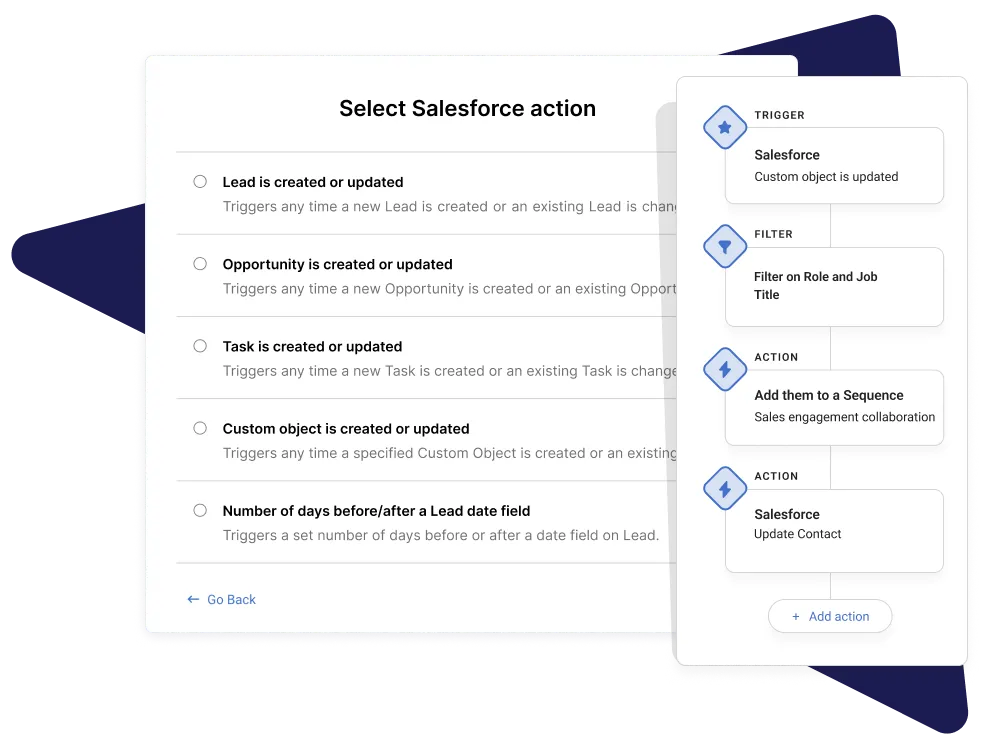 Create easy workflow rules to update statuses, notify teammates, and automate follow-ups.
With its integration with Salesforce and G-Suite, the three platforms communicate seamlessly, and all account updates are automated. Plus it doesn’t duplicate any data since Mixmax complements the CRM instead of trying to take over.
You can try Mixmax for free here.
If you’re a HubSpot user, you can check out their data cleansing guide here.
Related post: 5 Reasons Your Team Needs a Salesforce Gmail Integration
Specialized CRM Systems
Example: Healthcare CRMs and compliance
For some industries, keeping data clean isn’t just about efficiency—it’s a strict legal requirement. Healthcare is a prime example. This field handles incredibly sensitive patient information, which is protected by laws like the Health Insurance Portability and Accountability Act (HIPAA). A simple mistake, like a typo in a patient’s record or sending information to the wrong contact, isn’t just an embarrassing slip-up; it can be a serious compliance violation. This is why specialized healthcare CRMs exist—they’re built with these stringent security and privacy rules in mind from the ground up.
The stakes are incredibly high. Poor data hygiene in a healthcare setting can lead to massive fines and irreparable damage to an organization’s reputation. A single data breach can compromise patient trust and cost a clinic millions. This makes maintaining pristine data an absolute necessity. To minimize the risk of human error, many organizations in regulated industries rely on tools that can automate data entry and updates. Using AI-powered workflows helps ensure that data is handled consistently and correctly, which is crucial when compliance is on the line.
Wrap-up
CRM data hygiene is super important if you want to have accurate information about your prospects and customers.
Here are the key takeaways from this post:
- Accurate entry matters: Punching in data accurately from the get-go sets the stage for a smooth, error-free experience down the line. Automating this with a tool like Mixmax that integrates with your CRM is the way to go.
- Say no to duplicates: Duplicate data is a headache you don’t need. Communicate with your team to avoid this.
- Audit regularly: Schedule check-ins and clean-ups of our data to keep it fresh and reliable.
- Break down silos: Tear down those walls that keep valuable data locked away. Sharing is caring—and also super efficient.
- Give feedback: Create an environment where feedback is encouraged. This will help your team spot and fix issues quickly, keeping your data game strong.
- Training for the win: Get trained (or train your team) on keeping data clean and organized.
Frequently Asked Questions
This all makes sense, but where do I even start? It feels overwhelming. I get it, a big cleanup project can feel like a lot. The best first step is to run a simple audit. Just pull a report of your most recent contacts or deals and look for obvious issues like missing phone numbers, duplicate entries, or inconsistent company names. This gives you a clear, manageable starting point instead of trying to fix everything at once.
Who is actually responsible for keeping the CRM clean? Is it my job or my manager’s? That’s a great question. The short answer is that it’s a shared responsibility. While a RevOps or sales manager should set the standards and provide the right tools, every single person using the CRM plays a part. Think of it as a team effort; your manager creates the playbook, and you help execute the plays by entering data correctly and flagging any issues you see.
How often should we be auditing and cleaning our CRM data? There isn’t a single magic number, as it depends on how much new data your team brings in. A good rule of thumb is to schedule a dedicated data audit at least once a quarter. For more high-volume teams, a quick monthly check-in might be better. The key is to be consistent so it becomes a routine habit rather than a massive annual project.
My team is resistant to change. How can I convince them to care about data hygiene? People are more likely to adopt a new habit when they see what’s in it for them. Instead of just talking about “clean data,” frame it in terms of their success. Explain how accurate information leads to more effective outreach, fewer frustrating dead ends, and ultimately, a better chance of hitting their commission targets. Show them how it makes their job easier, not harder.
Can automation really handle most of this for me? Automation is a huge help, but it’s not a complete substitute for good habits. It’s fantastic for reducing manual entry and preventing common errors. For example, AI-powered workflows can automatically log your emails and update contact statuses, which saves time and ensures consistency. However, your team still needs to be mindful about searching for contacts before creating new ones and following the established data entry rules. Automation supports your process; it doesn’t replace it entirely.



