
Writing one great sales email is a challenge. Writing an entire email sequence that moves leads through your pipeline can feel impossible. But it doesn’t have to be. With the right strategy, you can build automated email sequences that save you hours and still feel personal. This guide shows you exactly how to create an email sequence that works. We’ll walk through the process step-by-step, from choosing the right email sequence tools to crafting messages that get replies. You’ll learn to automate your outreach without losing that crucial human touch.
At Mixmax, we’re all about helping sales teams automate, personalize, and optimize their email sequences. Whether you’re reaching out to prospects for the first time, nurturing leads, or closing deals, we’ll show you how to create email sequences that deliver results.
In this guide, we’ll cover:
- What is an email sequence?
- Why use email sequence tools?
- Types of email sequences
- How to create email sequences in 15 steps
- Prospecting email sequence template
- How to choose the right email sequence tools
- Why Mixmax?
- The finishing touch
What Is an Email Sequence?
An email sequence is a series of automated emails or multichannel touches designed to guide prospects toward a specific goal—whether that’s booking a meeting, downloading a resource, or closing a deal.
Here’s how email sequences work:
- They automate repetitive follow-ups, so nothing falls through the cracks.
- They allow personalization at scale, making every message relevant.
- They combine email, LinkedIn, and call tasks to engage prospects where they’re most active.
Why it works: By delivering the right message at the right time, email sequences help your team stay top of mind without overwhelming prospects.
Email Sequence vs. Drip Campaign
While they sound similar, an email sequence and a drip campaign serve different purposes. A drip campaign is a static, pre-written series of emails sent out on a fixed schedule after a trigger, like a new subscription. Think of it as a one-size-fits-all approach. An email sequence, on the other hand, is dynamic. It’s a series of marketing messages sent on a schedule, but it uses software to automatically send emails based on what people do, like visiting a specific page on your website. This allows for much deeper personalization, making it the preferred choice for sales teams who need to react to a prospect’s behavior in real time.
Understanding Lifecycle Emails
You might also hear email sequences referred to as “lifecycle emails.” That’s because they are designed to engage contacts at every stage of their journey with your brand. Unlike rigid drip campaigns, email sequences are flexible. According to Mailchimp, the content can change based on user actions, and they often use audience segmentation to send more personal messages. For example, you can create a welcome sequence for new leads, a re-engagement sequence for prospects who have gone quiet, or an onboarding sequence for new customers. With AI-powered workflows, you can build these sequences to automatically adapt, ensuring every touchpoint feels relevant and timely.
What is Email Looping?
The term “email looping” can be a bit confusing because it has two very different meanings. As Twilio explains, one type of looping is a helpful way to keep your team in the know, while the other is a technical nightmare that can clog up inboxes. The good kind of looping is when you intentionally add someone to an ongoing email conversation. The bad kind, often called a “looping email,” is when automated systems get stuck in an endless back-and-forth reply cycle. Understanding the difference is key to collaborating effectively and avoiding embarrassing technical glitches that make your team look unprofessional.
The Good: Keeping Colleagues Informed
The helpful version of email looping is simply the act of adding one or more people to an email chain that’s already in progress. You do this by adding their email address to the “To” or “CC” field to bring them into the conversation. For sales teams, this is a daily activity. An SDR might loop in their Account Executive after booking a meeting, or a rep might loop in a manager for approval on a discount. It’s a straightforward way to share context and ensure everyone is on the same page. This keeps deals moving forward without forcing team members to dig through forwarded messages to catch up on the conversation.
The Bad: Automated Reply Cycles
The bad kind of email looping is a technical glitch you want to avoid at all costs. This happens when two or more automated email systems start replying to each other without stopping. The classic example is when an automatic “out-of-office” reply triggers an automated support ticket confirmation, which then triggers the out-of-office reply again, creating an infinite cycle. This can quickly flood inboxes, create a mess for your IT team, and make your automated systems look broken. Thankfully, most modern email automation platforms have built-in safeguards to detect and prevent these kinds of endless reply cycles from happening.
Why Automate with Email Sequence Tools?
Gone are the days of manual follow-ups. Modern email sequence tools like Mixmax empower teams to:
- Automate outreach at every stage of the sales cycle.
- Personalize messages using CRM data, dynamic variables, and engagement analytics.
- Schedule emails for the optimal time with AI-driven features like Smart Send.
- Mix email, LinkedIn, and calls in one streamlined workflow.
By using email sequence tools, your team can focus on building relationships and closing deals rather than wasting time on repetitive tasks.

9 Powerful Email Sequences for Every Situation
Your email sequence should match your sales goals. Here are some common types:
Different goals require different types of email sequences. Below are some of the most effective sequences for sales and customer success teams:
1. Cold prospecting sequences
Designed to initiate contact with new leads, these sequences focus on capturing attention and sparking interest.
- Goal: Introduce your product and qualify the prospect.
- Structure:
- Email 1: Personalized outreach highlighting a specific pain point.
- Email 2: Follow-up with a customer success story or relevant data point.
- Email 3: Add value with a resource like a guide or webinar link.
- Email 4: Final follow-up with a call-to-action for a quick call or meeting.
2. Re-engagement sequences
These sequences are for leads you’ve previously engaged with but haven’t yet converted.
- Goal: Revive interest and encourage further engagement.
- Structure:
- Email 1: Reference your prior interaction and ask if their situation has changed.
- Email 2: Offer new insights or an updated resource.
- Email 3: Share a brief case study or testimonial.
- Email 4: Lighthearted “last chance” email with a poll to gauge interest.
3. Welcome/inbound sequences
These are triggered after prospects sign up for a demo, download content, or start a trial.
- Goal: Build trust and guide prospects to take the next step.
- Structure:
- Email 1: Thank them for their interest and introduce your product/service.
- Email 2: Share educational resources to help them explore your solution.
- Email 3: Encourage scheduling a call or providing feedback on their trial.
4. Nurture sequences
For leads that need more time to decide, nurture sequences educate and build trust.
- Goal: Keep your product top of mind and move prospects further down the funnel.
- Structure:
- Email 1: Share a thought leadership article or industry trends.
- Email 2: Highlight a feature or benefit tied to their pain points.
- Email 3: Introduce a case study or testimonial relevant to their role.
- Email 4: Send an exclusive invite to a webinar or event.
5. Renewal and expansion sequences
Ideal for existing customers approaching the end of their contract or those ready for an upgrade.
- Goal: Ensure customer retention and promote upselling or cross-selling opportunities.
- Structure:
- Email 1: Early reminder about renewal with a summary of value delivered.
- Email 2: Share how other customers have expanded their use of your product.
- Email 3: Offer an incentive for early renewal or an upgrade.
6. Deal management sequences
Used during active deal cycles, these sequences help move prospects toward a decision.
- Goal: Address objections, reinforce value, and secure the deal.
- Structure:
- Email 1: Recap key points from your meeting and next steps.
- Email 2: Provide detailed responses to any objections raised.
- Email 3: Share a summary of ROI or competitive differentiation.
7. Signal-stacking sequences
A powerful sequence that combines buyer intent signals to target high-priority prospects. This method leverages data points like website visits, tech stack, or job listings to craft hyper-relevant outreach.
- Goal: Reach highly engaged prospects with precise, timely messaging.
- Signals to use:
- Web visit: Track visits to key pages like pricing or solutions.
- Tech stack: Identify tools they already use and position your product as complementary.
- Job listing: Spot open roles related to your solution, such as hiring for sales enablement or customer success teams.
- Structure:
- Email 1: Share insights related to their challenges or industry trends. (e.g., “Many companies in [Industry] are exploring ways to [Pain Point].”).
- Email 2: Provide insights on how your solution fits their tech stack.
- Email 3: Offer to discuss how your solution can support their hiring goals.
- Email 4: Share a customer story about solving a similar challenge.
8. Onboarding sequences
Ensure new customers get the most out of your product with structured onboarding.
- Goal: Drive product adoption and reduce churn.
- Structure:
- Email 1: Welcome and share a “getting started” guide.
- Email 2: Highlight key features and resources.
- Email 3: Invite them to a training session or webinar.
9. Event follow-up sequences
For leads you met at webinars, trade shows, or conferences.
- Goal: Keep the conversation going post-event.
- Structure:
- Email 1: Reference your meeting or their event registration.
- Email 2: Share a presentation deck, recording, or exclusive resource.
- Email 3: Invite them to a follow-up call to discuss insights.
P.S. Each email sequence should include a mix of touches, from automated emails to LinkedIn messages and phone calls, to keep prospects engaged. Check out: How to Master Multi Channel Prospecting in Outbound Sales
10. Abandoned cart sequences
We’ve all done it: filled an online cart with goodies only to get distracted and click away. Abandoned cart sequences are your safety net for these moments. These automated emails gently remind shoppers about the items they left behind, giving them an easy path to return and complete their purchase. The goal is simple: recover sales that would otherwise be lost. To make the offer more compelling, many businesses include a small discount or free shipping in a follow-up email. This type of sequence is a must-have for any e-commerce business looking to turn near-misses into conversions.
11. Feedback sequences
Your customers have the answers you need to grow, but you have to ask for them. Feedback sequences automate the process of asking for reviews or opinions after a purchase or a key interaction. These emails are your direct line to understanding what you’re doing right and where you can improve. By collecting this valuable insight, you can refine your products, services, and overall customer experience. To encourage more responses, it’s common to offer a small incentive, like a discount on a future purchase. This shows you value their time and makes them more likely to share their thoughts.
How to Create an Email Sequence: A 15-Step Guide
1. Identify your triggers
Every great email sequence starts with a trigger. This is the specific action that kicks off your automated outreach—think of it as the starting gun for your sales play. When a prospect acts, your sequence begins automatically, ensuring your follow-up is perfectly timed. This is your first step away from manual, repetitive tasks and toward a system that works for you. The right trigger ensures your message is not just sent, but delivered at the exact moment it will be most relevant.
Common triggers for sales reps include a prospect downloading a whitepaper, visiting your pricing page, or signing up for a webinar. You can also use data from your CRM, like when a new lead is assigned to you or a deal has gone quiet for too long. Defining these moments is key to building effective AI-powered workflows that engage prospects without you hitting ‘send’ every time. It’s all about turning a prospect’s behavior into your next best action, automatically.
1. Know your ICP (ideal customer profile)
Define your target audience. Who are they? What pain points can you solve for them? Use insights from your CRM and prospecting tools to identify key personas and tailor your messaging.
2. Lead with value
Focus on solving problems, not pitching products. Each email should answer, “What’s in it for them?” Start with a strong hook that aligns with their challenges.
3. Set clear goals
What do you want your sequence to achieve? Whether it’s booking a meeting, onboarding a new customer, or nurturing a lead, define your desired outcome and structure the sequence accordingly.
Make them SMART goals
To make your goals truly effective, apply the SMART framework. This ensures your objectives are Specific, Measurable, Achievable, Realistic, and Timely. Instead of a vague goal like “get more replies,” a SMART goal would be: “Achieve a 15% reply rate and book 5 qualified meetings from my 100-prospect re-engagement sequence this month.” This goal is specific (15% reply rate, 5 meetings), measurable (you can track the numbers), and timely (this month). It’s also achievable and realistic, especially when using tools that provide real-time engagement signals to guide your follow-ups. By setting a clear target, you can easily measure the performance of your sequence and know exactly what success looks like.
4. Plan your sequence length
Most sequences require 6–8 touches. For colder leads, extend to 10–12. Tailor the sequence length to the prospect’s role and where they are in the sales funnel.
5. Mix up your touchpoints
Don’t rely solely on email. Combine email, LinkedIn messages, and phone calls to engage prospects where they’re most active. Personalize each touchpoint based on the medium.
6. Write engaging subject lines
Your subject line is the first thing prospects see—make it count. Use personalization, curiosity, or value-driven language to boost open rates.
Related post: 75 Follow Up Email Subject Line Examples for Revenue Teams
7. Follow the 5 C’s of email writing
To write emails that get replies, stick to the 5 C’s. This framework keeps your messaging sharp and focused on the prospect. Be clear by answering their core question: “What’s in it for me?” Be concise—get straight to the point because no one has time for long emails. Make it compelling with a subject line that uses personalization or curiosity to earn the open. Stay consistent with your tone and message to build trust over the sequence. And finally, include a clear call to action. Tell them exactly what to do next, like using one-click scheduling to book a meeting right from their inbox.
7. Personalize beyond first names
Go beyond simple name-dropping. Reference company-specific challenges, industry trends, or job responsibilities. Use dynamic variables in tools like Mixmax to scale personalization.
8. Segment your audience
Break down your list into smaller groups based on shared characteristics like job titles, industries, or engagement levels. Tailored messaging improves relevance and response rates.
9. Focus each email on a single CTA
Avoid overwhelming prospects with multiple asks. Each email in your sequence should have one clear call-to-action (CTA), whether it’s downloading a resource or scheduling a call.
Related post: Cold Email Call to Action Examples that Actually Get Answered
10. Use social proof
Incorporate testimonials, case studies, or data points to build credibility. Show how other companies in similar situations have succeeded using your product or service.
11. Vary your messaging
Avoid repetition in your sequence. Each touchpoint should deliver unique value—new insights, resources, or solutions to different pain points.
12. Time it right

Use AI-driven tools like Mixmax’s Smart Send to schedule emails at optimal times. Space your touches appropriately; for example, every 3 days for cold leads, or more frequently for warm prospects.
13. A/B test subject lines and content
Experiment with different subject lines, calls to action, and email formats. Track performance metrics like open rates and replies to refine your sequence over time.
14. Monitor and adjust performance
Use analytics to measure the success of your sequence. Tools like Mixmax can help you track open rates, click-throughs, and meeting conversions to identify what’s working.
15. Automate and delegate where possible
Use email sequence tools to automate repetitive tasks and set up workflows. Mixmax allows you to delegate tasks like call follow-ups and personalized emails, keeping your sequences running smoothly.
Managing Your Email Sequences: Technical Best Practices
A great sequence is more than just good copy. The technical setup behind the scenes is what ensures your emails land in the inbox and your workflow runs smoothly. Getting these details right prevents embarrassing mistakes, keeps your sender reputation clean, and makes your automation feel more human. It’s the foundation upon which successful outreach is built. Here are the technical best practices you need to follow to make sure your sequences perform as intended.
Warm up your email account
Before you launch a large-scale sequence, you need to warm up your email account. This process gradually increases your sending volume to show email providers like Google and Outlook that you’re a legitimate sender, not a spammer. A proper warm-up helps make sure your emails actually get delivered to inboxes instead of getting flagged. Start by sending a small number of emails to trusted contacts and slowly ramp up. This builds a positive sender reputation, which is essential for the long-term success of your outreach efforts. Skipping this step is a common mistake that can get your domain blacklisted.
Set up a return path
Have you ever been caught in an endless loop of automated out-of-office replies? A “return path” is the technical fix for that. It’s a hidden field in your email header that tells servers where to send bounce notifications and automated replies. When you set up a return path correctly, these automated responses are treated as bounces, which can automatically unenroll the contact from your sequence. This not only prevents the dreaded email loop but also helps keep your sequence analytics clean by filtering out non-human interactions, so you can focus on genuine engagement from your prospects.
Use automatic unenrollment rules
The goal of a sequence is to get a response or a meeting. Once that happens, the sequence should stop. Immediately. Sending another automated follow-up after a prospect has already replied is a quick way to look disorganized. Good sales engagement platforms handle this for you. For example, contacts should be automatically unenrolled from a sequence the moment they reply to an email or book a meeting. In Mixmax, this is built-in; if a prospect clicks your one-click scheduling link and books a time, the sequence stops, so the conversation can continue naturally without awkward, automated interruptions.
Be cautious when editing a live sequence
It can be tempting to tweak a sequence while it’s running, but you need to be careful. When you change a sequence that contacts are currently in, those changes can affect them in unexpected ways. For instance, if you add a new first step, contacts who are already partway through might suddenly receive an introductory email out of context. Or, if you change the timing between steps, it could disrupt the flow for everyone enrolled. Before making edits, pause the sequence, make your changes, and then carefully consider who will be affected when you reactivate it. It’s often safer to clone the sequence and start a new version for new contacts.
Configure your sequence settings
Your email sequence tool should give you control over the small details that make a big difference in the prospect experience. Before you launch, take a moment to review your sequence settings. This is where you can define the guardrails for your automation, ensuring your outreach feels personal and respectful, not robotic. Fine-tuning these settings helps you align your sales outreach with standard business practices and your company’s specific campaign goals. With AI-powered workflows, you can even automate these configurations to optimize for the best results.
Send only on business days
Your prospects have a life outside of work, and your emails should respect that. A great feature to look for is the ability to send emails only on business days. This prevents your carefully crafted message from landing in their inbox at 10 PM on a Saturday. Sending during the work week increases the chances your email will be seen and acted upon. You can also set a specific time window—like 8 AM to 6 PM in the prospect’s time zone—to make your outreach feel even more timely and considerate.
Link to marketing campaigns
Your sales sequences don’t exist in a vacuum. They are part of a larger effort to attract and convert customers. By linking your sequence to a specific marketing campaign, you can get a much clearer picture of what’s working. This allows you to track the overall performance and ROI of a campaign, from the first marketing touchpoint to the final sales email. This connection between sales and marketing data helps both teams understand their impact and make smarter decisions for future campaigns.
A High-Converting Prospecting Email Sequence Template
Need a head start? Here’s a ready-to-use email sequence template:
Stage 1. A personalized email including a Mixmax poll to gauge interest
Subject: [PROSPECT COMPANY NAME] or [THEIR COMPETITOR #1]?
[FIRST NAME],
How often do you lose deals to [THEIR COMPETITOR #1] or [THEIR COMPETITOR #2]?
What would help your reps win those deals?
✅ [USE CASE #1]
✅ [USE CASE #2]
✅ [USE CASE #3]
If your AEs aren’t successfully [PAIN] when they’re actively comparing you with the competition, you are leaving money on the table.
We could help with this if you’re interested?
[SENDER SIGNATURE]
Stage 2. Automated email targeting your prospect’s pain with a CTA button
Subject: Re: [PROSPECT COMPANY NAME] or [THEIR COMPETITOR #1]?
[FIRST NAME], have you considered the impact of [TOP USE CASE]?
[INSIGHT SHOWING WHY THEY SHOULD].
By using [YOUR COMPANY NAME], customers like [CUSTOMER #1] achieve [OUTCOME #1]. Plus, [OUTCOME #2].
Interested in how [POSITIVE OUTCOME] can help you [DESIRED STATE]?
📆 Schedule a 15min call
[SENDER SIGNATURE]
P.S. thought you’d find this helpful since you’re [PROSPECT COMPANY NEWS] now.
Stage 3. Personalized LinkedIn connection request sent from your Gmail
Hi [FIRST NAME],
I noticed that you are currently [PROSPECT COMPANY INSIGHT/NEWS].
I sent over a few ways to [POSITIVE OUTCOME] and would appreciate hearing your thoughts.
Thanks and take care!
Stage 4. Call task to be completed from Gmail

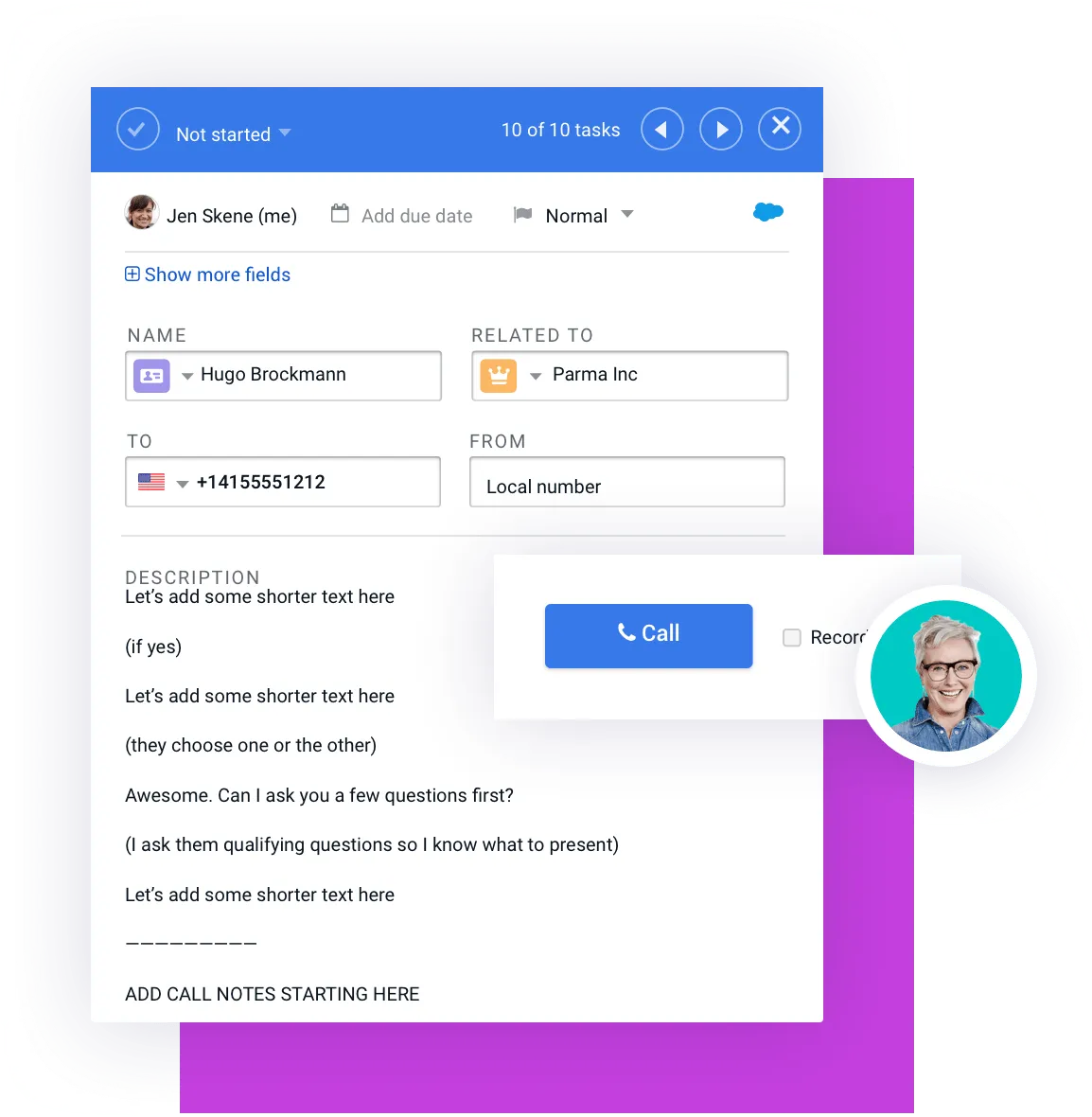
Add a call task in stage four of your sequence. With Mixmax, call tasks are easily completed directly from your Gmail and logged to Salesforce. If needed, we also have this article on the best cold call opening lines to avoid hangups.
Stage 5. Manual email task to insert in-email calendar availability
[FIRST NAME],
I just called. Would any of the following times work better for you?
[INSERT YOUR AVAILABILITY]
I would love to hear from you if [PAIN #1] and [PAIN #2] are actually stopping you from achieving [DESIRED STATE].
Here’s why [YOUR CUSTOMER #1] loves [YOUR COMPANY NAME] in 1min:
[VIDEO]
Looking forward to connecting with you,
[SENDER SIGNATURE]
.D3ynGtuK_Z1zK6pO.webp?dpl=dpl_2v5dWcPK7CWc3S8WthfLf2LzpUFf)
Stage 6. Automated email sent on behalf of your leadership team
Subject: From one [DEPARTMENT] leader to another
[FIRST NAME],
My team has been reaching out to you, so I wanted to share why we want to bring you on as a customer from the exec perspective.
Companies like [PROSPECT COMPANY NAME] are our happiest customers. [YOUR COMPANY NAME] was truly built for [DEPARTMENT TEAM] like yours.
We select companies of your size, industry, and growth phase because we are sure we can add the most value to your business and keep on doing so in years to come.
Happy to answer any questions.
[SENDER SIGNATURE]
Stage 7. Manual email task to insert a personalized Vidyard
Subject: Video
[FIRST NAME],
Here is a quick video for you and the Team explaining how you can beat [COMPETITOR #1] and [COMPETITOR #1] in [OUTCOME #1] and [OUTCOME #2] with [YOUR COMPANY]:
[INSERT VIDYARD]
Would you be interested in scheduling a demo to learn how [YOUR COMPANY] can [DESIRED STATE]?
[SENDER SIGNATURE]
**
Stage 8. Automated email with the next steps poll and a farewell GIF**
Subject: Re: Video
Alright [FIRST NAME],
I’m not trying to jam your inbox. Let me know how to proceed.
What would help your reps win those deals?
✅ Yes, let’s book some time
✅ Can you follow up next month?
✅ Just not interested. Sorry sales pro 👋
How to Choose the Right Email Sequence Tool
When evaluating email sequence tools, ask these questions:
- Does it integrate with my existing tech stack (e.g., Gmail, Outlook, Salesforce, HubSpot)?
- Can it handle multichannel touches like LinkedIn and calls?
- Does it provide analytics to track and optimize performance?
- Is it AI-forward?
- Does it lessen the burden of my admin tasks with automation?
- Does this solution fit our sales cycle?
- Does it help us achieve our goals?
- Does it fit my team’s roles and challenges?
- Why do we need it? Prospecting, deal management, customer success, or all three? Is it scalable enough to answer all our needs?
- Is it easy to implement?
Check for plan limitations and permissions
Before you commit to a tool, it’s crucial to check the fine print. Your email provider has its own rules, and ignoring them can get your outreach shut down fast. For example, a standard Gmail account caps you at 500 emails per day, while Google Workspace allows up to 2,000. The best tools help you work within these constraints by letting you throttle volume and set sending schedules. You also need to consider permissions. Internally, sales leaders need control over who can create and launch campaigns. For instance, Mixmax lets you set role permissions to ensure every sequence is on-brand. This level of control prevents a free-for-all and keeps your team’s outreach consistent and professional.

Why Choose Mixmax for Your Email Sequences?
Mixmax is the ultimate email sequence tool, offering:
- Automation and personalization at scale.
- Seamless CRM integration.
- Enhanced features like polls, scheduling links, and embedded videos.
- AI sequence creator with built-in sequence library
- Smart scheduler that schedules emails when prospects are most likely to engage.
Ready to Build Your First Email Sequence?
Hopefully this post has taught you how to create email sequences that help you crush quota by moving prospects through the pipeline.
There’s no silver bullet for success, though. Automation takes the grunt work out of setting up sequences and drafting emails but it’s up to you to customize each and every one to your business, prospects, unique value proposition, and goals.
You’ll hear sales gurus claiming they’ve developed the perfect sequence, but what they mean is perfect for their company.
To find your own secret sauce, you’ll need to put in the hours in the kitchen. Assisted by the right technological sous chef, of course.
Frequently Asked Questions
What’s the real difference between an email sequence and a drip campaign? Think of a drip campaign as a fixed path; everyone gets the same emails in the same order. An email sequence is more like a conversation. It’s dynamic and can change based on what a prospect does. For example, if they click a specific link, the sequence can adapt its messaging. This makes sequences much more effective for sales because they allow you to react to a person’s real-time interest.
How many touches should my sequence have? There is no single magic number, but a good starting point for most sales outreach is between six and eight touches. For colder leads or more complex sales, you might extend that to ten or twelve. The most important thing isn’t the number of steps; it’s that each touch provides new value. If you’re just sending “bumping this up” emails, your sequence is too long.
What happens if a prospect replies? Do they keep getting automated emails? No, and this is a critical point. A good sales engagement tool will automatically unenroll a contact from a sequence the moment they reply to an email or book a meeting through your scheduling link. This prevents you from sending an awkward automated follow-up after they’ve already engaged. The automation should stop so a real, human conversation can begin.
Is it okay to just use email, or should I add other steps? You should absolutely add other steps. Relying only on email is like trying to have a conversation in a crowded room with one hand tied behind your back. Your prospects are active on LinkedIn and answer their phones, so your outreach should be there, too. Combining email with call tasks and LinkedIn messages makes your sequence feel more personal and significantly increases your chances of getting a response.
What’s the biggest mistake reps make with email sequences? The biggest mistake is treating them as a “set it and forget it” tool. Automation is meant to handle the repetitive work, not to remove the human element entirely. The most successful reps use sequences to save time, but they still personalize their messages, monitor engagement signals, and know when to jump in and take over the conversation. Automation should assist you, not replace you.
Key Takeaways
- Define your goal first: A successful sequence starts with a clear objective and a plan that goes beyond just email. Incorporate multiple touchpoints like calls and LinkedIn messages, and use triggers so your outreach reacts to prospect behavior.
- Focus on the prospect, not the product: Write short, clear emails that solve a specific problem for your reader. Each message should have one clear call to action, making it easy for them to reply or book a meeting.
- Automate the guardrails: The best sequences run on a solid technical foundation. Use rules to automatically stop outreach after a reply, warm up your email account to ensure delivery, and use analytics to find out what is actually working.



