

You hit send on a critical sales email. Then comes the waiting game. Did they open it? Is it lost in their inbox? Relying on Outlook’s built-in read receipts is a gamble. The whole system fails if your recipient simply clicks “No.” You’re left completely in the dark. Effective email tracking for Outlook shouldn’t depend on permission. You need a professional email tracker for Outlook that gives you consistent, reliable data. This kind of Outlook email tracking tells you who opens your emails and when, so you can follow up with confidence.
This guide will help you effectively track emails in Outlook to tailor your outreach strategy based on real data.
We’ll discuss Outlook’s built-in tracking (i.e., read receipts) as well as a third-party solution that offers you in-depth email tracking for Outlook plus a ton of other functionality.
- Why email tracking for Outlook matters
- How to use Outlook read receipts (built-in)
- How to choose the right tool for advanced email tracking in Outlook
- Email tracking with Mixmax for Outlook
- Best practices for email tracking in Outlook
Why Use an Email Tracker for Outlook?
Before we dive into the specifics, let’s understand why tracking emails in Outlook is essential:
- Improved follow-up timing: Knowing when your emails are opened helps you time your follow-ups perfectly.
- Enhanced engagement: Insight into email opens allows you to tailor your content for better audience engagement.
- Sales intelligence: Understand your prospects’ interest levels and prioritize your leads.
- Performance metrics: Track and analyze the success of your email campaigns to improve your sales strategy.
Who benefits from email tracking?
Email tracking isn’t just for one type of professional. Salespeople, marketers, and even finance teams use these tools to see how people interact with their emails. Knowing who opens your message and when gives you the context to make your next move the right one. It turns your inbox from a simple communication tool into a source of valuable data that can guide your strategy, no matter your role.
Sales teams
For sales teams, email tracking is essential. It’s the difference between following up blindly and engaging at the perfect moment. When you see that a prospect has opened your proposal three times in the last hour, you know it’s time to pick up the phone. This insight helps you gauge interest and prioritize your most engaged leads, focusing your energy where it will have the biggest impact. Instead of guessing which deals are hot, you can follow the digital breadcrumbs your prospects leave behind and spend your time on accounts that are showing real buying signals.
Marketers and customer support
Marketers and customer support teams also rely on tracking to improve their outreach. For marketers, open rates are a direct measure of how well a campaign headline or topic is resonating with an audience. This data allows you to A/B test your content and refine your messaging for better engagement. For customer support, tracking confirms that a customer has seen your response to their ticket or received important instructions. Knowing when your emails are opened helps you time your follow-ups perfectly, ensuring no customer query falls through the cracks.
Finance and operations
Even finance and operations teams find value in email tracking. Think about the critical documents they send every day, from invoices to contracts. Tracking provides a simple way to confirm if important documents have been opened and reviewed. This is especially useful for finance professionals who need to follow up on unpaid invoices. Seeing that an invoice has been opened but not paid gives them the context they need to send a polite reminder. It’s a small detail that can significantly improve communication and manage cash flow more effectively.
How Does Email Tracking Technology Work?
Email tracking isn’t magic; it’s just clever technology working behind the scenes. Most modern email tracking tools rely on a couple of simple methods to give you insight into your recipient’s engagement. The first and most common method is for tracking opens, which uses a tiny, invisible image. The second is for tracking clicks, which works by routing links through a tracking service before sending the user to the final destination. When you get a notification that a prospect has opened your email or clicked a link, it’s one of these technologies at work.
Understanding this process is helpful for any sales professional. It demystifies the data you see in your sales tools and helps you interpret it correctly. For example, knowing that open tracking relies on images loading can explain why some opens aren’t recorded—the recipient might have images disabled in their email client. This knowledge helps you use the engagement signals you receive more effectively, turning simple data points into a clear picture of which prospects are interested and when you should follow up with them next.
The tracking pixel explained
The most common way to track email opens is with a tracking pixel. When you send a tracked email, the software inserts a tiny, transparent 1x1 pixel image into the message. This pixel is invisible to the naked eye and doesn’t affect your email’s layout. When your recipient opens the email, their email client (like Outlook or Gmail) sends a request to the server to download this tiny image. That request is the signal. The server logs the request, and your tracking software notifies you that the email was opened, often including the time and location of the open. It’s a simple but effective way to get a read on engagement without being intrusive.
How to tell if an email you received is being tracked
Curious if an email in your own inbox is being tracked? There are a few tell-tale signs. The easiest one to spot is a tracked link. Before you click on a link in an email, hover your mouse over it. If the URL preview that appears in the bottom corner of your browser is a long, complex string of characters from a service you don’t recognize, it’s likely a tracked link. Spotting a tracking pixel is much harder since it’s invisible. However, many email clients are catching on. For instance, Apple’s Mail Privacy Protection now pre-loads email content, which can trigger tracking pixels and lead to inaccurate open data. It’s a good reminder that open rates are a signal, not a guarantee.
How to Use Outlook’s Built-In Read Receipts
Outlook provides a basic email tracking feature known as Read Receipts. Here’s how to use it:
- Compose an email: Open Outlook and start composing a new email.
- Request a read receipt: In the email composition window, navigate to the “Options” tab in the ribbon.
- Select read receipt: Check the “Request a Read Receipt” box under “Tracking” to get notifications when your email is opened.
- Send your email: Complete your email and send it.
Note: Not all recipients may agree to send a read receipt, which can limit this method’s effectiveness.
The unreliability of native read receipts
While Outlook’s built-in read receipts seem like a straightforward way to track emails, they have some serious reliability issues. The biggest problem is that the entire system depends on your recipient’s consent. When they open your email, a pop-up asks if they want to send a receipt. If they click “No,” you get nothing. As Microsoft Support points out, the feature’s success hinges entirely on the recipient’s choice, making it an inconsistent tool for gathering sales intelligence.
Even if a recipient agrees to send a receipt, the information isn’t always accurate. Factors like email previews or aggressive spam filters can trigger a “read” notification before your contact has actually seen the message. This can lead to false positives and poorly timed follow-ups. Furthermore, some email clients or privacy tools can block these tracking requests altogether. For sales teams who rely on accurate engagement data to prioritize leads and forecast effectively, these limitations make native receipts a risky bet. You need a more dependable method to know what’s really happening after you hit send.
How to Choose the Right Outlook Email Tracking Tool
The market is filled with email tracking solutions, and while Outlook’s built-in read receipts are useful (if the recipient agrees to them), sometimes you need more advanced insights to stay ahead in the sales game.
Beyond basic tracking
Outlook’s read receipts tell you if an email was opened, but often you need more details. Did the recipient click any links or open attachments? How many times did they open the email? Which device did they use?
Advanced tools like Mixmax provide these extra insights, helping you make informed decisions on your next steps.
Get free email tracking in Outlook with Mixmax ⬇️

Advanced features to look for
When you move past basic read receipts, you need a tool that gives you a complete picture of recipient engagement. Knowing an email was opened is just the start. You need to see who clicked your links, how many times they viewed an attachment, and when they are most active in their inbox. This level of detail turns a simple follow-up into a perfectly timed conversation. The best tools also provide real-time notifications, so you can act on buying signals the moment they happen, not hours later. This immediate insight helps you know exactly when to follow up with people, catching them when they’re most interested.
Beyond tracking a single email, you need to see the bigger picture of your outreach performance. Look for a tool that provides clear metrics on your campaigns. Which subject lines get the most opens? Which templates earn the most replies? Having this data lets you stop guessing and start making strategic decisions about your sales process. This is where AI-powered workflows make a real difference. They help you analyze what’s working across your team and then automate your next steps based on that proven success, making every rep more effective.
Seamless integration
A good email tracking tool should integrate seamlessly with the platforms you already use. For example, tools that work directly within Outlook can save you time and reduce the hassle of switching between different applications.
Related post: How to Track Email Opens in Gmail: The Ultimate Guide
Email deliverability and spam filters
Choosing the right email tracking software is a big deal. A poor choice, especially some free or cheap options, can actually hurt your efforts by sending your emails straight to the spam folder. A tracker’s ability to keep your emails out of spam is critical; otherwise, the tracking data is useless. Some tools use a single tracking domain for all their users or add a promotional signature to your emails on their free plans. These are red flags for spam filters and can seriously damage your email deliverability over time. You need a tool that prioritizes getting your message seen by a human, not just a spam bot.
User reviews and reputation
Before committing to a tool, see what other people are saying about it. User reviews are your best source of unbiased information on how the software performs in the real world. Check out review sites and the add-in marketplaces for honest feedback on features, reliability, and customer support. A tool might look great on its website, but if users consistently report bugs, poor deliverability, or a clunky interface, you’ll want to know that upfront. A strong reputation and positive user reviews are good indicators that you’re choosing a reliable partner for your sales outreach.
Costs and free plan limitations
Many tools offer a free plan, but it’s important to understand the limitations. Often, free versions will only track a small number of emails, limit you to basic open tracking, or add their branding to your email signature. These limitations can make the free plan impractical for serious sales work, pushing you toward a paid subscription. When evaluating options, look closely at the pricing tiers. Make sure the features you need, like link tracking or CRM integration, are included in the plan you’re considering. A slightly more expensive plan that gives you everything you need is often a better investment than a “free” tool that doesn’t get the job done.
Limitations and Problems with Email Tracking
Email tracking is a powerful tool, but it’s not perfect. Understanding its limitations helps you interpret the data correctly and avoid making decisions based on flawed information. It’s important to see tracking as a source of strong signals, not absolute truths.
Inaccurate open rates
An “open” notification doesn’t always mean your prospect carefully read your message. Sometimes, a preview pane in an email client can trigger the tracking pixel, and as one source notes, “a preview or spam filter can make it look like an email was opened when it wasn’t truly read.” Some aggressive spam filters can also “open” an email to scan its contents for threats, leading to a false positive. This is why you should treat open rates as a directional guide rather than a perfect metric. It tells you there’s interest, but the real proof is in the reply.
Tracking blockers and privacy settings
Privacy is a big deal, and many email users are taking steps to protect theirs. As experts point out, “some people use tools that block tracking pixels.” Furthermore, major email providers like Apple Mail now include features that automatically block trackers, masking the user’s activity. This means a prospect could open your email ten times, and you’d never know. You have to be comfortable with these blind spots and focus on the engagement signals you *can* see, knowing that the absence of a signal isn’t definitive proof of disinterest.
Poor deliverability with certain tools
The tool you choose for tracking can directly impact whether your emails reach the inbox. According to industry analysis, “a bad choice, especially cheap or free options, can cause your emails to go to spam.” This happens because they might use poorly coded tracking pixels or shared IP addresses that have been flagged by email servers. Using a reputable, well-maintained tool is essential to protect your sender reputation and ensure your messages actually get delivered. Your tracking data is useless if no one sees your email in the first place.
Popular Email Tracking Tools for Outlook
While the market for Gmail add-ons is vast, the options for Outlook have historically been more limited. However, several strong contenders provide reliable tracking and other sales productivity features directly within the Outlook interface. Finding the right one depends on your specific needs, from basic open tracking to a full suite of sales engagement tools.
Comparing Mailsuite, HubSpot, and Yesware
When looking for Outlook trackers, you’ll likely come across a few common names. Mailsuite, formerly Mailtrack, is “known for free and unlimited email tracking” and provides real-time notifications when emails are opened. HubSpot Sales Hub provides email tracking as part of its larger CRM and marketing platform, making it a good choice for teams already in the HubSpot ecosystem. Yesware is another established player that offers tracking, templates, and campaign features for both Outlook and Gmail, though its Salesforce integration is often reserved for higher-tier plans.
Why there are fewer trackers for Outlook than Gmail
If you’ve ever searched for sales tools, you’ve probably noticed more options for Gmail. For a long time, Gmail’s open architecture and the Chrome Web Store made it easier for developers to build and distribute add-ins. As one recent analysis noted, many of the top tracking tools work only with Gmail. Outlook’s ecosystem was traditionally more closed off, especially for desktop versions. While that has changed significantly, the market is still catching up. The good news is that the tools that *do* support Outlook are often robust and built for professional sales teams.
Get Better Outlook Email Tracking with Mixmax
Mixmax is a standout in the realm of sales engagement and email tracking tools, offering a seamless integration with Outlook. Here’s how Mixmax differentiates itself:
Automatic tracking
With Mixmax, you can enable email tracking on all your messages automatically, eliminating the need to manually specify it each time.
Engagement insights
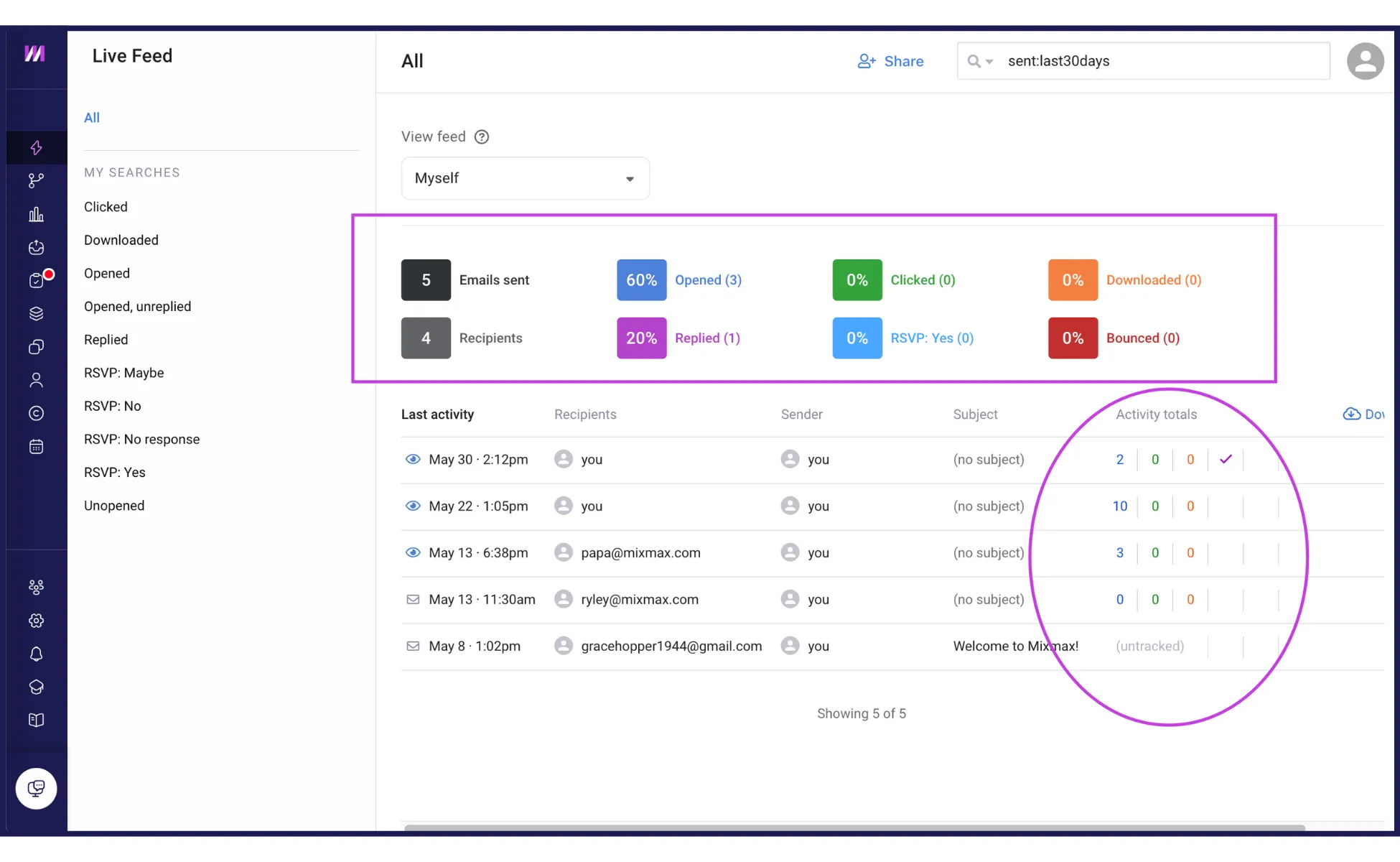
Identify your most engaged recipients by tracking who opens or interacts with your content and how often.
Device and location tracking
Discover which devices your recipients are using and where they are located, providing valuable context for your outreach.
Content performance
Determine which content resonates most by analyzing link clicks and attachment opens.
Custom notifications
Get instant alerts when critical emails are read, through Slack alerts, email notifications, or automated tasks.
Workflow integration & triggers
Integrate these insights into your workflow and create tasks to ensure timely follow-ups.
Engagement scoring

By tracking your Outlook emails, you can filter your contacts from the most engaged to the least engaged so you know which account or prospect to focus on first.
Email Tracking, Privacy, and Legality
Email tracking gives you powerful insights, but it also comes with responsibilities. When you track an email, you’re collecting data about someone’s behavior, and privacy laws like the General Data Protection Regulation (GDPR) in Europe and the California Consumer Privacy Act (CCPA) set clear rules on how you can do that. Think of these regulations not as obstacles, but as a framework for building trust. Being transparent about your practices shows respect for your prospects and customers, which is the foundation of any good business relationship. It’s about selling ethically and building a reputation your buyers can count on.
The key principle across all privacy laws is transparency. Your recipients have a right to know what data you’re collecting and why. While the specific rules can vary depending on where your recipient is located, the best practice is to be upfront. This doesn’t mean you need to write a legal disclaimer in every email, but it does mean your company should have a clear privacy policy that’s easy to find. Ultimately, using tracking tools responsibly helps you gather valuable intelligence while ensuring your outreach remains professional and compliant, protecting both your recipient and your business.
Complying with GDPR and other privacy laws
If you’re emailing anyone in the European Union, GDPR is the gold standard for privacy, and its rules on email tracking are strict. The regulation is clear that you must get explicit consent from recipients before you can track their email activity. This consent needs to be “freely given, specific, and informed,” which means you can’t bury it in fine print or use a pre-checked box. Without that clear permission, email tracking is largely considered to be categorically prohibited. This puts the control back in the hands of the individual, ensuring they are fully aware of and agree to their data being monitored.
To stay compliant, it’s crucial to document your legal basis for data processing, whether it’s consent or another justification. This documentation serves as your proof of compliance if you’re ever audited. The easiest way to manage this is to use tools designed with privacy in mind. When evaluating platforms, look for ones with built-in features that help you manage consent and handle data responsibly. This makes it easier to follow the rules and focus on what you do best: building relationships and closing deals.
Smarter Email Tracking: Best Practices for Outlook
To maximize the benefits of email tracking for Outlook, follow these best practices:
- Be transparent: Inform recipients about email tracking, especially in regions with strict privacy laws.
- Use insights: Use tracking data to refine your email content and follow-up timing.
- Combine metrics: Track additional metrics such as link clicks and replies for a comprehensive understanding of engagement.
Related post: Mixmax Is Now Available on Microsoft Outlook
Ready to Start Tracking Your Outlook Emails?
Understanding and leveraging email tracking for Outlook can significantly enhance your sales outreach efforts. By knowing when and how your emails are engaged, you can tailor your follow-ups, prioritize leads, and improve your overall email strategy.
In summary:
Why email tracking for Outlook matters:
- Improved follow-up timing
- Enhanced engagement
- Sales intelligence
- Performance metrics
Using Outlook read receipts:
- Simple method to track email opens
- Limitations due to recipient opt-in
Advanced Outlook email tracking tools:
- Beyond basic tracking (link clicks, attachment opens, device usage)
- Seamless integration with Outlook
- Real-time notifications and reminders
Tracking Outlook emails with Mixmax:
- Automatic tracking
- Detailed engagement insights
- Device and location tracking
- Content performance analysis
- Custom notifications
- Workflow integration and triggers
- Engagement scoring
By implementing these email tracking techniques and tools, you can gain valuable insights into your email campaigns, ensuring your outreach is both effective and efficient. Start tracking your emails today to stay ahead in the competitive sales landscape.
Frequently Asked Questions
What’s the real difference between Outlook’s read receipts and a tool like Mixmax? Outlook’s read receipts only work if your recipient agrees to send one by clicking “Yes” on a pop-up. Most people click “No,” leaving you with no information. A tool like Mixmax uses an invisible tracking pixel that works automatically. This gives you consistent, reliable data on who opened your email and when, without depending on the recipient’s permission.
Will my prospects know that I’m tracking their emails? For the most part, no. The technology is designed to be completely invisible to the recipient. There is no indicator or notification on their end. While some newer privacy features or specific email clients can block tracking pixels, the average person will not see anything different about your message.
Is it actually legal to track sales emails? Yes, but you need to be responsible. Privacy laws like GDPR in Europe have strict rules about data collection, so it’s important that your company has a clear privacy policy and that you understand the regulations for the regions you sell into. The focus is on transparency, not on banning the practice itself.
Can using an email tracker hurt my chances of landing in the inbox? The tool you choose matters. Some free or poorly designed trackers can damage your sender reputation and make it more likely your emails go to spam. Professional platforms are built to protect your deliverability, ensuring your tracking efforts don’t prevent your message from being seen in the first place.
Why should I pay for a tracking tool if Outlook has a free option? You’re paying for reliability and intelligence. Outlook’s free feature is inconsistent because it requires the recipient to opt in. A dedicated tool gives you dependable open tracking and provides much deeper insights, like who clicked your links or how many times they viewed an attachment. This turns simple tracking into actionable data you can use to close deals.
Key Takeaways
- Outlook’s built-in read receipts are unreliable: The feature requires your recipient to approve the notification, meaning you get no data if they simply click “No.” A dedicated tracker works automatically, giving you consistent insight.
- Go beyond simple open notifications: Advanced tracking shows you who clicks links, how often they view your message, and from which device. Use these signals to focus on your most engaged prospects and time your follow-up perfectly.
- Use tracking data as a signal, not a guarantee: Privacy settings and email clients can sometimes block tracking pixels or create false positives. Combine open rates with other metrics like clicks and replies for a complete picture of engagement.



