
Outbound sales remains one of the most effective ways to build pipeline. But scaling your outreach often feels like a trade-off. Do you contact more people with a generic message, or spend hours personalizing just a few emails? This is the exact problem outbound sales automation is built to solve. With the right outbound sales automation tool, you can send highly personalized messages at scale. It’s about combining efficiency with authenticity to make every prospect feel like you’re speaking directly to them, without sacrificing volume.
For many companies, however, scaling an outbound sales operation can seem like a daunting (and costly) endeavor. In an era when top talent is increasingly hard to come by, many organizations are looking to maximize the productivity of existing staff rather than recruiting more reps.
An outbound sales automation tool, such as Mixmax, can be an excellent way to scale your pipeline-generating activities—without adding headcount. Let’s explore four important features to look for when selecting a high-impact sales automation tool.
Related Post: 13 Tips for Using Sales Automation to Hit Quota
How AI is Redefining Outbound Sales Automation
The introduction of artificial intelligence has fundamentally changed the game for outbound sales. We’ve moved past simple, trigger-based automation that just sends emails on a schedule. Modern sales automation is about creating intelligent, adaptive systems that learn and improve over time. Instead of just doing tasks faster, AI helps your team perform them more effectively, ensuring that every outreach effort is more targeted and impactful than the last. This shift means your automation platform can become a strategic partner in your sales process, actively helping you refine your approach based on real-time engagement data.
This evolution doesn’t just make your campaigns better; it transforms how your sales team operates. By handing off the repetitive, data-driven tasks to an intelligent system, you free up your reps to focus on what they do best: building relationships and having meaningful conversations. The goal is to combine the efficiency of machines with the irreplaceable value of human connection. This synergy allows you to scale your outbound efforts without sacrificing the personalized touch that ultimately closes deals and builds lasting customer relationships.
The Shift to Self-Improving Campaigns
One of the most significant changes AI brings to sales automation is the ability for campaigns to learn and adapt. As the team at Warmly notes, “AI has made sales automation much smarter. It learns and adjusts based on what’s happening, like who opens emails or what’s in your customer database.” This means your outreach sequences are no longer static. An AI-powered system can analyze engagement signals—like email opens, link clicks, and replies—and use that information to optimize future steps. For example, it might automatically adjust send times or modify messaging for different segments based on what’s proven to work, all without manual intervention.
The Evolving Role of the Salesperson
It’s a common concern that automation will replace salespeople, but the reality is quite different. AI is here to augment your team, not replace it. As one expert from Artisan explains, “Salespeople won’t be replaced. Instead, AI frees them from busywork so they can focus on high-value tasks like talking to customers, negotiating, and closing deals.” Think of it as giving each of your reps a personal assistant. AI can handle scheduling, data entry, and initial follow-ups, which allows your sellers to dedicate their time and energy to strategic conversations and building rapport with high-value prospects.
Key Statistics Showing the Value of Automation
The move toward AI-driven automation isn’t just based on theory; it’s backed by tangible results. The data shows a clear connection between adopting these tools and seeing real business growth. For instance, research from Artisan found that “Companies that use AI and automation software report a 10-20% increase in sales profits.” This statistic highlights that investing in the right automation platform is more than just an operational expense—it’s a direct driver of revenue. By making your sales process more efficient and effective, you create a clear path to improved profitability and a stronger bottom line.
Building Your Outbound Automation System Layer by Layer
Creating a powerful outbound automation system doesn’t happen overnight. It’s a process of carefully layering different components to build a seamless and effective sales engine. Each layer builds upon the last, from sourcing quality leads to analyzing your results for continuous improvement. Approaching it this way ensures you create a robust and sustainable process rather than a collection of disconnected tactics. By focusing on one step at a time, you can build a system that not only saves time but also consistently generates high-quality opportunities for your sales team.
Think of it like building a house. You need a solid foundation before you can put up the walls and a roof. In sales automation, your data is the foundation, your outreach sequences are the walls, and your reporting is the roof that protects and informs everything underneath. Rushing any of these steps can lead to a shaky structure that won’t stand the test of time. Let’s walk through the six essential layers for building an outbound automation system that truly works.
Step 1: Lead Generation & Enrichment
Everything starts with your data. Before you even think about automating a single email, you need to ensure your lead list is clean, accurate, and well-targeted. As the experts at HeyReach wisely put it, you have to remember the “Garbage in, garbage out” principle, because “Automation just makes bad data spread faster.” Starting with poor-quality leads means you’ll be wasting time and resources reaching out to the wrong people or using incorrect information. Invest in reliable lead sources and use data enrichment tools to verify contact details and gather relevant information that can be used for personalization.
Step 2: Multi-Channel Outreach & Sequencing
Your prospects live on more than just one channel, and your outreach should reflect that. A truly effective automation strategy incorporates multiple touchpoints across platforms like email, LinkedIn, and phone calls. For example, HeyReach suggests a practical approach: “Start your outreach on LinkedIn. Only switch to email if there’s a good reason, like if the lead doesn’t connect on LinkedIn after a certain time.” Using a platform that can manage multichannel sequences allows you to create a cohesive journey for your prospects, increasing your chances of connecting with them on their preferred platform.
Step 3: Automated Inbox Handling
As your outbound efforts scale, so will the number of replies. Manually sorting through every out-of-office message, auto-reply, and bounce notification is a huge time sink for your reps. This is where automated inbox handling becomes critical. You can set up rules and filters to automatically categorize incoming replies, so your team only has to focus on the ones that matter—like positive responses or questions from interested prospects. The key, as HeyReach advises, is to “Sort your replies carefully. Don’t dump everything into your CRM,” which keeps your main systems clean and your reps focused.
Step 4: Clean CRM Syncing
Your CRM is your team’s single source of truth, and maintaining its integrity is non-negotiable. Your automation platform should work to protect your CRM, not pollute it. This means establishing clear rules for what data gets synced and when. For example, you should only push contacts to your CRM once they’ve shown a certain level of engagement or have been qualified as a legitimate lead. The goal is to “Only send clean, qualified data to your CRM,” as HeyReach recommends. A platform with deep CRM integrations ensures this data transfer is seamless and accurate, preventing clutter and keeping your database reliable.
Step 5: Post-Meeting Follow-ups
The work isn’t over once a meeting is booked. Consistent and timely follow-up is crucial for moving a deal forward. Automation can help you standardize this process, ensuring no prospect falls through the cracks. You can create workflows that automatically send a thank-you note, a meeting summary, or relevant resources after a call. However, it’s important to maintain a personal touch. Even with automation, you should “keep the messages human,” as HeyReach suggests. Using customizable templates and personalization tokens helps your follow-ups feel genuine and thoughtful, strengthening the relationship you’ve started to build.
Step 6: Reporting & Feedback
The final layer of your automation system is the feedback loop created by reporting and analytics. Without tracking your performance, you’re just guessing what works. Your automation platform should provide clear insights into key metrics like open rates, reply rates, and conversion rates for each sequence and template. This data is essential for refining your strategy over time. The best approach is to “Focus on simple reports that show you what’s working and what’s not.” This allows you to make data-driven decisions to optimize your outreach and improve your results continuously.
Actionable Outbound Sales Automation Plays
Once your system is built, it’s time to put it into action. Remember, “Outbound sales automation isn’t just about saving time; it’s about making a bigger impact,” as the team at Warmly points out. The right automation plays can help you engage prospects at the perfect moment, re-engage cold leads, and ensure no opportunity is missed. Instead of just sending generic email blasts, you can create sophisticated, trigger-based workflows that respond to your prospects’ behavior. This level of targeted outreach feels more personal and is far more effective at starting meaningful conversations.
To get you started, here are a few practical automation plays you can implement right away. These examples show how you can use AI-powered workflows to handle different scenarios in the sales cycle, from initial outreach to post-meeting follow-up. Each play is designed to save your team time while creating a better experience for your prospects. Think of these as starting points—you can customize them to fit your specific sales process and goals.
1. Put Your Outreach on Autopilot with Email Sequences
“Drip campaigns” aren’t just for marketing teams anymore. By utilizing an outbound sales automation tool, sales reps can unlock the power of drip marketing, too—all from the comfort of their email inbox or CRM.
Keep in mind that not all automated tools are created equal. Simply automating your sales messaging offers no guarantee of engagement. To maximize the effectiveness of your sequences, look for a tool that delivers the following important features:
Intelligent follow-ups: Overwhelming your recipients with a never-ending flow of communication is not wise, especially after they have taken the time to respond. An ideal system monitors opens, replies, and engagement with your content to help you understand what works best with your audience. This has been proven to save you money.
Mass personalization: Sending a generic, canned message to every prospect reduces the probability of engagement, but personalizing each email is usually not scalable. An outbound sales automation tool should offer the best of both worlds by making it easy to customize individual messages with custom data from your CRM.
Transparent analytics: Which message yields the greatest level of engagement? Does time of day influence a prospect’s willingness to respond? What percent of automated emails are actually getting read? To move faster and build more pipeline, your sales team needs data-driven answers to questions like these.
2. Know Exactly When to Follow Up with Email Tracking & Alerts
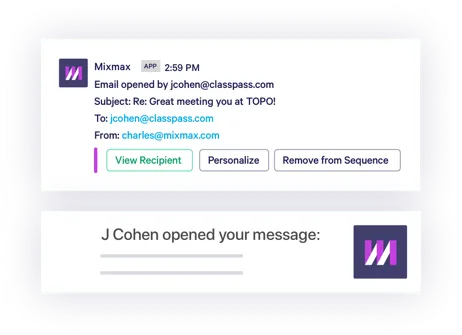
Empower your sales team to follow up smarter (and faster) by arming them with real-time email engagement data. Detailed analytics keep reps informed about important interactions, such as opens, clicks, RSVPs, and downloads, making it easier to know who to follow up with next.
Desktop notifications take email tracking to a whole new level, alerting your sales team within moments of an open, click, or download. Notifications create a continuous feedback loop for your reps, thereby increasing the chances for engagement.
Related Post: The Driving Forces Behind Successful Sales
3. Let Prospects Book Meetings in a Single Click
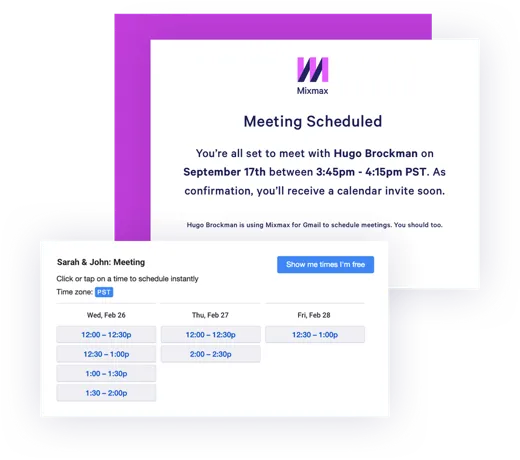
Realistically, only a small percent of prospects will ever respond to your sales team’s emails. That’s why it’s vital to make life as easy as possible for those who do choose to engage. Wasting a prospect’s time with endless back-and-forth to schedule a demo is the opposite of “easy.”
One-click meetings simplify scheduling for prospects and your sales staff. For example, our Mixmax tool integrates with Google Calendar, enabling your reps to insert a block of available times into the body of any email. Prospects simply click on a time slot, and Mixmax handles all of the calendar invitations, meeting confirmations, and emails.
Target Prospects Based on Buying Signals and Job Changes
Timing is everything in sales, but it’s tough to get right. You can have the perfect pitch for the perfect prospect, but if they aren’t ready to buy, your message falls flat. This is where smart automation changes the game. Instead of just working through static lists, you can use tools to target prospects based on real-time buying signals. Think about triggers like recent job changes, new technologies a company adopts, or even what topics their team is researching online. By setting up automated alerts for these events, your outreach becomes incredibly relevant. You’re no longer just another cold email; you’re a helpful resource showing up at the exact moment they need you.
Re-engage “Ghosted” Leads Automatically
We’ve all been there: a promising conversation with a lead suddenly goes silent. Manually tracking every “ghosted” prospect and deciding when to reach back out is a drain on your time and energy. Automation offers a simple solution for this common problem. You can set up workflows to automatically re-engage leads who have stopped responding after a set period, like 60 or 90 days. This isn’t about sending the same old “just checking in” email. Instead, you can automatically send a fresh message with a new piece of content, a product update, or a relevant case study. This approach keeps your brand on their radar without manual effort and can reignite a conversation when the timing is finally right for them.
Best Practices for Successful Automation
Adopting an outbound sales automation tool can transform your team’s productivity, but it’s not a magic wand. The most successful sales teams understand that automation is there to support their strategy, not replace it. Simply turning on a machine to send thousands of emails won’t get you very far. The real power comes from using these tools thoughtfully to handle the repetitive, time-consuming tasks, which frees up your reps to do what they do best: build relationships and close deals. It’s about creating a system where technology and human expertise work together to create a better experience for your prospects.
Before you dive in, it’s crucial to establish some ground rules. Think about which parts of your process are ripe for automation—like initial outreach or scheduling—and which moments absolutely require a personal touch. A well-defined sales strategy will prevent you from over-automating and losing the human connection that ultimately closes deals. The goal is to build a scalable process that still feels one-to-one. This means continuously testing your messaging, monitoring engagement analytics, and giving your reps the flexibility to jump in and personalize communication whenever a prospect shows genuine interest. Automation should be the engine, but your sales reps are still in the driver’s seat.
Balance Automation with a Human Touch
The golden rule of sales automation is to never let your prospect feel like they’re talking to a robot. As one guide on the topic puts it, the key is to find a balance between automation and a human touch. Don’t try to automate every single interaction. Instead, identify the tasks that are truly repetitive and low-value, like sending initial sequence emails or logging activities in your CRM. This is where AI-powered workflows can be a massive help, handling the busywork in the background. This frees up your reps to focus on high-impact activities: writing a thoughtful, personalized note to a key prospect, answering a complex question, or hopping on a call to build rapport. Remember, automation is fantastic for ensuring timely follow-ups, but a generic, robotic message at the wrong moment can easily lose you a deal.
4. Create Custom Rules for Smarter Outbound Sales Automation
Your sales reps send and receive a ton of emails every day. Why not leverage this activity to automate other time-consuming aspects of running your business?
Let’s assume that your outbound email sequence encourages prospects to book a 15-minute appointment. When a prospect selects a meeting time (via your one-click meeting link, of course), this could trigger several other downstream activities. For example, if you’re using Mixmax, you might build a Rule to automatically update the associated CRM lead record, send a follow-up email with pre-meeting materials, and post an update to an internal Slack channel.
For more examples of how to leverage Mixmax Rules, watch this brief video:
Leverage AI-powered workflows
Taking custom rules a step further, AI-powered workflows can completely change your outbound sales game. Think of AI as your smartest assistant—it’s brilliant at handling the repetitive, time-consuming tasks that can bog down your day, like data entry or initial lead qualification. This frees up your sales team to focus on what they do best: building relationships and closing deals. Modern sales execution platforms, like Mixmax, use AI-powered workflows to analyze data from past interactions, helping you refine your sales strategies over time. By automating the right tasks with intelligent tools, you can create a more efficient and effective outbound process that learns and improves as you go.
Key Metrics Your Team Should Be Tracking
Automation without measurement is just guessing. To know if your outbound efforts are actually working, you need to track the right metrics. Start with the basics: your email open rate tells you if your subject lines are compelling enough to grab attention. Next, look at your reply rate, which shows whether your message is resonating with your audience. But the most important metric is often the booked meetings rate. This number is the clearest indicator that your outreach is successfully turning prospects into legitimate sales opportunities. Keeping an eye on these figures helps you understand what’s working and where you need to make adjustments to your strategy.
Common Outbound Automation Mistakes to Avoid
Outbound automation can be a powerful engine for growth, but it’s not a set-it-and-forget-it solution. Without a thoughtful strategy, you can run into some common pitfalls that do more harm than good. The goal is to make your sales process more efficient and personal, not to create a spam machine that alienates prospects. By being aware of potential mistakes from the start, you can build an automation system that genuinely supports your sales team and helps them connect with more of the right people. Let’s look at a couple of the most important things to watch out for.
Don’t Automate a Broken Process
Here’s a hard truth: automation scales everything, including your problems. If your manual outbound process isn’t working—maybe you’re targeting the wrong leads or your messaging is unclear—automating it will only help you fail faster. Before you flip the switch on any automation tool, take the time to refine your existing process. Make sure you have a solid system for identifying quality leads and a clear, compelling message that gets results. A tool can’t fix a broken strategy. Once you have a process that works on a small scale, you can confidently use automation to scale your success.
Avoid Letting AI Write Everything Without Review
AI is an incredible tool for drafting outreach, but it shouldn’t be the only voice your prospects hear. Relying entirely on AI to write your messages can make your communication feel impersonal and robotic, which is the fastest way to get ignored. Use AI as a co-pilot to generate ideas, craft initial drafts, and overcome writer’s block. However, a human touch is essential. Always have your reps review, edit, and personalize AI-generated messages before they hit a prospect’s inbox. This ensures your outreach maintains an authentic, human connection, which is what ultimately builds the trust needed to close a deal.
Is Mixmax the Right Outbound Automation Tool for You?
Leveraging an outbound sales automation tool like Mixmax can be a highly scalable way to build pipeline faster. Create personalized, multi-stage email sequences, gain total transparency into what works, and automate scheduling and other time-consuming tasks.
Sign up for free and automate your outbound sales operation with Mixmax.
Related Post: The Definitive Guide to B2B Sales Automation
Frequently Asked Questions
Will using automation make my sales emails sound robotic and impersonal? That’s a common and valid concern, but the answer is no—as long as you use it correctly. The goal of automation isn’t to remove the human element, but to handle the repetitive tasks so you have more time to be human where it matters most. Think of it as a tool to ensure timely follow-ups and manage outreach at scale, while you focus your energy on writing personalized notes for high-value prospects or responding thoughtfully to replies.
How is AI-powered automation different from the basic email sequences I’ve used in the past? Older automation tools are great at following a rigid, pre-set schedule. AI-powered automation is much smarter. Instead of just sending Email #2 three days after Email #1, an intelligent system can analyze engagement data to make adjustments on the fly. It learns what’s working—like the best time to send an email or which subject lines get the most opens—and adapts your campaigns to be more effective over time, without you having to manually review every single step.
My current sales process isn’t perfect. Should I fix it before I start automating? Yes, absolutely. Automation is an amplifier, which means it will make a good process great, but it will make a broken process fail even faster. Before you invest in a tool, make sure you have a solid manual process that gets results, even on a small scale. Once you know your targeting is right and your messaging connects with people, you can confidently use automation to scale that success.
What’s the most important part of the automation system to get right first? Your data, without a doubt. Everything starts with your lead list. Before you build a single sequence or workflow, you need to ensure your contact data is clean, accurate, and targeted to the right audience. A clever email sequence sent to the wrong person is still a wasted effort. Focusing on high-quality lead generation and enrichment first is the foundation for everything else you build.
How do AI-powered workflows help beyond just sending emails on a schedule? They connect your entire sales process. A truly powerful workflow doesn’t just manage outreach; it automates the administrative tasks that follow. For example, when a prospect books a meeting from your email, an AI-powered workflow can automatically update their status in your CRM, send a confirmation with pre-meeting resources, and post a notification in your team’s Slack channel. It handles the busywork so you can stay focused on the conversation.
Key Takeaways
- Let AI handle the busywork: Use AI-powered workflows to manage repetitive tasks like data entry, scheduling, and initial follow-ups. This gives your sales team more time to focus on what truly matters: building relationships and having strategic conversations with prospects.
- Build your system layer by layer: A successful automation strategy starts with a foundation of clean lead data. From there, add multi-channel outreach, smart CRM syncing, and automated follow-ups to create a robust process that generates quality opportunities.
- Personalize, don’t just automate: The goal of automation is to scale personalized outreach, not to send generic messages. Always review and customize AI-generated content to ensure your communication feels authentic and builds the trust needed to close a deal.



