
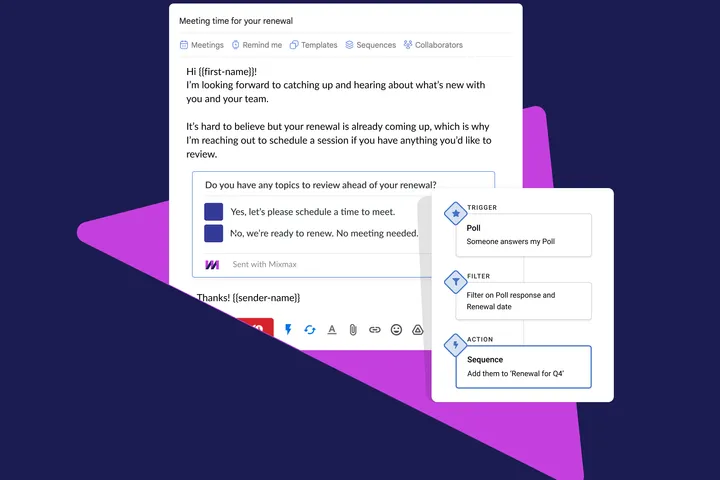
Customer success managers struggle to navigate budget cuts and prevent churn in the current economy. Here are three ways your CS team can use Mixmax’s unique Polls feature to get customers to engage with you, get back time, and drive more renewals.
Improve customer engagement
Make it easy for customers to respond to you in one click by using a Poll. Less friction = more engagement.

Type /poll in your Gmail Compose window and try inserting a Poll today.
Drive more renewals and business reviews
While adding a Poll to a one-off email helps engage one customer, there’s no reason to stop there. Add Mixmax Polls to your sequences to drive more renewals and QBRs. Not sure where to start? Let Blaire, our CSM, guide you **👇
**
Once your sequence is ready, create a Mixmax rule to automate follow-ups based on their reply. Their Poll answer can trigger a rule to:
📧 send a follow-up email with your availability if they are unsure about renewal, or
⏭ place them in a different sequence confirming they are all set for renewal.
.CpYgvIDZ_Z27KJ7a.webp?dpl=dpl_GTNpRSHSzFe8E21RvDXA3y2jVSxD)
Learn how to add someone to a sequence when they vote in your Mixmax renewal poll.
Let Poll responses update Salesforce
Don’t worry about updating Salesforce… let Mixmax do it for you. Add another action to your rule to update the status of your renewal opportunity in Salesforce based on the Poll vote.
That’s it! Add Mixmax Polls to your sequences today to improve customer engagement and drive more renewals.

.-3INYKdL.png)