

Historical context
Mixmax’s Chrome extension historically operated as a dual-component system: a “core” shell and a “source” frontend. Under Manifest V2, this architecture allowed for seamless updates by loading dynamic JavaScript, minimizing the need for Chrome Web Store releases. However, the introduction of Manifest V3 necessitated a complete overhaul of our release process given the increased dependency on Google’s approval system.
Understanding Our Starting Point
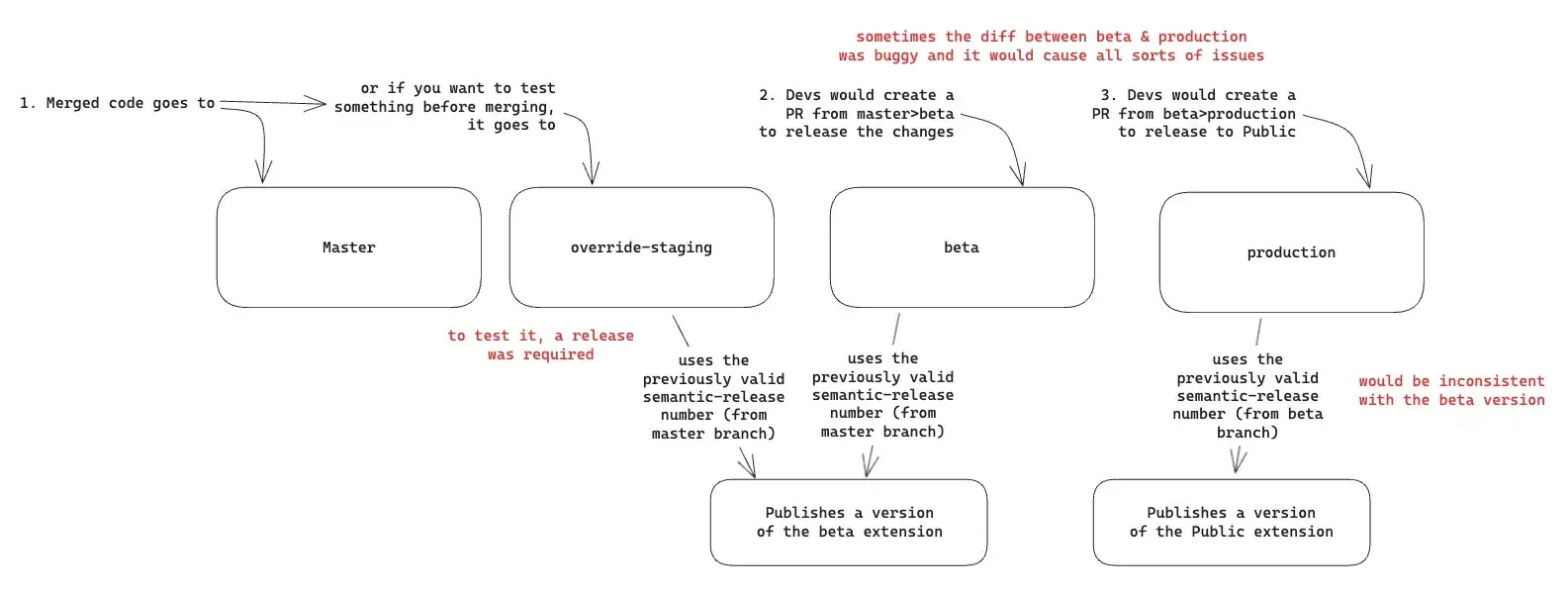
Before redesigning our pipeline, we conducted a thorough analysis of our existing process, which revealed several challenges:
Existing Pain Points
- Complex Branch Management: We had 4 different branches (master, override-staging, beta, and production) that often led to frequent merge conflicts
- Fragile Deployment Process: The upload/deploy process was tightly coupled with the build process, making retries difficult
- Version Control Issues: Semantic-release sometimes failed to increase version numbers correctly and the beta/production builds had different version numbers
- Google’s Approval Process: No visibility of whether the deployment is approved
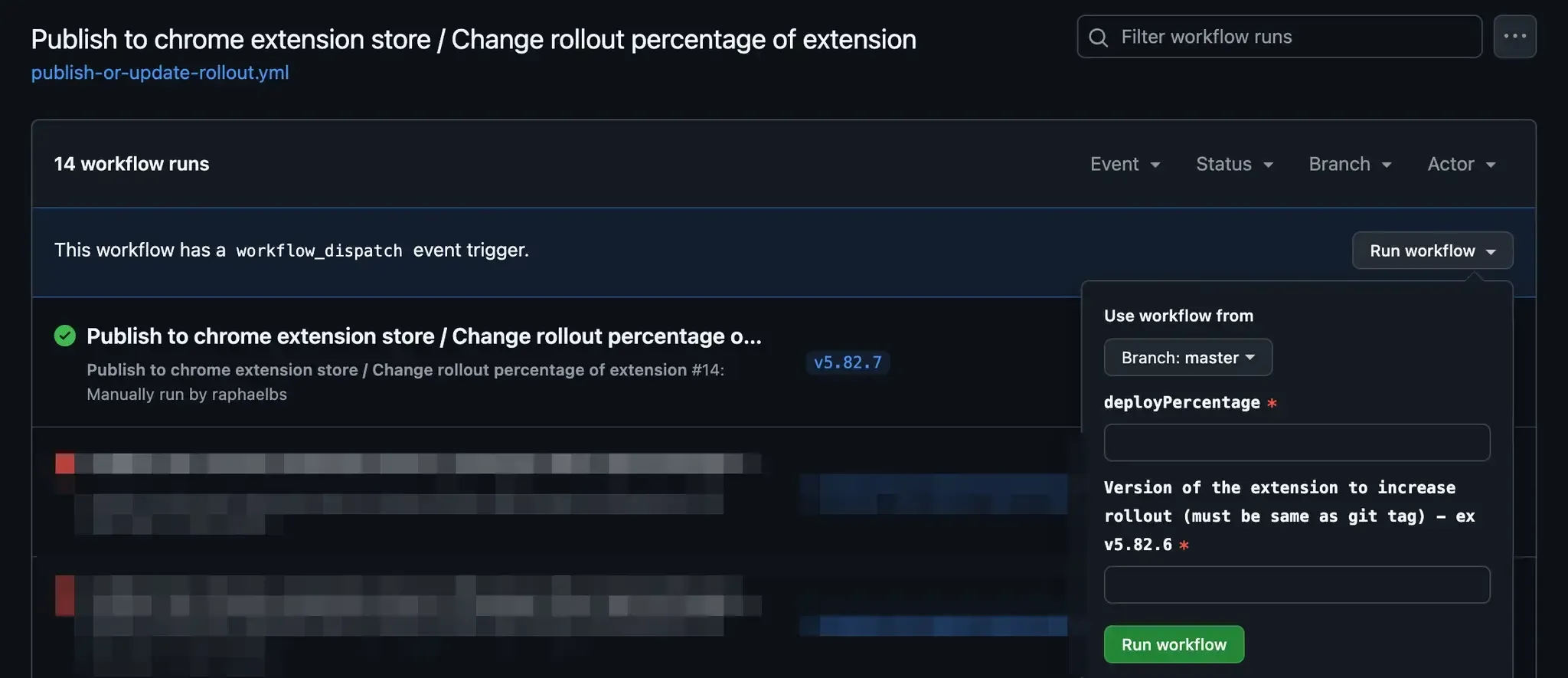
- Roll-out Complications: Developers without access to the Webstore couldn’t manage partial roll-outs
Core Requirements
After analyzing our situation, we established clear constraints across three key areas:
Testing Needs
- Ability to test without Chrome Store involvement
- Maintain a reference build for automated QA testing
Release Management
- Version numbers must always increment and remain consistent between channels (public or beta)
- Cannot upload new versions until previous ones are approved
- Need flexibility in managing roll-out percentages
- Must support static asset releases to different environments (more on this later)
Environment Support
- Must work across local, staging, QA, and production environments
- Support for both beta and production release channels
The Reimagined Pipeline
Our solution addressed these challenges through three main components:
Single Branch Strategy
- Single master branch instead of four
- Preview builds generated directly from pull request branches
Automated Workflows
- Separate workflows for beta and production releases
- Automatic release of static assets with QA assertion
- Manual triggers to ensure control over the release (gate)
- Built-in support for partial roll-outs
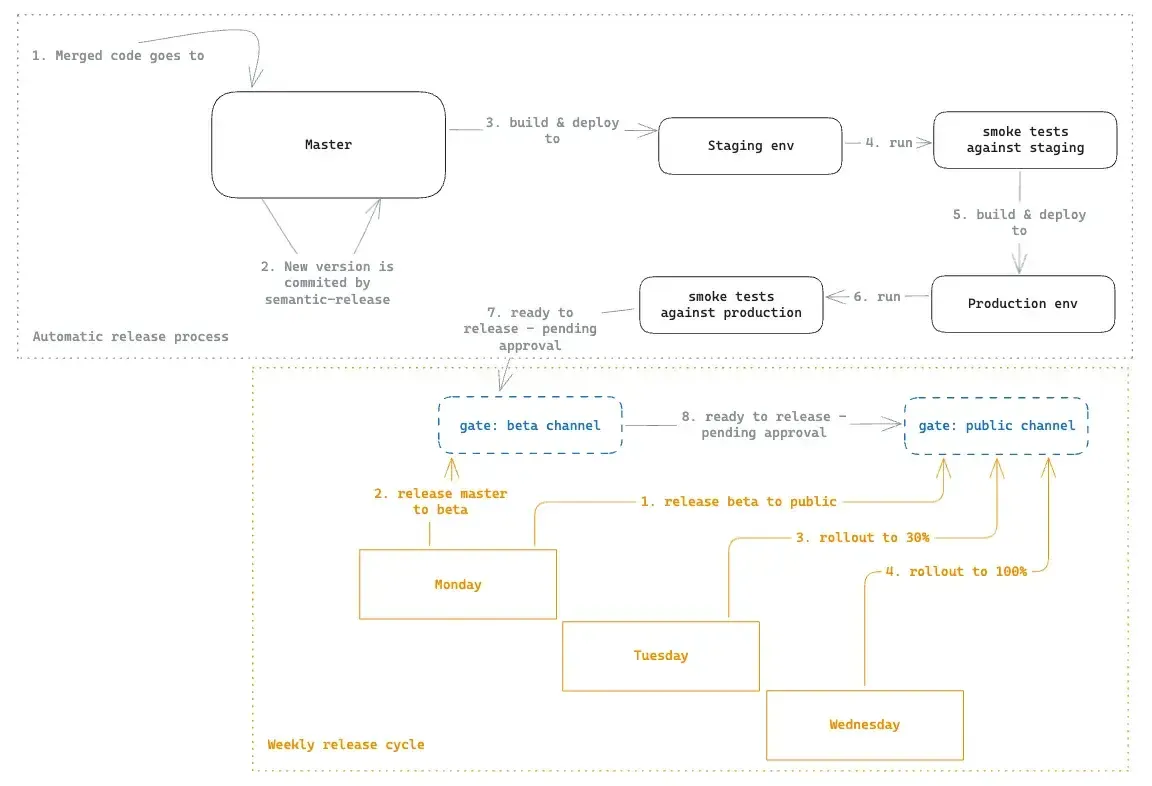
Weekly Release Cycle (manual)
- Monday: Beta to production (10% roll-out) + New master to beta
- Tuesday: Increase to 30% if there are no issues
- Wednesday: Increase to 100% if stable
Here is a visual summary of how that translates to actual continuous integration steps (after merging a code):
Technical Implementation Details
The Two-Step Release Process
If you look closely at the image above, you might be asking yourself why it is required to build, deploy, and run smoke tests on the extension for different environments, and why would the deployment phase happen before the “gate” steps. That is a good question! Here is why:
The extension is actually released in 2 steps:
- A release of static assets
- A release of the Chrome extension in the webstore
What does it mean to “release static assets” and why it is needed?
Our Chrome extension modifies 3rd-party websites. It does so by grabbing specific selectors and mutating the DOM of those websites. Because we don’t control those 3rd-party websites, unexpected changes can break our extension. To be able to quickly react to those changes, we separate the critical bits and deploy them separately: CSS and page selectors are statically deployed and that happens as fast as possible!
So, to recap the image above, as soon as the new code lands on master, it builds & releases the static assets to staging. And then, it runs smoke tests against it. This type of change (a static asset) is backward compatible: The newer version of the static assets will run with the old version of the Chrome extension until that newer version reaches the user.
GitHub actions
The real magic sauce is how we combined Github actions with this new process.
In summary, those are the CI files that compose the process:
-
ci.yml— the main one# ci.yml name: continuous-integration 'on': push: branches: - master jobs: # Release via semantic-release release: if: github.event.head_commit.author.username != 'semantic-release-bot' uses: ./.github/workflows/semantic-release.yml secrets: inherit # Build & deploy static assets + QA (Staging) build-and-deploy-staging: needs: build-and-deploy-qa uses: ./.github/workflows/build-and-deploy.yml secrets: inherit ext_stg_smoke_tests: needs: build-and-deploy-staging uses: ./.github/workflows/extension_stg_smoke.yml secrets: inherit with: extension_public_url: $ # Build & deploy static assets + QA (Production) build-and-deploy-prod: needs: ext_stg_smoke_tests uses: ./.github/workflows/build-and-deploy.yml secrets: inherit with: override-environment: production ext_prod_smoke_tests: needs: build-and-deploy-prod uses: ./.github/workflows/extension_prod_smoke.yml secrets: inherit with: branches_for_test_execution: | ["master"] extension_public_url: $ # For BETA build and publish build-and-deploy-beta: needs: ext_prod_smoke_tests uses: ./.github/workflows/build-and-deploy.yml secrets: inherit with: override-environment: beta publish-to-beta: needs: build-and-deploy-beta uses: ./.github/workflows/publish-or-update-rollout.yml secrets: inherit with: target: beta deployPercentage: 100 # For PUBLIC, publish with 1% deploy percentage publish-to-public: needs: publish-to-beta uses: ./.github/workflows/publish-or-update-rollout.yml secrets: inherit with: target: public deployPercentage: 1 -
build-and-deploy.yml— builds the extension and deploy to s3 (static assets and the extension zip)# build-and-deploy.yaml # This is a simplified version name: Build and Deploy on: workflow_call: inputs: override-environment: required: false type: string outputs: extension-url: description: 'S3 url of the built artifact' value: $ env: TARGET_ENVIRONMENT: $preview permissions: # Reduced set of necessary permissions contents: write id-token: write jobs: build-and-deploy: runs-on: ubuntu-latest outputs: extension-url: $0 steps: - uses: actions/checkout@v2 - uses: actions/setup-node@v4 with: node-version-file: .nvmrc cache: npm # To allow S3 uploads - name: Configure AWS Credentials uses: aws-actions/configure-aws-credentials@v1 with: aws-region: us-east-1 role-to-assume: $ # At this stage, semantic already ran so we can grab the version from package.json - name: Set Environment Variables run: | echo "VERSION=$(cat package.json | jq -r '.version')" >> "$GITHUB_ENV" echo "GIT_SHA=${GITHUB_SHA}" >> "$GITHUB_ENV" - name: Build Application run: npm run build:$ # Upload to Github actions - uses: actions/upload-artifact@v4 if: $false with: name: extension-artifact-$ path: $ retention-days: 10 overwrite: true - name: Upload to S3 id: upload-artifact run: | BUCKET=mixmax-extension-$ BUNDLE_NAME=$(echo *.zip) aws s3 cp $BUNDLE_NAME "s3://$BUCKET/versions/$VERSION/$BUNDLE_NAME/" --cache-control 'max-age=0, must-revalidate' --acl public-read aws s3 cp $BUNDLE_NAME "s3://$BUCKET/versions/latest.zip" --cache-control 'max-age=0, must-revalidate' --acl public-read BUNDLE_URL=https://$.s3.amazonaws.com/versions/$VERSION/$BUNDLE_NAME echo "EXTENSION_URL=$ARTIFACT_URL" >> "$GITHUB_OUTPUT" # Prepare and upload HTML, CSS, assets with appropriate headers - name: Upload Static Assets run: | BUCKET=mixmax-extension-$ aws s3 cp static_dist/ "s3://$BUCKET/static/" --recursive --cache-control 'max-age=0' --acl public-read -
publish-or-update-rollout.yml— changes the extension in the Chrome Webstore# publish-or-update-rollout.yml name: Publish Chrome Extension on: workflow_call: inputs: target: required: true type: string deployPercentage: required: true type: number workflow_dispatch: inputs: deployPercentage: required: true type: number version: description: 'Version to deploy (must match git tag) - ex v1.2.3' required: true type: string permissions: # ... relevant permissions ... jobs: publish: runs-on: ubuntu-latest env: CHROME_CLIENT_ID: $ CHROME_CLIENT_SECRET: $ CHROME_REFRESH_TOKEN: $ BETA_CHANNEL_ID: your-beta-extension-id PUBLIC_CHANNEL_ID: your-public-extension-id TARGET: $ environment: $ steps: - name: Validate version if: $false run: | if [[ ! $ =~ ^v[0-9]+\\.[0-9]+\\.[0-9]+$ ]]; then echo "Invalid version format" exit 1 fi - uses: actions/checkout@v2 with: ref: $ - uses: actions/setup-node@v4 with: node-version-file: .nvmrc cache: npm - name: Download extension artifact if: $false uses: actions/download-artifact@v4 with: name: extension-artifact-$ - name: Publish extension run: | COMMAND="npx chrome-webstore-upload-cli" if [[ "$" == 'push' ]]; then COMMAND+=" --source=path/to/extension.zip" else COMMAND+=" publish" fi # Add authentication parameters COMMAND+=" --client-id=$" COMMAND+=" --client-secret=$" COMMAND+=" --refresh-token=$" # Set extension ID based on target COMMAND+=" --extension-id=$" # Add deployment options if [[ "$" == 'public' ]]; then COMMAND+=" --deploy-percentage=$" else COMMAND+=" --trusted-testers=true" fi eval $COMMAND
Wait, but there is more
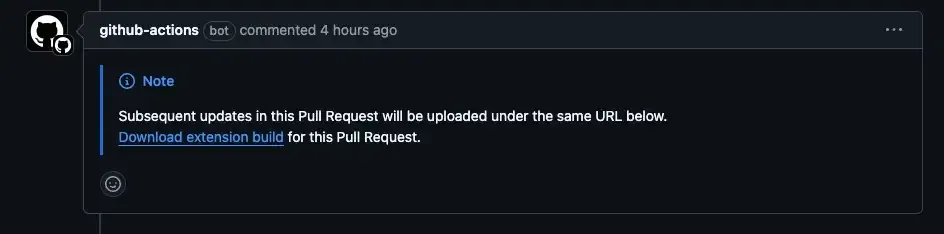
It is paramount that we test the extension before releasing it. We made that happen through a comment in the Pull request:
-
And for that, we have done a “preview” build and deployment:
# PIPELINE FOR PREVIEW BUILDS
name: continuous-integration
'on':
  pull_request:
    branches:
      - master
jobs:
  build-and-deploy-preview:
    needs: checks
    uses: ./.github/workflows/build-and-deploy.yml
    secrets: inherit
  preview_pr_comment:
    needs: build-and-deploy-preview
    runs-on: ubuntu-22.04-8-cores
    steps:
      - name: Find existing comment
        uses: peter-evans/find-comment@v3
        id: fc
        with:
          issue-number: $
          comment-author: 'github-actions[bot]'
          body-includes: '<!-- preview-deploy-comment -->'
      - name: Comment link to extension build in PR
        if: $true
        uses: actions/github-script@v7
        with:
          github-token: $
          script: |
            const url = '$';
            const message = `<!-- preview-deploy-comment -->
            > [!NOTE]
            > Subsequent updates in this Pull Request will be uploaded under the same URL below.
            [Download extension build](${url}) for this Pull Request.`;
            github.rest.issues.createComment({
              issue_number: context.issue.number,
              owner: context.repo.owner,
              repo: context.repo.repo,
              body: message
            })
Managing the gate
After the automation runs, we can approve the pipeline for the different deployments:
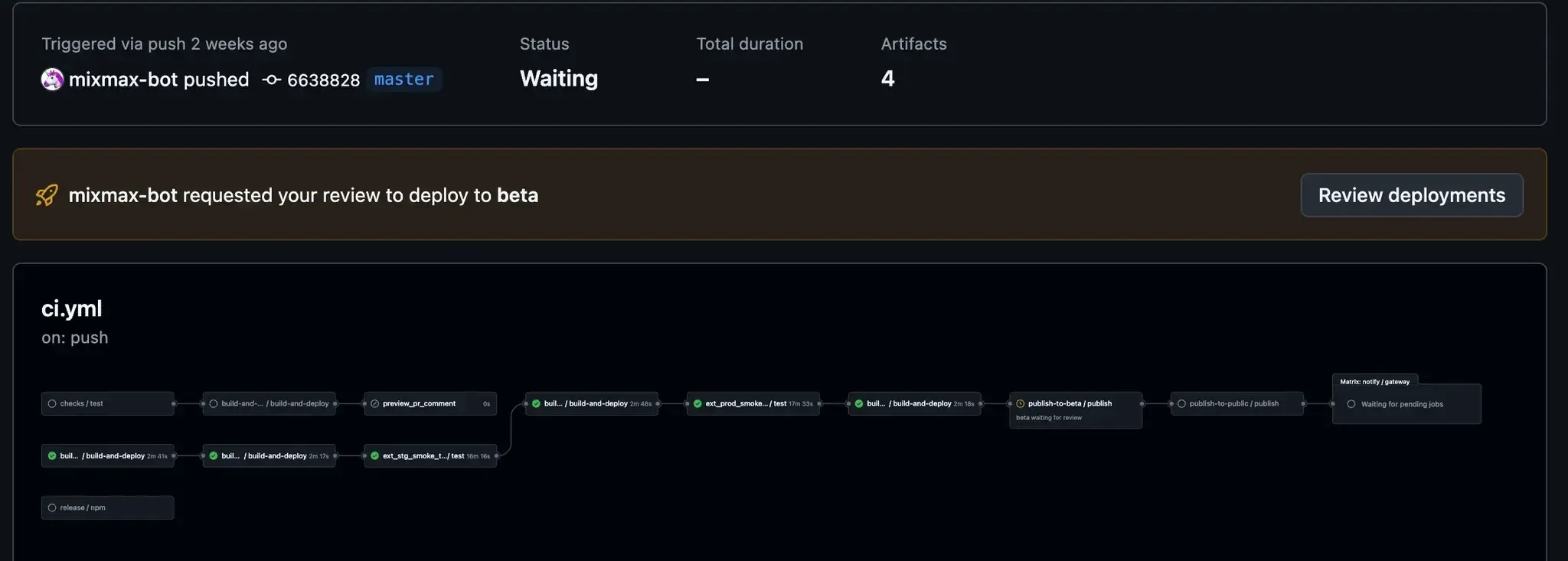
And following our weekly cadence, devs with access to Github can create a new workflow to update the rollout percentage:
Shameless plug
After this whole saga, one feature is still missing:
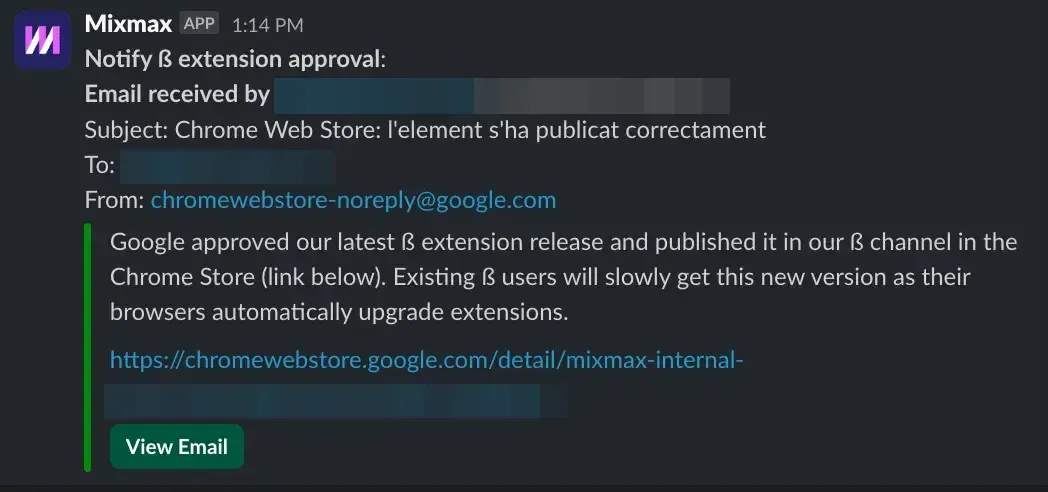
Google’s Approval Process: No visibility of whether the deployment is approved
And for that, we used the easiest tool: Mixmax! You can try it out for free. Here is how:
- Set up your Mixmax account at https://app.mixmax.com
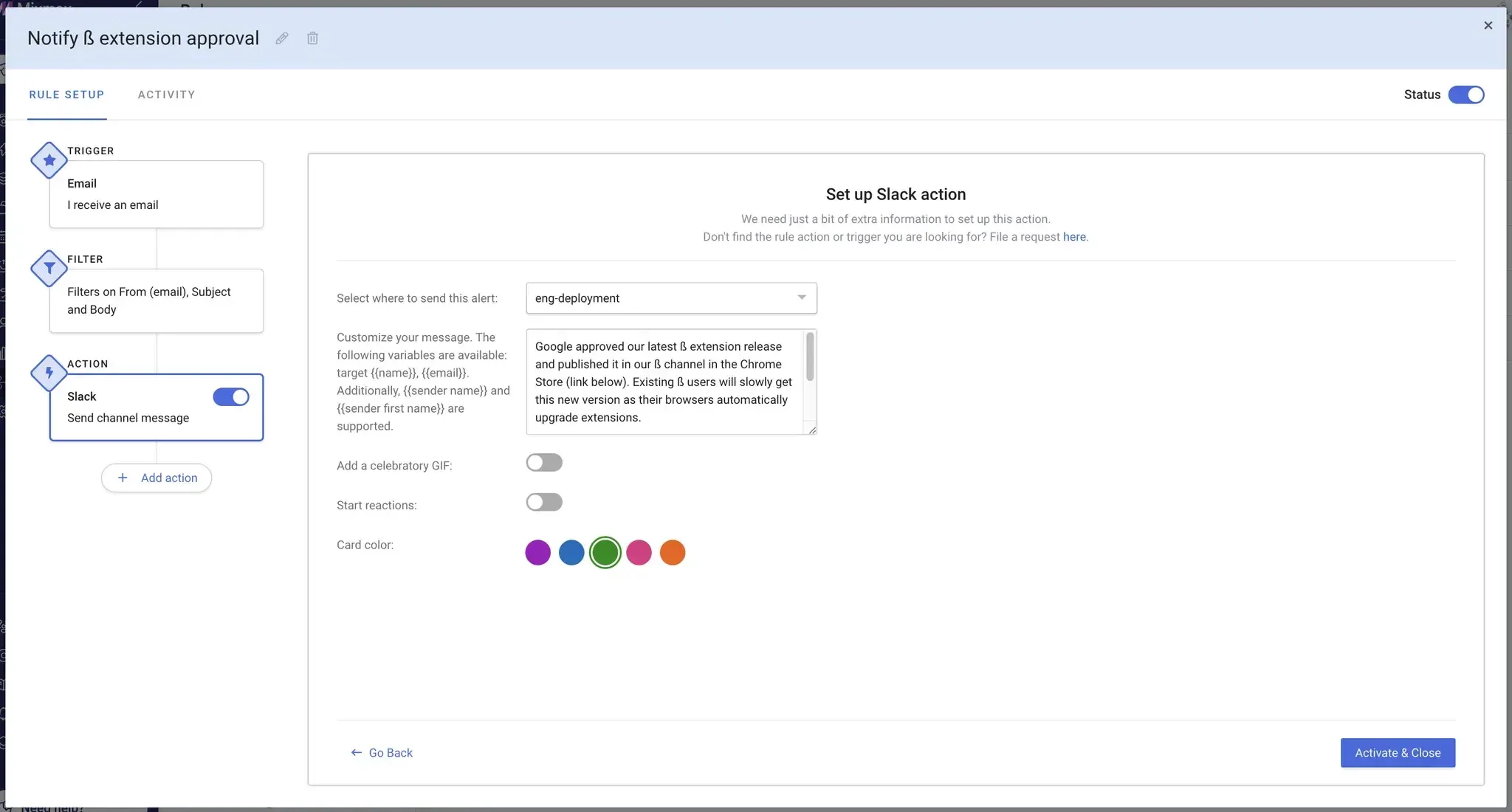
- Go to the Rules page and create a rule as such:
- Trigger = “I receive an email”
- Filter = “From(email) is chromewebstore-noreply@google.com”
- Action = Slack > “Send channel message”
Conclusion
Our new pipeline has significantly improved the Chrome extension release process, reducing labor and increasing reliability. With GitHub Actions, AWS S3, and Chrome Web Store APIs, we’ve created a powerful and maintainable process. And, on top of that, Mixmax helps us track Google’s approval process, addressing all previous pain points.
A good release pipeline balances control, speed, and reliability. We believe this solution achieves that balance effectively.
I hope you have learned at least one or two deployment best practices and/or caveats for your Chrome Extension deployment!
Happy deploying! 🚀
Interested in joining the team? Visit Mixmax Careers.